Essential Architectural Takeaways:
- 6 Core Embedding Techniques: Inline
<svg>, external<img>,<object>tag, CSSbackground-image, CSSmask-image, and modern Web Components. - Dynamic CSS Theming: Inline SVG and CSS
mask-imageallow immediate color switching viacurrentColorandbackground-color. The<img>and CSSbackground-imagetags create sealed execution contexts that reject external stylesheet overrides. - Network & Caching Efficiency: External
<img>and CSS masks enable persistent HTTP disk caching and parallel downloads. Inline SVG avoids network requests entirely but permanently increases initial HTML document weight. - Security Boundaries: External images (
<img>and CSS backgrounds) disable internal script execution for safety. The<object>and<iframe>tags preserve active scripting environments.
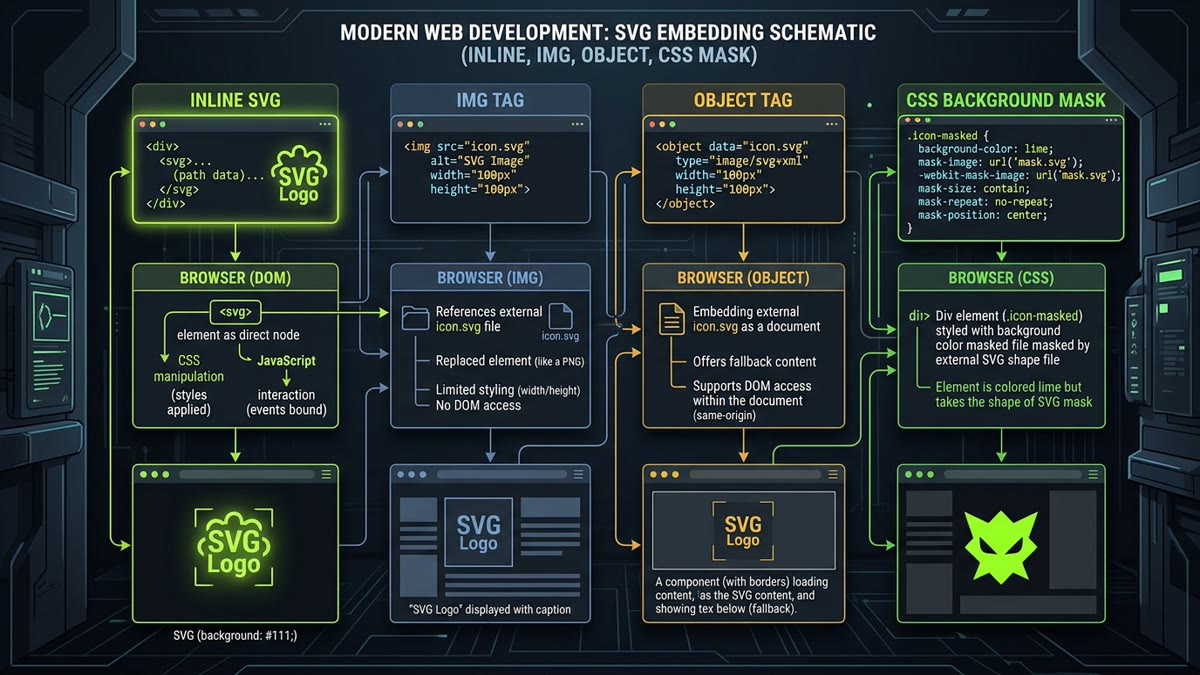
Embedding Scalable Vector Graphics (SVG) into HTML appears deceptively simple. Yet choosing the wrong embedding strategy is one of the most common causes of bloated DOM trees, broken dark-mode color theming, layout shifts (CLS), and unexpected Cross-Site Scripting (XSS) vulnerabilities.
Depending on whether your graphic is an interactive UI icon, an illustrative hero banner, an animated chart, or a reusable brand logo, modern web standards offer 6 distinct embedding techniques. In this engineering deep-dive, we examine the mechanics, performance trade-offs, Core Web Vitals implications, and browser constraints of every method.
Interactive HTML SVG Embedding Decision Matrix
Select your technical constraints below. The decision engine will calculate the optimal embedding strategy and generate production-ready HTML/CSS snippets.
Method 1: Inline SVG Element
Direct XML embedding in HTML. Provides full CSS currentColor inheritance, instant zero-latency paint, and complete DOM event access.
Method 1: Inline SVG (<svg> Tag)
Inline embedding places the raw <svg> XML markup directly into the HTML document structure. It is the industry standard for UI icons and button graphics.
<!-- Production Inline SVG with Accessibility -->
<button class="action-btn" aria-label="Search Catalog">
  <svg
    xmlns="http://www.w3.org/2000/svg"
    viewBox="0 0 24 24"
    width="20"
    height="20"
    fill="none"
    stroke="currentColor"
    stroke-width="2"
    stroke-linecap="round"
    stroke-linejoin="round"
    aria-hidden="true"
    focusable="false"
  >
    <circle cx="11" cy="11" r="8"></circle>
    <line x1="21" y1="21" x2="16.65" y2="16.65"></line>
  </svg>
  <span>Search</span>
</button>
Pros & Performance Strengths:
- Zero Latency & CLS: Renders synchronously during initial HTML tokenization. No network round-trips or layout shifts.
- currentColor Inheritance: Inherits the parent text color dynamically. Works seamlessly across light and dark modes with zero CSS overrides.
- DOM Manipulability: Individual paths and shapes can be targeted with CSS hover animations, keyframe transitions, and JavaScript click handlers.
Cons & Architectural Costs:
- No Browser Caching: If an icon is used on 20 pages, its markup is sent down the wire 20 times.
- DOM Node Bloat: Inlining hundreds of icons adds thousands of nodes to the DOM tree, increasing memory usage and slowing down style recalcs.
Method 2: External HTML <img> Tag
Treating the SVG file as a standard raster image source via the <img> tag is the cleanest and most modular technique for logos and illustrative graphics.
<img
  src="https://example.com/assets/icons/brand-logo.svg"
  alt="Company Logo"
  width="180"
  height="48"
  loading="lazy"
  decoding="async"
/>
Pros & Performance Strengths:
- Persistent HTTP Caching: The browser caches the
.svgfile on disk. Subsequent page visits require zero bytes over the wire. - HTML Cleanliness: Keeps HTML templates lean and prevents DOM node accumulation.
- Strict Security Sandbox: Browsers isolate the image context. Scripts and external resources within the SVG are permanently blocked.
- SEO & Google Images: Properly indexed by Google Image search when provided with descriptive
alttext.
Cons & Constraints:
- Sealed CSS Boundary: Parent stylesheets cannot modify internal fills, strokes, or colors. You cannot use
fill: currentColor. - Requires Explicit Dimensions: If
widthandheightare omitted, the browser cannot calculate aspect ratios before download, triggering CLS.
Method 3: HTML <object> Tag
The <object> tag embeds an SVG as an external document while maintaining an active DOM tree. It is ideal for complex interactive diagrams and animated infographics.
<object
  type="image/svg+xml"
  data="https://example.com/assets/diagrams/interactive-map.svg"
  width="600"
  height="400"
  aria-label="Interactive Architecture Diagram"
>
  <!-- Semantic Fallback for Legacy Clients or Screen Readers -->
  <p>Your browser does not support interactive SVG graphics. <a href="https://example.com/assets/diagrams/interactive-map.png">View static diagram</a>.</p>
</object>
You can access and manipulate the internal SVG document from parent JavaScript, provided the asset is served from the same origin:
const objectEl = document.querySelector('object');
objectEl.addEventListener('load', () => {
  const svgDoc = objectEl.contentDocument;
  const path = svgDoc.getElementById('region-node');
  if (path) path.style.fill = '#C1DD2D';
});
Method 4: CSS background-image
When an icon is purely decorative (such as a bullet point, input field icon, or separator pattern), embedding it via CSS separates design entirely from semantic HTML.
.input-search-field {
  background-image: url("https://example.com/assets/icons/search.svg");
  background-repeat: no-repeat;
  background-position: left 12px center;
  background-size: 18px 18px;
  padding-left: 40px;
}
Alternatively, using a percent-encoded Data URI eliminates the extra network request:
.input-search-field {
  background-image: url("data:image/svg+xml,%3Csvg xmlns='http://www.w3.org/2000/svg' viewBox='0 0 24 24' fill='none' stroke='%23C1DD2D' stroke-width='2'%3E%3Ccircle cx='11' cy='11' r='8'/%3E%3Cline x1='21' y1='21' x2='16.65' y2='16.65'/%3E%3C/svg%3E");
}
Method 5: Modern CSS mask-image Stencils
The modern industry benchmark for scalable UI icons is mask-image. It applies an external SVG as a transparency stencil over an HTML element, allowing you to set and animate icon color using standard background-color.
.ui-icon {
  display: inline-block;
  width: 20px;
  height: 20px;
  background-color: #C1DD2D; /* Current icon fill color */
  -webkit-mask-image: url("https://example.com/assets/icons/settings.svg");
  mask-image: url("https://example.com/assets/icons/settings.svg");
  -webkit-mask-size: contain;
  mask-size: contain;
  -webkit-mask-repeat: no-repeat;
  mask-repeat: no-repeat;
  -webkit-mask-position: center;
  mask-position: center;
  transition: background-color 150ms ease;
}

.ui-icon:hover {
  background-color: #FFFFFF; /* Dynamic color transition without redownloading SVG */
}
Why CSS Mask Icons Dominate Modern Design Systems
CSS masks solve the biggest paradox in web iconography: how to cache the SVG file externally while dynamically altering its color in CSS. With mask-image, the browser downloads the SVG once, caches it indefinitely, and lets CSS control colors across 50 different application themes.
Method 6: Custom Web Components (<svg-icon>)
Modern frontend engineering often wraps vector icons into declarative Web Components. This enables Shadow DOM encapsulation, automatic SVG sprite fetching, and lazy hydration.
class SvgIcon extends HTMLElement {
  static get observedAttributes() { return ['name', 'size']; }

  connectedCallback() {
    this.render();
  }

  attributeChangedCallback() {
    this.render();
  }

  render() {
    const name = this.getAttribute('name') || 'search';
    const size = this.getAttribute('size') || '20';
    this.innerHTML = `
      <svg width="${size}" height="${size}" viewBox="0 0 24 24" fill="none" stroke="currentColor" stroke-width="2" class="component-icon" aria-hidden="true">
        <use href="#icon-${name}"></use>
      </svg>
    `;
  }
}
customElements.define('svg-icon', SvgIcon);
In HTML, developers can write clean, framework-agnostic tags:
<svg-icon name="shield" size="24"></svg-icon>Comprehensive 6-Method Feature & Compatibility Matrix
| Method | DOM Access | CSS Theming | HTTP Disk Caching | Google Image SEO | Script Safety | Ideal Use Case |
|---|---|---|---|---|---|---|
| 1. Inline <svg> | Yes (Full DOM) | Native (currentColor) | None (Inlined) | Moderate | Requires Sanitization | Interactive UI icons, primary actions |
| 2. HTML <img> | None (Isolated) | None (Sealed) | Full HTTP Cache | Excellent | 100% Sandboxed | Brand logos, content illustrations |
| 3. HTML <object> | Yes (Same-Origin) | Internal Styles | Full HTTP Cache | Low | Active Scripts Allowed | Interactive maps, complex diagrams |
| 4. CSS Background | None | None (Static URL) | Full HTTP Cache | None | 100% Sandboxed | Form inputs, list bullets, patterns |
| 5. CSS mask-image | None | Full (background-color) | Full HTTP Cache | None | 100% Sandboxed | High-scale SaaS icon systems |
| 6. Web Component | Encapsulated | CSS Variables / currentColor | Sprite Sheet Cached | Moderate | Component Managed | Enterprise micro-frontends, design systems |
Core Web Vitals & Performance Benchmarks
How you embed SVGs directly impacts Google's Core Web Vitals:
- Largest Contentful Paint (LCP): If your LCP element is a hero illustration, embedding it via
<img fetchpriority="high">ensures the browser preload scanner discovers and fetches it early. Inline SVG also performs well for LCP, provided the HTML document itself is not over-bloated. - Cumulative Layout Shift (CLS): Unsized external SVG files trigger massive layout shifts because vector graphics lack intrinsic raster dimensions. Always declare both
viewBoxon the SVG and CSS dimensions (widthandheight) on the HTML host element. - Interaction to Next Paint (INP): Pages with 500+ inline SVGs incur significant main-thread style recalculation overhead during scrolling and DOM mutations. Shifting repetitive icons to CSS masks or sprite sheets drastically improves INP responsiveness.
Frequently Asked Questions
What is the best way to embed an SVG in HTML for web performance?
The optimal embedding method depends on architectural requirements. For critical above-the-fold icons that need dynamic CSS currentColor styling or animations, inline SVG is best because it renders instantly without an HTTP round-trip. For non-interactive illustrations or repeated logos, the standard HTML img tag is best because it enables browser HTTP disk caching and parallel non-blocking downloads.
Why can't you style an SVG embedded with an <img> tag using external CSS?
When an SVG is embedded via an img tag, modern browser rendering engines instantiate an isolated document browsing context. The internal XML document object model is sealed from the parent page's CSS cascade and JavaScript runtime for security reasons. To style an external SVG dynamically, you must use inline SVG, CSS mask-image, or an object tag.
How do you prevent Cumulative Layout Shift (CLS) when loading external SVG files?
To prevent layout shifts, always declare explicit width, height, and viewBox attributes on the SVG, and set CSS aspect-ratio: attr(width) / attr(height) or width: 24px; height: 24px; on the container. This informs the browser's layout engine of the graphic's dimensions before the external network payload resolves.
When should you use the <object> tag instead of inline SVG or <img>?
The HTML object tag (with type='image/svg+xml') should be used when the SVG contains internal interactive JavaScript, links, or complex SMIL animations that must execute independently while preserving semantic fallback HTML content (placed inside the object tag) for older clients or assistive tech.
How does CSS mask-image compare to inline SVG for UI iconography?
CSS mask-image combines the caching benefits of an external SVG file with the dynamic theming of inline SVG. It applies the SVG as an alpha stencil over a standard div, allowing developers to change the icon color dynamically by simply altering background-color. It reduces HTML DOM node count by up to 75% compared to inline SVG.
Is inline SVG indexed by Google Images for SEO?
Googlebot can index text content contained within inline SVG tags for standard web search ranking, but Google Images primarily indexes stand-alone image URLs referenced in HTML img src tags, srcset attributes, Open Graph image tags, or XML image sitemaps. If an image is critical for Google Image search visibility, referencing an external .svg file via img is superior.