Executive Summary & Decision Matrix:
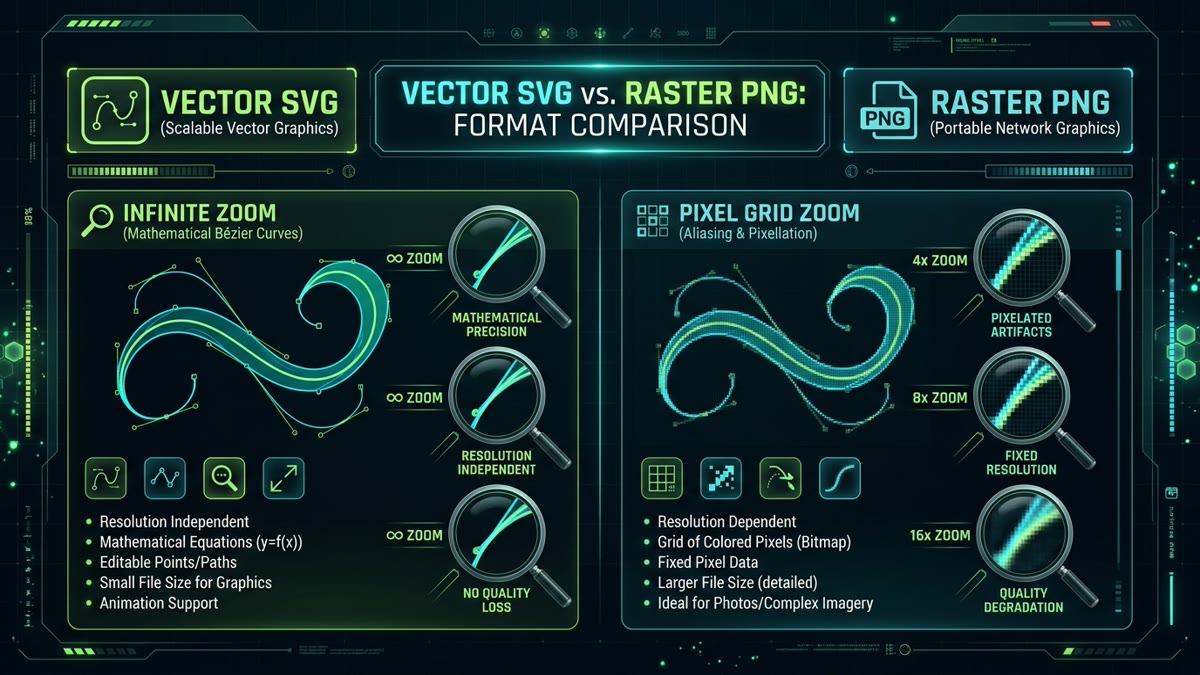
- Geometry vs. Pixels: SVG stores mathematical instructions (points, lines, Bézier curves), scaling losslessly to 8K, 16K, or print without artifacting. PNG stores a fixed grid of discrete RGBA color pixels, which inevitably pixelates under zoom.
- File Size & Network Wire Weight: For user interface icons, logos, and simple diagrams, SVG is typically 75% to 90% lighter than multi-density 1x/2x/3x Retina PNG sprites. For photos or graphics with 10,000+ complex nodes, PNG is lighter.
- Decoded RAM Footprint: PNG decompresses in device RAM into an uncompressed RGBA pixel buffer:
width * height * 4 bytes. A 4K PNG consumes ~33MB of VRAM, whereas an SVG consumes negligible memory proportional to the active viewport geometry. - Theming & Dynamic Adaptability: SVG integrates directly with the CSS cascade (
currentColor, CSS variables, dark mode switching, and stroke hover animations). PNG requires exporting separate raster files for every theme and state.
The choice between Scalable Vector Graphics (SVG) and Portable Network Graphics (PNG) is one of the most critical decisions in frontend engineering and digital product design. Choosing incorrectly results in either blurry logos on modern Apple Retina/4K displays, or bloated multi-megabyte stylesheets that crush your site's Core Web Vitals score.
While the conventional wisdom states "use SVG for vector shapes and PNG for photos," modern web development involves far more nuanced trade-offs: GPU memory allocation, main-thread XML parsing, tree-shaking, DOM bloat, dark-mode styling, and search engine discoverability. In this guide, we break down the underlying mathematics, benchmark real-world payloads, and demonstrate an interactive quality simulator.
Interactive Visual Quality & Memory Benchmark Simulator
Inspect the fundamental rendering differences in real-time. Adjust the zoom level from 1x to 16x to see how vector mathematical formulas preserve infinite razor-sharp edges while raster bitmaps break down into pixelated staircases.
The Mathematics: Vector Coordinate Geometry vs. Raster Matrices
To understand why SVG and PNG perform so differently, consider how they represent visual data in memory:
1. Vector Graphics (SVG): Procedural Mathematics
An SVG is an XML text document that describes geometric shapes through mathematical equations. For example, a line is defined simply as two Cartesian coordinate points: (x1, y1) and (x2, y2). A smooth curve is recorded as a cubic or quadratic Bézier polynomial:
Because the image is represented purely as algebraic formulas, the browser's 2D rendering pipeline (such as Skia in Chrome and CoreGraphics in Safari) recalculates the exact pixel values at whatever resolution the screen demands. Scaling up an SVG does not require storing extra data; it simply alters the scale multiplier in the transformation matrix.
2. Raster Graphics (PNG): Discrete Pixel Grids
A PNG stores a fixed two-dimensional matrix of color values. A 96×96 pixel PNG consists of 9,216 individual pixels, each storing Red, Green, Blue, and Alpha (transparency) channels:
When you scale a PNG beyond its original 96×96 boundary, the browser must synthesize missing pixels using interpolation algorithms (bilinear or bicubic). Because the source data lacks geometric knowledge of the original curves, the result is blurry edges, aliasing artifacts, and visible pixel staircases.
Real-World File Size & Network Benchmarks
A major advantage of SVG in web design is payload reduction. To support modern high-density screens (like iPhone Retina @3x or MacBook Retina @2x), PNG assets must be generated in multiple resolutions (@1x, @2x, and @3x) and served via srcset.
In contrast, a single SVG file serves all screen densities simultaneously. Here is how real-world assets compare across common interface scenarios:
| Visual Asset Type | SVG Payload (Single Asset) | PNG @1x (Standard) | PNG @2x (Retina) | PNG @3x (Super Retina) | Savings with SVG |
|---|---|---|---|---|---|
| UI Navigation Icon (24×24) | 380 Bytes | 1.2 KB | 3.4 KB | 7.8 KB | 95.1% lighter |
| Company Brandmark Logo | 1.8 KB | 6.4 KB | 18.2 KB | 38.6 KB | 95.3% lighter |
| Dashboard Metric Chart | 4.2 KB | 14.8 KB | 42.5 KB | 89.0 KB | 95.2% lighter |
| App Store Feature Hero Banner | 28.5 KB | 92.0 KB | 260.0 KB | 580.0 KB | 95.0% lighter |
| Photographic Product Showcase | 420.0 KB (Poor Vector) | 48.0 KB | 145.0 KB | 310.0 KB | PNG is 88% lighter |
Decoded Memory Footprint in RAM and GPU
Many frontend engineers evaluate image performance exclusively by file transfer size. However, the decoded in-memory footprint is often the true culprit behind mobile browser crashes, jank during scrolling, and sluggish navigation.
Consider an e-commerce catalog page displaying 40 product icons and badges:
- With PNGs: Each 512×512 Retina PNG decompresses into
512 * 512 * 4 = 1,048,576 bytes (1.0 MB)of uncompressed bitmap memory in the GPU texture cache. Forty badges consume 40 MB of RAM, draining mobile battery and triggering garbage collection pauses. - With SVGs: The browser parses the compact XML DOM and rasterizes only the visible pixels needed on the immediate screen surface. The total memory overhead is less than 800 KB.
Theming, Dark Mode & Interactive Animation
In modern web applications with multiple color palettes and system dark mode support, SVG provides an unbeatable architectural advantage:
1. Dynamic CSS currentColor Inheritance
By specifying stroke="currentColor" or fill="currentColor" inside an SVG, the icon automatically inherits whatever color is applied to its parent HTML container:
.nav-item {
  color: #525252;
}

.nav-item:hover,
html[data-theme="dark"] .nav-item {
  color: #C1DD2D; /* Automatically recolors the SVG without touching image files */
}
Achieving the same result with PNG requires exporting both light and dark raster files, loading them conditionally with CSS or JavaScript, and risking momentary white flashes or image load delays.
2. Micro-Interactions & Keyframe Animations
Because an SVG's internal elements are DOM nodes, you can animate individual components: spinning gear cogs, morphing checkboxes into checkmarks, or drawing outlines with stroke-dashoffset. PNG files are static pixel arrays that cannot be animated internally without switching to video or GIF.
SEO Indexing & Accessibility (A11y)
Search engines and screen readers interact with SVG and PNG fundamentally differently:
- Search Engine Text Crawling: Search engine crawlers (Googlebot, Bingbot) parse the plain-text XML inside inline SVGs. Words within
<text>,<title>, and<desc>tags are indexed as organic webpage content. With PNG, search engines must rely on externalalttext or expensive OCR computer vision. - Screen Reader Accessibility: SVGs support accessible names via
role="img"and<title id="titleId">coupled witharia-labelledby="titleId". Complex diagrams can even include navigable hierarchies of groups and labels for assistive devices.
Comprehensive Scenario Decision Guide: When to Choose SVG vs. PNG
| Use Case / Scenario | Recommended Format | Primary Technical Reason |
|---|---|---|
| User Interface Icons | SVG | Instant rendering, currentColor theming, zero pixelation. |
| Company & Brand Logos | SVG | Infinite crispness on 4K/8K displays, 90% smaller file size. |
| Photographs & Camera Images | PNG (or WebP/AVIF) | Continuous color gradients cannot be modeled efficiently in vectors. |
| Illustrations with Solid Colors | SVG | Compact XML, sharp line art, scalable to any device width. |
| Complex Raytraced 3D Renders | PNG (or WebP) | Photorealistic lighting and grain create millions of path points in SVG. |
| Interactive Charts & Dashboards | SVG | Data-driven DOM elements, tooltips on hover, CSS animations. |
| Software App Screenshots | PNG (or WebP) | Lossless pixel preservation for crisp text and UI borders. |
| Dynamic Dark/Light Mode Elements | SVG | Single file recolored via CSS variables without reloading. |
Frequently Asked Questions
What is the primary technical difference between SVG and PNG?
SVG is an XML-based vector format that defines graphics using mathematical formulas, geometry coordinates, and Bézier curves. It scales infinitely to any display resolution without losing fidelity. In contrast, PNG is a raster bitmap format that records a fixed two-dimensional grid of discrete color pixels (RGBA), which degrades and pixelates when scaled beyond its native dimensions.
Is SVG always smaller in file size than PNG?
No. For simple geometric shapes, logos, UI icons, and technical diagrams, SVG is almost always 70% to 90% smaller than a high-DPI Retina PNG. However, for continuous-tone imagery, photographic content, complex textures, or vector files with over 10,000 intricate path nodes, the XML coordinate description becomes massive, making PNG (or WebP/AVIF) significantly smaller.
How does GPU and RAM memory consumption compare between SVG and PNG?
When a browser renders a PNG, it uncompresses the file into an RGBA bitmap in device RAM/VRAM, requiring width * height * 4 bytes of memory regardless of the compressed file size on disk (e.g. a 4000x3000 PNG uses 48MB of RAM). An SVG is parsed as a lightweight DOM document and rasterized dynamically on-demand, consuming minimal texture memory proportional only to the visible viewport.
Is SVG better than PNG for SEO and Google Search Console?
SVG provides substantial SEO advantages for textual and technical graphics because Googlebot crawls the raw XML text inside <text>, <title>, and <desc> tags, contributing to topical keyword relevance. Furthermore, faster load speeds and elimination of layout shifts directly improve Core Web Vitals (LCP & CLS) ranking signals.
Can you use SVG for dark mode theming without serving two separate files?
Yes. Inline SVG and CSS mask-image allow you to use CSS currentColor or CSS custom properties (--color-primary) to change graphic colors instantly when dark mode activates. With PNG, you must create, export, and load two separate bitmap assets (@1x/@2x light and dark), doubling server asset maintenance and network requests.
When should you definitively choose PNG over SVG?
Choose PNG (or next-gen formats like WebP or AVIF) for photographic imagery, screenshots, complex 3D renders with raytraced lighting, heavily distressed grunge textures, or artwork containing millions of discrete color gradients where vector math approximation is unfeasible or inefficient.