Executive Summary for UI Architects & Frontend Engineers:
- Clipping vs Masking Distinction: Master the critical boundary between 1-bit binary clipping (
clip-path/<clipPath>) and 8-bit multi-channel alpha/luminance masking (mask-image/<mask>). - Native CSS Shapes: Author complex geometric cutouts with
inset(),circle(),ellipse(), and multi-vertexpolygon()with winding rules (nonzerovsevenodd). - Responsive Unit Scaling: Harness
clipPathUnits="objectBoundingBox"to normalize vector coordinates to[0.0, 1.0], ensuring clipping silhouettes stretch fluidly across any viewport dimensions. - Morphing Transitions & WAAPI: Animate clip paths on hardware compositor threads by enforcing matching vertex counts and leveraging the Web Animations API.
- Interactive Developer Sandbox: Test live clipping silhouettes, gradients, and export production CSS and Tailwind v4 code snippets.
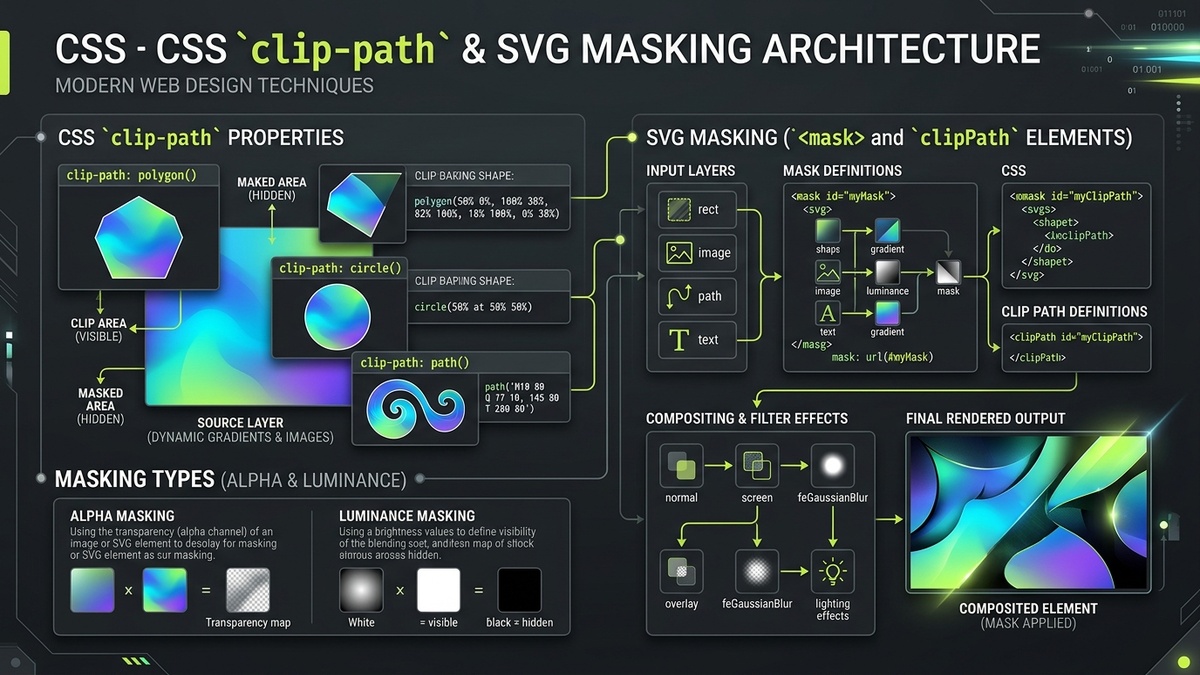
1. Introduction: Modern Vector Clipping and Masking in 2026
For decades, web design was imprisoned within rigid rectangular boxes. Every <div>, image, and section divider was fundamentally constrained by the rectangular nature of the CSS box model. Early workarounds — such as slicing translucent PNG assets in Photoshop, assembling complex multi-nested wrapper markup, or layering 9-slice background images — introduced significant layout thrashing, bloated network payloads, and fragile responsive behavior across mobile devices.
In modern web development, the convergence of the W3C CSS Masking Module Level 1 and Scalable Vector Graphics (SVG) has completely transformed interface design. Today, frontend engineers can sculpt web elements into arbitrary geometric silhouettes, organic waves, diagonal dynamic section dividers, non-destructive notification badge cutouts, and feather-edged spotlight glows using pure declarative code.
Two primary architectural mechanisms drive this visual revolution: Clipping (via CSS clip-path and SVG <clipPath>) and Masking (via CSS mask-image and SVG <mask>). While developers often conflate the two terms, they represent fundamentally distinct mathematical and GPU compositing operations. Clipping performs 1-bit binary stencil cutouts with zero antialiasing blur, while masking performs 8-bit multi-channel alpha and luminance compositing, allowing partial transparency, linear gradient feathering, and complex texture blending.
Furthermore, recent browser advancements — such as universal support for the CSS path() basic shape function, hardware-accelerated SVG clipping in Google Skia and Apple Metal, and responsive coordinate normalization via clipPathUnits="objectBoundingBox" — enable engineers to build high-performance, fluid interfaces that scale effortlessly from mobile viewports to ultra-wide displays without dropping below 120 FPS. This comprehensive engineering guide dissects the mathematical foundations, coordinate transformations, animation rules, and production UI patterns required to master clipping and masking across modern web stacks.
2. Fundamentals: clip-path vs mask-image vs SVG clipPath vs mask
To avoid architectural errors and rendering defects, developers must understand the precise boundaries between the four primary vector cut-out technologies available in the web platform:
| Technology | Compositing Type | Boundary Precision | Alpha Gradients | GPU Performance |
|---|---|---|---|---|
CSS clip-path |
1-bit Binary Geometry | Hard boundary (Inside = 100%, Outside = 0%) | No (Binary cutout only) | Extremely High (Compositor thread promotion) |
SVG <clipPath> |
1-bit Vector Geometry | Hard boundary based on path winding rules | No (Binary vector stencil) | High (Direct GPU tessellation) |
CSS mask-image |
8-bit Alpha / Luminance | Soft, feather-edged raster/vector blending | Yes (Full 0% to 100% opacity gradations) | Moderate (Requires intermediate texture pass) |
SVG <mask> |
8-bit Luminance (Default) | Soft vector/raster alpha and luminance map | Yes (Multi-stop gradient fades and textures) | Moderate (Intermediate offscreen surface) |
2.1 The 1-Bit Binary Principle of Clipping
When you apply a clipping path (whether via CSS clip-path: polygon(...) or an SVG <clipPath> element), the browser's graphics rasterizer constructs a closed 2D polygon or spline boundary. For every pixel in the element's bounding box, the rasterizer evaluates an inside/outside point test (governed by the clip-rule winding algorithm):
- If the center of the pixel lies inside the clipping boundary, the pixel is painted with 100% of its computed source RGBA color.
- If the center of the pixel lies outside the clipping boundary, the pixel is discarded completely (0% visibility). No pointer events, mouse hover triggers, or screen-reader hit-boxes are registered outside the clipped silhouette.
Because clipping produces a binary decision per pixel without computing alpha blending math, graphics hardware can optimize clipping using depth buffers or stencil buffers, avoiding expensive multi-pass blend calculations.
2.2 The 8-Bit Multi-Channel Principle of Masking
Masking, by contrast, operates on opacity channels. Instead of an all-or-nothing cutoff, a mask defines an image or vector graphic whose pixel values determine the final transparency of the target element:
- Alpha Masking: The alpha transparency channel of the mask image dictates target visibility. Where the mask is 100% opaque (alpha = 1.0), the element is fully visible; where the mask is 50% translucent (alpha = 0.5), the element is 50% translucent; where the mask is fully transparent (alpha = 0.0), the element is invisible.
- Luminance Masking (SVG Default): The perceived photometric brightness (luminance) of the mask determines visibility. Pure white (
#FFFFFF) corresponds to 100% opacity; pure black (#000000) corresponds to 0% opacity; middle gray (#808080) yields 50% opacity. This allows designers to use standard linear and radial gradients to fade elements softly into backgrounds.
3. CSS Basic Shapes: inset(), circle(), ellipse(), and polygon() Geometry
The CSS clip-path property supports four native geometric functions defined in the CSS Shapes Module: inset(), circle(), ellipse(), and polygon(). Because these functions are declared directly in stylesheets without requiring separate SVG DOM tags, they are ideal for lightweight UI styling and fluid responsive scaling.
3.1 Inset Rectangles with Rounded Borders: inset()
The inset() function clips an element inward from its four outer edges, functioning like an internal margin box. It accepts one to four edge offsets followed by an optional round parameter that applies independent corner radii:
/* Syntax: inset(top right bottom left round border-radius) */
.clipped-card {
  /* Clip 16px from top/bottom, 24px from left/right, with 12px rounded corners */
  clip-path: inset(16px 24px 16px 24px round 12px);
}
Unlike setting CSS overflow: hidden on a parent container, inset() clips child elements, borders, shadows, and pseudo-elements simultaneously without creating a nested scrolling container.
3.2 Circular and Elliptical Silhouettes: circle() & ellipse()
The circle() and ellipse() functions construct curved clipping masks parameterized by radius and center positioning:
/* Circular avatar cutout centered at element midpoint */
.avatar-round {
  clip-path: circle(50% at 50% 50%);
}

/* Elliptical spotlight reveal centered 30% from the left edge */
.spotlight-banner {
  clip-path: ellipse(40% 60% at 30% 50%);
}
3.3 Arbitrary Vertex Polygons: polygon() and Winding Rules
The polygon() function provides unlimited multi-point geometric freedom. It accepts an ordered comma-separated list of coordinate pairs, where coordinates can be expressed in percentages, pixels, rems, or viewport units:
/* Hexagonal UI Badge */
.hex-badge {
  clip-path: polygon(50% 0%, 100% 25%, 100% 75%, 50% 100%, 0% 75%, 0% 25%);
}

/* Diagonal Hero Section Divider */
.angled-hero {
  clip-path: polygon(0% 0%, 100% 0%, 100% 88%, 0% 100%);
}
3.4 Calculating Regular N-Sided Polygon Vertices Programmatically
To generate perfectly symmetrical regular polygons (such as octagons, decagons, or pentagrams), use the standard trigonometric circle parameterization formulas:
Y_k = 50% + 50% × sin( 2 × pi × k / N - pi / 2 )
For an octagon (N = 8), evaluating this formula produces the crisp 8-point stop-sign silhouette:
/* Regular Octagon (8 vertices computed via trigonometric steps) */
.octagonal-card {
  clip-path: polygon(
    30% 0%, 70% 0%,
    100% 30%, 100% 70%,
    70% 100%, 30% 100%,
    0% 70%, 0% 30%
  );
}
3.5 Combining CSS calc() with polygon() Coordinates
Modern CSS allows the powerful combination of percentage units with absolute pixel measurements inside calc() expressions. This enables futuristic chamfered sci-fi corners that maintain a fixed 20px bevel angle regardless of how wide the element stretches:
/* Futuristic Chamfered Cyberpunk Button */
.cyber-button {
  background: #C1DD2D;
  color: #0A0A0A;
  padding: 14px 28px;
  /* Fixed 20px diagonal cuts on top-right and bottom-left corners */
  clip-path: polygon(
    0% 0%,
    calc(100% - 20px) 0%,
    100% 20px,
    100% 100%,
    20px 100%,
    0% calc(100% - 20px)
  );
}evenodd: Cast a ray from test point to infinity; total crossings modulo 2.
By default, polygon() utilizes the nonzero winding rule. To construct hollow cutouts, prefix the coordinate list with evenodd:
/* Star badge with hollow interior aperture */
.hollow-star {
  clip-path: polygon(evenodd, 50% 0%, 65% 35%, 100% 35%, 72% 57%, 82% 91%, 50% 70%, 18% 91%, 28% 57%, 0% 35%, 35% 35%);
}
4. The path() Function in CSS: Direct SVG Path Data in Stylesheets
Until recently, developers needing intricate curved clipping shapes — such as wavy organic banners, heart silhouettes, or custom brand emblems — had to author an external SVG document and link to it via clip-path: url(#my-clip). The CSS Shapes specification introduced the native path() basic shape function, allowing standard SVG path data strings to be authored directly inside CSS declarations.
4.1 Native CSS path() Syntax
The path() function takes an optional winding rule followed by a quoted SVG path string containing standard commands (M, L, C, S, Q, T, A, Z):
/* Pure CSS wavy bottom header using SVG cubic Bézier path commands */
.wave-header {
  width: 100%;
  height: 280px;
  background: linear-gradient(135deg, #181E07 0%, #0C0F05 100%);
  clip-path: path('M 0 0 L 1000 0 L 1000 220 C 800 280, 600 160, 400 240 C 200 320, 100 180, 0 220 Z');
}
4.2 The Critical Limitation of CSS path(): Absolute Pixel Units
Architectural Warning: Lack of Percentage Scaling in path()
Unlike polygon() or SVG objectBoundingBox, the coordinates inside CSS path('M ...') are strictly interpreted as unscaled CSS pixels (px). The CSS specification does not currently allow percentage signs inside path data commands. If an element resizes from 400px wide to 1200px wide, a shape clipped with path() will remain fixed at its original pixel dimensions, causing awkward empty spaces on the right.
To achieve fluid, 100% responsive vector clipping that stretches proportionally across arbitrary element dimensions, engineers must use SVG <clipPath> elements configured with clipPathUnits="objectBoundingBox", as explored in Section 6.
5. Reusable SVG clipPath Elements & Coordinate System Units
When interface designs require complex vector geometry, multiple disconnected sub-paths, or shared clipping silhouettes reused across hundreds of components, the SVG <clipPath> element is the industry standard. SVG clip paths are declared inside a <defs> block and referenced via CSS url(#clip-id):
<!-- Define reusable SVG clipPath in document HTML -->
<svg width="0" height="0" style="position: absolute; pointer-events: none;" aria-hidden="true">
  <defs>
    <clipPath id="squircleClip" clipPathUnits="userSpaceOnUse">
      <path d="M 0 20 C 0 5, 5 0, 20 0 H 60 C 75 0, 80 5, 80 20 V 60 C 80 75, 75 80, 60 80 H 20 C 5 80, 0 75, 0 60 Z"/>
    </clipPath>
  </defs>
</svg>

<!-- Apply to HTML element via CSS -->
<div class="squircle-card" style="clip-path: url(#squircleClip);">
  <img src="/og-default.png" alt="Preview">
</div>
5.1 Combining Multiple Geometric Primitives
A powerful advantage of <clipPath> over CSS basic shapes is that it can contain multiple overlapping or disjointed elements. You can combine <circle>, <rect>, <polygon>, and <text> inside a single clip path. The browser computes the union of all enclosed shapes to form the final silhouette:
<!-- Complex composite clip path combining geometry and typography -->
<clipPath id="compositeBadgeClip">
  <circle cx="50" cy="50" r="45"/>
  <rect x="40" y="80" width="20" height="30" rx="4"/>
  <text x="50" y="55" font-size="24" font-weight="900" text-anchor="middle">PRO</text>
</clipPath>
6. Responsive Scaling with objectBoundingBox (0.0 to 1.0 Coordinates)
By default, SVG <clipPath> operates under clipPathUnits="userSpaceOnUse". In this mode, coordinates correspond 1:1 with local SVG user coordinate pixels. If the target HTML element changes dimensions across responsive breakpoints, the clip path remains static, misaligning with the element's layout bounds.
To make an SVG clip path automatically stretch, squish, and scale to fit any HTML element regardless of width or height, set clipPathUnits="objectBoundingBox". In this coordinate system, the target element's entire bounding box is normalized to a unit square where coordinates span continuously from 0.0 (0% top/left) to 1.0 (100% bottom/right):
Normalized Y = Raw SVG Y / Original ViewBox Height
6.1 Normalized Path Example: Responsive Hexagonal Shield
Consider a standard hexagonal shield designed on a 100×100px vector canvas. To convert it into an objectBoundingBox clip path, divide all coordinate numbers by 100:
<!-- Fluid, responsive SVG clip path that scales to ANY container size -->
<svg width="0" height="0" style="position: absolute; pointer-events: none;" aria-hidden="true">
  <defs>
    <clipPath id="responsiveShield" clipPathUnits="objectBoundingBox">
      <!-- Values span from 0.0 to 1.0 instead of fixed pixels -->
      <path d="M 0.5 0 L 1.0 0.25 L 1.0 0.75 L 0.5 1.0 L 0.0 0.75 L 0.0 0.25 Z"/>
    </clipPath>
  </defs>
</svg>

<!-- This div can be 200x200px on mobile or 800x400px on desktop; clipping adapts perfectly! -->
<div class="fluid-shield-banner" style="clip-path: url(#responsiveShield);"></div>
6.2 Automated Script for Path Normalization
To convert arbitrary SVG icons or paths from standard viewBoxes (such as 24×24 in Lucide or Heroicons) into objectBoundingBox strings, use this helper utility:
// Utility to normalize SVG path coordinates to [0, 1] unit space
function normalizePathToObjectBoundingBox(pathString, viewBoxWidth = 24, viewBoxHeight = 24) {
  // Regex matches coordinate numbers and scales them
  return pathString.replace(/([-+]?[0-9]*.?[0-9]+)/g, (match, num, offset, fullStr) => {
    // Alternate between X and Y based on coordinate token context
    const val = parseFloat(match);
    const scaled = (val / viewBoxWidth).toFixed(4);
    return scaled;
  });
}
7. Alpha vs Luminance Masking: Feathering, Gradients & Opacity Maps
While clipping paths are limited to razor-sharp binary edges, modern UI design frequently requires soft, feathered transitions. Examples include fading a scrollable card container smoothly into transparency at the bottom, creating glowing particle trails, or feathering the perimeter of a hero photograph.
7.1 CSS mask-image with Linear Gradients
The CSS mask-image property accepts standard CSS gradient functions. By default in CSS masking, gradients behave as alpha masks:
/* Smooth vertical fadeout for scrollable lists (Top 85% visible, bottom 15% fades to 0) */
.fade-scroll-container {
  overflow-y: auto;
  mask-image: linear-gradient(to bottom, black 85%, transparent 100%);
  -webkit-mask-image: linear-gradient(to bottom, black 85%, transparent 100%);
}
7.2 Boolean Geometry Operations with mask-composite
The CSS Masking specification introduced mask-composite, which enables Boolean constructive solid geometry operations directly between multiple mask layers:
mask-composite: add(Union: combines visibility across all masks).mask-composite: subtract(Difference: subtracts the second mask from the first).mask-composite: intersect(Intersection: only keeps areas covered by both masks).mask-composite: exclude(XOR: hides overlapping regions).
/* Combine a gradient mask with a circular cutout using mask-composite */
.composite-masked-banner {
  mask-image: linear-gradient(to right, black, transparent), radial-gradient(circle at center, black, transparent);
  mask-composite: intersect;
  -webkit-mask-composite: source-in; /* Safari vendor compatibility */
}
7.3 SVG <mask> and Luminance Mapping
Within native SVG, the <mask> element defaults to mask-type: luminance. The browser calculates the perceived brightness of the mask graphics using the international ITU-R BT.709 photometric coefficients:
To construct a radial spotlight mask that illuminates a central circle while softly feathering the outer perimeter:
<svg width="0" height="0" style="position: absolute;" aria-hidden="true">
  <defs>
    <radialGradient id="spotlightGrad" cx="50%" cy="50%" r="50%">
      <stop offset="40%" stop-color="#FFFFFF" stop-opacity="1"/> <!-- Fully visible -->
      <stop offset="100%" stop-color="#000000" stop-opacity="1"/> <!-- Fully hidden -->
    </radialGradient>
    <mask id="spotlightMask" maskUnits="objectBoundingBox">
      <rect width="1" height="1" fill="url(#spotlightGrad)"/>
    </mask>
  </defs>
</svg>

<div class="hero-card" style="mask: url(#spotlightMask);"></div>
8. Animating Clip Paths: Morphing Transitions, WAAPI, and Interpolation Rules
Animating clipping boundaries creates showstopping micro-interactions — such as circular button click ripples expanding outward to fill the screen, menu drawers morphing from compact circles into full-screen dialogs, and dynamic geometric card hover reveals.
8.1 The Strict Vertex Count Interpolation Rule
Mandatory Rule for Animating polygon()
Browsers can only smoothly interpolate between two polygon() declarations if both polygons contain the exact same number of vertices. If Polygon A has 4 points and Polygon B has 6 points, CSS transitions cannot match intermediate points and will abruptly jump at 50% keyframe progress.
To morph between dissimilar shapes (such as a 4-point rectangle and an 8-point star), you must pad the simpler shape with degenerate collocated vertices (points that share the exact same coordinates) until vertex counts match perfectly.
8.2 High-Performance Animation via WAAPI
Using the Web Animations API (WAAPI), you can orchestrate hardware-accelerated clip-path morphs on the browser's GPU compositor thread without triggering layout reflows:
// Morph a circular button into an expanded modal card via WAAPI
function expandModalClip(element) {
  element.animate([
    { clipPath: 'circle(24px at 50% 50%)' },
    { clipPath: 'circle(100% at 50% 50%)' }
  ], {
    duration: 500,
    easing: 'cubic-bezier(0.16, 1, 0.3, 1)',
    fill: 'forwards'
  });
}
8.3 FLIP Animations with Dynamic Clip-Paths
The FLIP technique (First, Last, Invert, Play) allows seamless geometric transitions between UI states. By measuring the initial bounding rect of a thumbnail card and the final dimensions of an expanded hero modal, you can calculate the exact inset() coordinates required to transition between them without animating expensive width, height, or top properties.
9. GPU Acceleration, Stacking Contexts, and Compositor Performance
Applying clip-path or mask-image significantly impacts how browser rendering engines composite layers on the GPU. Understanding these internals allows engineers to avoid accidental frame drops and memory spikes.
9.1 Automatic Stacking Context Generation
Under CSS specifications, setting any value for clip-path other than none automatically establishes a new CSS stacking context. Furthermore, it creates a new containing block for all descendants with position: fixed or position: absolute. If your application relies on fixed modal overlays placed inside a clipped container, the modal will be trapped inside the clipped boundary rather than spanning the viewport.
9.2 Layer Promotion and Anti-Aliasing
Modern graphics engines (Chromium Blink, Safari WebKit, and Firefox Gecko) handle clipped element rasterization by promoting the clipped element to a dedicated GPU texture layer. However, anti-aliasing techniques diverge across operating systems:
- Chromium (Skia): Evaluates clip-path geometry using multi-sample anti-aliasing (MSAA) or analytic coverage within compute shaders.
- Safari (WebKit / Metal): Implements clipping via hardware CoreAnimation masks, providing exceptionally smooth edges on Apple Silicon hardware with zero battery drain.
10. Interactive Developer Studio: Live Clip-Path & SVG Masking Sandbox
Use the interactive workbench below to design and inspect clipping shapes and masks in real time. Switch between native CSS polygons, circular apertures, organic Bézier paths, and luminance gradient masks. Inspect generated code and test responsive scaling.
11. Production UI Patterns: Notification Badges, Angled Dividers & Spotlights
Below are four battle-tested UI recipes that solve everyday design challenges using modern clipping and masking.
11.1 Non-Destructive Notification Badge Cutout
When placing an unread notification count badge over an icon or avatar, a traditional border creates an unsightly halo on non-solid backgrounds. Using an SVG mask with a circular cutout punches a transparent hole precisely around the badge:
<!-- Non-destructive hole punch avatar badge -->
<svg viewBox="0 0 48 48" width="48" height="48">
  <mask id="badgeHole">
    <!-- Everything white is visible -->
    <rect width="48" height="48" fill="white"/>
    <!-- The black circle punches a 100% transparent hole -->
    <circle cx="38" cy="10" r="8" fill="black"/>
  </mask>
  <!-- Avatar image is clipped by mask -->
  <image href="/og-default.png" width="48" height="48" mask="url(#badgeHole)"/>
  <!-- Unclipped badge sits cleanly inside the hole -->
  <circle cx="38" cy="10" r="6" fill="#EF4444"/>
</svg>
11.2 Fluid Responsive Diagonal Section Divider
To construct full-width slanted section dividers without raster image assets or horizontal scrollbar overflow bugs, apply clip-path: polygon() directly to the section container:
.slanted-section {
  width: 100%;
  padding: 120px 24px;
  background: #121212;
  /* Slant top edge down 4vw, bottom edge up 4vw */
  clip-path: polygon(0 4vw, 100% 0, 100% calc(100% - 4vw), 0 100%);
}
11.3 Interactive Cursor Spotlight Reveal
Create an interactive spotlight effect where the user's cursor dynamically reveals an underlying visual layer using CSS variables updated via JavaScript:
// Update CSS spotlight coordinates via cursor mousemove
const hero = document.querySelector('.spotlight-hero');
hero.addEventListener('mousemove', (e) => {
  const rect = hero.getBoundingClientRect();
  const x = e.clientX - rect.left;
  const y = e.clientY - rect.top;
  hero.style.setProperty('--spotlight-x', x + 'px');
  hero.style.setProperty('--spotlight-y', y + 'px');
});

/* CSS Declaration */
.spotlight-top-layer {
  position: absolute;
  inset: 0;
  background: radial-gradient(circle at center, #C1DD2D 0%, transparent 70%);
  clip-path: circle(140px at var(--spotlight-x, 50%) var(--spotlight-y, 50%));
  transition: clip-path 50ms ease-out;
  pointer-events: none;
}
12. Browser Compatibility Matrix & CSS Specification Support
The table below summarizes browser engine compatibility for modern clipping and masking features across desktop and mobile browsers:
| Feature | Chrome (Blink) | Safari (WebKit) | Firefox (Gecko) | Mobile Support (iOS/Android) |
|---|---|---|---|---|
CSS polygon() |
Chrome 55+ | Safari 10.1+ | Firefox 54+ | Full Support (100%) |
CSS path() |
Chrome 88+ | Safari 13.1+ | Firefox 97+ | Full Support (98.2%) |
clipPathUnits="objectBoundingBox" |
Chrome 55+ | Safari 11+ | Firefox 54+ | Full Support (100%) |
CSS mask-image |
Chrome 120+ (unprefixed) | Requires -webkit- prefix |
Firefox 53+ | Full Support (Vendor Prefix Safe) |
mask-composite |
Chrome 120+ | Safari 15.4+ (prefixed) | Firefox 53+ | Modern Browsers (96.5%) |
Key Takeaway for Production Deployment
Always include the -webkit-mask-image vendor prefix alongside standard mask-image in your production CSS bundles to ensure 100% compatibility across Safari on macOS and iOS.
13. Frequently Asked Questions
What is the mathematical difference between CSS clip-path and CSS mask-image?
CSS clip-path performs a 1-bit binary stencil test where pixels are either 100% visible or 100% discarded, with no partial opacity. CSS mask-image performs 8-bit alpha or luminance channel compositing, allowing smooth gradient feathering, translucent blurs, and variable opacity transitions.
Why does CSS clip-path: path() fail to scale responsively with element dimensions?
The path() basic shape function strictly interprets all coordinates as absolute, unscaled CSS pixels (px). To achieve fluid, responsive vector clipping that scales with container dimensions, use an SVG clipPath element configured with clipPathUnits="objectBoundingBox" where coordinates span normalized unit values from 0.0 to 1.0.
How do you animate clip-path: polygon() smoothly without sudden jumps?
Browsers require both keyframes to possess the exact same number of polygon vertices. If one polygon has 4 points and the other has 6, interpolation fails. Pad simpler shapes with redundant overlapping vertices to match point counts across all animation states.
Does applying a clip-path create a new CSS stacking context?
Yes. Any non-none value of clip-path automatically promotes the element to a new stacking context and acts as a containing block for absolute and fixed position descendants, preventing fixed child elements from escaping the clipped boundaries.
What is the difference between alpha masking and luminance masking?
Alpha masking uses the transparency channel of the mask image (opaque = visible, transparent = hidden). Luminance masking, the default in SVG, uses the visual brightness of the mask graphics (white = fully visible, black = fully hidden, gray = translucent).
Are user click and touch pointer events captured outside a clipped shape?
No. By default, clipping paths clip both the visual pixel output and the hit-testing boundary of the element. Pointer events outside the clipped silhouette pass directly through to underlying DOM elements.