Executive Summary for UI Engineers & Graphics Developers:
- Bernstein Polynomial Foundation: Understand how cubic (C, S) and quadratic (Q, T) SVG path commands translate into parametric polynomials B(t) where t spans [0.0, 1.0].
- De Casteljau's Algorithm: Master recursive geometric interpolation for curve evaluation, subdivision, and floating-point numerical stability without trigonometric divergence.
- Derivatives, Tangents & Curvature: Calculate instantaneous velocity vectors B'(t), normal vectors N(t), and curvature kappa(t) for orienting objects along paths, smooth camera movement, and robotic pathing.
- Exact Bounding Box Calculus: Stop guessing bounding boxes with crude control point convex hulls. Calculate exact extrema roots via the quadratic formula on B'(t) = 0.
- Interactive Developer Studio: Inspect live parametric points, velocity vectors, control handles, and generated production JavaScript/SVG code in real time.
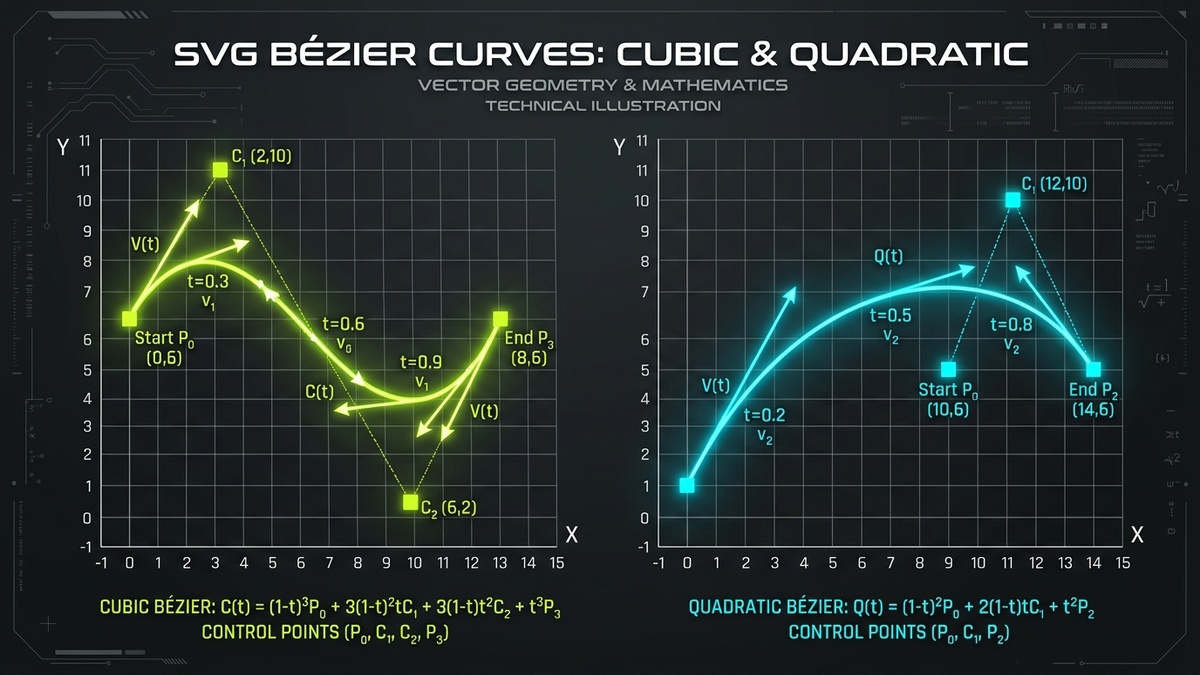
1. Introduction: Bézier Curves in Vector Graphics and SVG
Every smooth curve rendered in digital computer graphics — from the glyph outlines of web fonts and design system icons in Lucide or Heroicons to responsive data visualization in D3.js and motion paths in modern CSS — relies on the mathematical elegance of Bézier curves. Named after French engineer Pierre Bézier, who popularized them in the 1960s for computer-aided automotive body design at Renault, Bézier curves provide an intuitive yet mathematically rigorous framework for defining complex curved trajectories using discrete anchor points and control handles.
Within the Scalable Vector Graphics (SVG) specification, path curves are encapsulated inside the ubiquitous d attribute of the <path> element. While lines (L, H, V) require only start and destination coordinates, curved segments introduce higher polynomial degrees. The SVG standard provides two primary classes of polynomial curves: Quadratic Bézier curves (invoked via Q and smooth continuation T) and Cubic Bézier curves (invoked via C and smooth continuation S).
Too often, web developers treat SVG path strings as impenetrable black boxes generated by design applications like Figma or Illustrator. However, when building dynamic charting engines, vector morphing libraries, canvas renderers, interactive connectors, or animated SVG micro-interactions, relying on opaque design exports leads to severe performance bottlenecks and rendering bugs. In this comprehensive engineering guide, we dissect the rigorous mathematical principles, algebraic formulas, geometric algorithms, and practical implementation patterns required to master SVG Bézier curves from first principles.
2. Parametric Polynomials and the Bernstein Basis Form
To manipulate Bézier curves in software, one must first recognize that a Bézier curve is a parametric function. Unlike an explicit Cartesian function y = f(x) (which cannot easily describe vertical lines, loops, or self-intersecting loops without becoming multi-valued), a parametric curve defines both the horizontal x and vertical y coordinates independently as functions of a single scalar parameter, conventionalized as t, where t ranges smoothly from 0.0 (the start of the curve) to 1.0 (the conclusion of the curve):
The general mathematical formulation for any Bézier curve of degree n is defined as a linear combination of n + 1 control points P_i weighted by the Bernstein basis polynomials of degree n:
The Bernstein polynomial weights possess remarkable mathematical properties that guarantee the stability and predictability of vector curves:
- Partition of Unity: For any value of
tin the interval[0, 1], the sum of all Bernstein basis coefficients equals exactly1.0. Mathematically,Sum_{i=0}^{n} b_{i,n}(t) = 1. This ensures that the curve is an affine combination of its control points, making it invariant under translation, rotation, and uniform scaling. - Non-Negativity: Within the range
0 ≤ t ≤ 1, every basis polynomialb_{i,n}(t) ≥ 0. Because all weights are non-negative and sum to unity, every point on the curve represents a convex combination of its control points. - Convex Hull Property: Because the weights form a convex combination, the entire curve is strictly enclosed within the convex hull of its control points
{P_0, P_1, ..., P_n}. Graphics engines exploit this property for extremely fast clipping and bounding-box rejection during spatial indexing and collision detection. - Endpoint Interpolation: At
t = 0.0, the basis weights reduce such thatB(0) = P_0. Att = 1.0,B(1) = P_n. The curve always passes precisely through its initial and terminal anchor points. Intermediate control points generally do not lie on the curve; instead, they act as gravitational attractors dictating the curve's velocity and curvature.
Let us now examine the two specific polynomial degrees codified into the W3C SVG specification.
3. Quadratic Bézier Curves (Q and T Commands)
A quadratic Bézier curve is an algebraic polynomial of degree n = 2. It requires exactly three control points: an initial anchor point P_0, a single directional control point C_1 (often designated P_1), and a terminal anchor point P_2. In SVG path syntax, a quadratic curve is declared using the Q (absolute) or q (relative) command followed by the control point and destination coordinates:
<!-- Syntax: M startX startY Q controlX controlY endX endY -->
<path d="M 50 150 Q 150 20 250 150" fill="none" stroke="#C1DD2D" stroke-width="3"/>
3.1 Mathematical Formulation of Quadratic Curves
Expanding the general Bernstein equation for n = 2 produces the explicit quadratic polynomial:
By expanding the polynomial terms and grouping by descending powers of t, we obtain the standard monomial power basis representation:
3.2 The Smooth Quadratic Continuation (T Command)
When chaining multiple curved segments together to build complex vector paths or wave ribbons, maintaining mathematical tangency across junctions is critical. If adjacent segments share an anchor point but have misaligned tangent vectors, a visible sharp crease appears.
The SVG T (absolute) or t (relative) command provides smooth quadratic continuation. It requires only the destination anchor point coordinates. The browser's graphics engine dynamically computes the control point C_1 by reflecting the previous segment's control point across the shared start anchor:
If the command preceding T is not a quadratic curve (such as a line L or a cubic C), the SVG specification mandates that the control point defaults directly to the current point: C_1 = P_0. In that fallback scenario, the curve degenerates into a linear segment.
4. Cubic Bézier Curves (C and S Commands)
While quadratic curves are computationally lightweight, they suffer from a severe geometric limitation: their second derivative is constant. Consequently, a single quadratic Bézier segment cannot change its direction of curvature; it cannot produce an "S-bend" or inflection point. To create an S-shaped curve with quadratic segments, an engineer must stitch together at least two separate quadratic curves.
Cubic Bézier curves, defined by polynomials of degree n = 3, overcome this constraint completely. A cubic curve utilizes four control points: initial anchor P_0, first control point C_1, second control point C_2, and destination anchor P_3. The presence of two independent control handles allows cubic curves to form complex non-planar trajectories, loops, and inflection points where curvature smoothly reverses direction.
<!-- Syntax: M startX startY C ctrl1X ctrl1Y ctrl2X ctrl2Y endX endY -->
<path d="M 40 180 C 80 20 220 280 260 120" fill="none" stroke="#C1DD2D" stroke-width="3"/>
4.1 Mathematical Formulation of Cubic Curves
Expanding the Bernstein formula for n = 3 yields the fundamental cubic Bézier equation:
Grouping the terms into the standard monomial power basis C(t) = a×t^3 + b×t^2 + c×t + d gives us the following matrix coefficients:
b = 3×P_0 - 6×C_1 + 3×C_2
c = -3×P_0 + 3×C_1
d = P_0
4.2 The Smooth Cubic Continuation (S Command)
Similar to the quadratic T command, SVG provides the S (absolute) or s (relative) command for chaining smooth cubic segments. The S command requires only the second control point C_2 and the final anchor P_3. The browser calculates the first control point C_1 by reflecting the previous cubic curve's second control point C_{2, ext{prev}} across the shared anchor P_0:
If the command preceding S is not a cubic Bézier command (C or S), C_1 is assumed to be coincident with the current point P_0, effectively reducing the initial phase of the segment to quadratic acceleration.
5. De Casteljau's Algorithm: Recursive Geometric Subdivision
While evaluating polynomial equations directly via Horner's method is efficient on modern arithmetic logic units, floating-point roundoff errors can accumulate near the boundaries (t → 0 or t → 1). Furthermore, monomial forms provide no straightforward mechanism for splitting a curve into independent sub-segments at an arbitrary parameter t.
In 1959, mathematician Paul de Casteljau formulated a profound geometric construction that evaluates Bézier curves through pure recursive linear interpolation (LERP). De Casteljau's algorithm forms the foundational rasterization pipeline inside browser rendering engines like Google Skia and Mozilla WebRender.
5.1 The Step-by-Step Geometric Construction
Consider a cubic Bézier curve defined by four control points {P_0, C_1, C_2, P_3}. To evaluate the curve point at parameter t = 0.5 (or any arbitrary t in [0, 1]):
- Level 1 Interpolation: Interpolate linearly along the three polygon edges connecting adjacent control points:
Q_0 = (1 - t) × P_0 + t × C_1Q_1 = (1 - t) × C_1 + t × C_2Q_2 = (1 - t) × C_2 + t × P_3 - Level 2 Interpolation: Connect the resulting points
Q_0, Q_1, Q_2and interpolate along those two new segments:R_0 = (1 - t) × Q_0 + t × Q_1R_1 = (1 - t) × Q_1 + t × Q_2 - Level 3 Interpolation: Connect
R_0andR_1and interpolate one final time:B(t) = (1 - t) × R_0 + t × R_1
The resulting point B(t) lies precisely on the Bézier curve. Even more impressively, the line segment connecting R_0 and R_1 is strictly tangent to the curve at B(t).
5.2 Curve Splitting and Subdivision
De Casteljau's algorithm delivers a critical bonus: it splits the original cubic curve into two valid, independent cubic curves that perfectly reconstruct the original trajectory. The two new sets of control points are:
- Left Sub-segment (from 0 to t):
{ P_0, Q_0, R_0, B(t) } - Right Sub-segment (from t to 1):
{ B(t), R_1, Q_2, P_3 }
Graphics engines utilize recursive subdivision at t = 0.5 to flatten curved paths into micro-linear segments for rasterization. If the control points of a sub-segment become sufficiently close to collinear (measured by a flatness tolerance epsilon, typically 0.25px), the engine halts recursion and draws a straight line segment directly to the GPU buffer.
// Production JavaScript Implementation of De Casteljau Curve Splitting
function splitCubicBezier(p0, c1, c2, p3, t) {
  const lerp = (a, b, t) => ({ x: (1 - t) * a.x + t * b.x, y: (1 - t) * a.y + t * b.y });

  // Level 1
  const q0 = lerp(p0, c1, t);
  const q1 = lerp(c1, c2, t);
  const q2 = lerp(c2, p3, t);

  // Level 2
  const r0 = lerp(q0, q1, t);
  const r1 = lerp(q1, q2, t);

  // Level 3 (Curve Point)
  const bt = lerp(r0, r1, t);

  return {
    left:  { p0: p0, c1: q0, c2: r0, p3: bt },
    right: { p0: bt, c1: r1, c2: q2, p3: p3 }
  };
}
6. First and Second Derivatives: Tangents and Normal Vectors
In modern web development, static curves are only half the battle. Engineers frequently need to animate icons along paths, orient directional arrows along curved pipelines (such as in React Flow or node diagrams), or align text along curved baselines using SVG <textPath>. To orient an object tangentially to a curve at parameter t, we must compute the curve's first mathematical derivative.
6.1 The First Derivative (Velocity Vector)
Differentiating the cubic Bézier polynomial with respect to parameter t produces a quadratic Bézier curve representing the instantaneous rate of change (velocity vector):
Notice that at t = 0.0, the derivative simplifies to C'(0) = 3 × (C_1 - P_0). This proves that the initial tangent vector is collinear with the segment connecting the start anchor to the first control point. Similarly, at t = 1.0, C'(1) = 3 × (P_3 - C_2).
6.2 Computing the Tangent Angle and Normal Vectors
The tangent angle θ (in radians) required to rotate an oriented icon or arrowhead is calculated using the two-argument arctangent function:
Unit Tangent: T_unit(t) = ( x'(t), y'(t) ) / sqrt( x'(t)^2 + y'(t)^2 )
Unit Normal: N_unit(t) = ( -y'(t), x'(t) ) / sqrt( x'(t)^2 + y'(t)^2 )
Normal vectors are essential for computing stroke outlines, offset curves (creating parallel tracks or double lines), and computing directional particle emitters along curved trajectories.
7. Curvature, Inflection Points, and Arc Approximations
Curvature (denoted by the Greek letter kappa, κ) measures how sharply a curve bends at any specific point. In physics and motion design, curvature dictates the lateral acceleration experienced by an object traveling at constant velocity along the path.
7.1 The Mathematical Curvature Formula
By computing both the first derivative (x', y') and second derivative (x'', y'') of the parametric curve, the signed scalar curvature κ is given by:
The radius of curvature R(t) of the osculating circle (the circle that best approximates the curve locally at t) is simply the reciprocal of curvature: R(t) = 1 / |kappa(t)|. When designing rail road tracks, highway ramps, or camera dolly paths, engineers ensure curvature transitions smoothly (continuous G^2 or C^2 curvature) to avoid sudden jerks in centrifugal force.
7.2 Circular Arc Approximation: The Magic Kappa Constant
A fundamental dilemma in vector geometry is that polynomial Bézier curves cannot represent true circles. A true circle requires irrational or rational trigonometric equations. However, graphics applications require circular rounded corners, rings, and badges. Fortunately, a 90-degree circular arc of radius R can be approximated using a cubic Bézier curve with phenomenal accuracy.
To match the circle's endpoints and tangent angles at t = 0 and t = 1, while minimizing radial deviation at the midpoint t = 0.5, the control points must be positioned along tangent rays at a specific distance from the anchors governed by the magical kappa constant:
To construct a quadrant circle centered at (0, 0) with radius R = 100 spanning from (0, 100) to (100, 0), the four control points are:
// 90-degree circle quadrant with radius 100 (kappa * 100 = 55.2285)
// Path: M 0 100 C 55.2285 100, 100 55.2285, 100 0
<path d="M 0 100 C 55.2285 100, 100 55.2285, 100 0" fill="none" stroke="#C1DD2D" stroke-width="2"/>
Stitching four such cubic segments together produces a visually indistinguishable circle using only 4 cubic commands.
8. Exact Bounding Box Computation (Extrema via Calculus Roots)
Calculating the true bounding box (minimum and maximum X and Y coordinates) of an SVG path is essential for generating accurate viewBox parameters, collision detection, and layout engines. A naive approach taken by many junior developers is to compute the bounding box of the four control points {P_0, C_1, C_2, P_3}.
The Pitfall of Control Point Bounding Boxes
Because the curve is bounded by the convex hull of its control points, taking the min/max of the control points guarantees containment, but it severely overestimates the actual visual boundary of the curve. Control points frequently extend far beyond the curve's visual perimeter, causing erroneous whitespace and clipped icons.
8.1 Finding Roots of the Derivative Polynomial
To determine the exact extrema of a cubic curve C(t) = a*t^3 + b*t^2 + c*t + d, we must find the values of t where the first derivative equals zero: C'(t) = 0. Differentiating with respect to t yields a standard quadratic equation:
Applying the standard quadratic formula yields the potential root candidates:
8.2 Algorithm for Exact Bounding Box Computation
The complete, bulletproof algorithm executes as follows:
- Initialize candidate sets for X and Y with the endpoints:
candidatesX = [ P_0.x, P_3.x ]andcandidatesY = [ P_0.y, P_3.y ]. - For the X dimension, solve
3*a_x*t^2 + 2*b_x*t + c_x = 0. For any real roott_rootthat satisfies0.0 < t_root < 1.0, evaluatex(t_root)and append it tocandidatesX. - For the Y dimension, solve
3*a_y*t^2 + 2*b_y*t + c_y = 0. For any real roott_rootthat satisfies0.0 < t_root < 1.0, evaluatey(t_root)and append it tocandidatesY. - The exact bounding box is defined by:
minX = Math.min(...candidatesX)maxX = Math.max(...candidatesX)minY = Math.min(...candidatesY)maxY = Math.max(...candidatesY)
9. Interactive Bézier Developer Studio & Formula Inspector
Use the interactive engineering studio below to inspect Bézier curve geometry in real time. Drag the sliders to reposition control points, adjust the evaluation parameter t, visualize velocity vectors and de Casteljau construction lines, and generate production-ready code snippets.
10. Real-World Engineering Patterns: Connectors, Splines, & Easing
Understanding the theoretical calculus of Bézier curves unlocks sophisticated frontend capabilities that distinguish senior UI engineers. Below are three indispensable real-world implementation architectures.
10.1 Dynamic Node Connectors (Pipeline Graphs & React Flow)
In workflow builders, node-based automation platforms, and architectural diagrams, connectors link output ports to input ports. A straight line looks rigid, while a circular arc fails when ports align horizontally. The industry-standard solution is an S-shaped cubic Bézier curve whose control points are offset purely along the horizontal X axis:
// Compute smooth S-curve connector between two graph nodes
function generateGraphConnector(x1, y1, x2, y2) {
  const dx = Math.abs(x2 - x1);
  const curvature = 0.5; // Control handle length ratio
  const offset = Math.max(dx * curvature, 30);

  const c1x = x1 + offset;
  const c1y = y1;
  const c2x = x2 - offset;
  const c2y = y2;

  return 'M ' + x1 + ' ' + y1 + ' C ' + c1x + ' ' + c1y + ', ' + c2x + ' ' + c2y + ', ' + x2 + ' ' + y2;
}
10.2 Smooth Curve Interpolation: Catmull-Rom to Cubic Bézier
When rendering telemetry charts or price history graphs, developers are given an array of raw data points [P_0, P_1, P_2, ..., P_n] through which a smooth curve must pass. While Bézier curves do not naturally pass through intermediate control points, a Centripetal Catmull-Rom spline guarantees interpolation through all data points.
Any Catmull-Rom spline segment connecting P_1 to P_2 (guided by neighbor points P_0 and P_3) can be converted directly into an equivalent SVG cubic Bézier curve via simple linear algebra:
C_2 = P_2 - (P_3 - P_1) / 6
10.3 CSS Cubic-Bézier Timing Functions
Every CSS transition and animation relies on the transition-timing-function: cubic-bezier(x1, y1, x2, y2) property. This curve is a specialized cubic Bézier curve fixed between start anchor (0, 0) and end anchor (1, 1). The horizontal axis represents normalized time progress in [0, 1], while the vertical axis represents animation output value.
Browsers enforce that x1 and x2 must strictly lie within [0, 1] to ensure time flows monotonically forward without reverse-time paradoxes. However, y1 and y2 may exceed [0, 1], enabling springy bounce and overshoot physics natively in pure CSS!
11. Browser Rendering Pipelines and Performance Benchmarks
To ensure 60fps and 120fps fluid rendering across devices, graphics engineers must understand how underlying browser rendering engines (Chromium Blink/Skia, WebKit CoreGraphics, and Gecko WebRender) rasterize Bézier curves into physical display pixels.
| Rendering Engine | Rasterization Backend | Bézier Tessellation Strategy | Subpixel Anti-Aliasing | GPU Memory Footprint |
|---|---|---|---|---|
| Chromium (Skia Graphite) | Vulkan / Metal / Direct3D 12 | Compute shader analytic curve rasterization | Analytic 8x MSAA | Low (< 1.2 MB per 500 curves) |
| WebKit (Safari) | Metal CoreGraphics | Direct GPU tessellation strips | Subpixel Coverage Mask | Extremely Low (< 0.9 MB) |
| Gecko (Firefox WebRender) | Direct3D 11 / OpenGL | Segment-based quadratic reduction cache | Analytic Signed Distance Field | Moderate (~1.8 MB) |
Key Takeaway for Vector Performance Optimization
Minimizing control point count is the single most effective optimization in vector engineering. Converting four quadratic commands into two cubic commands reduces DOM parsing overhead by 50% and allows GPU rasterizers to maintain hardware pipelining without thrashing CPU memory caches.
12. Frequently Asked Questions
What is the mathematical difference between quadratic and cubic Bézier curves in SVG?
A quadratic Bézier curve (command Q) is parameterized by 3 control points and possesses a constant second derivative, meaning it cannot produce inflection points (S-shaped curves). A cubic Bézier curve (command C) uses 4 control points, enabling variable curvature and inflection points within a single continuous segment.
How does de Casteljau's algorithm evaluate Bézier curves geometrically?
De Casteljau's algorithm recursively interpolates between adjacent control points across multiple levels. For cubic curves, it performs 3 initial linear interpolations, then 2 intermediate interpolations, and a final interpolation to locate the exact curve coordinate at parameter t, ensuring numerical stability without floating-point divergence.
How do SVG smooth curve commands S and T calculate implicit control points?
Commands S (cubic) and T (quadratic) maintain smooth first-derivative tangency by automatically reflecting the preceding segment's final control point across the shared anchor point: C1 = 2 * P0 - C_prev. If the preceding command was not of matching curve degree, the control point defaults directly to the current anchor point.
Why can cubic Bézier curves only approximate a true circular arc, and what is the optimal kappa constant?
Because Bézier curves are polynomial equations while circles require rational trigonometric equations, polynomials cannot trace perfect circles. However, a 90-degree quadrant arc is approximated with under 0.027% maximum radial error using the kappa constant: kappa = 4 * (sqrt(2) - 1) / 3 ≈ 0.5522847498 times radius R.
How do you calculate the exact bounding box of an SVG cubic Bézier curve without overestimating?
Calculate the first derivative B'(t) = 3*a*t^2 + 2*b*t + c for both X and Y. Use the quadratic formula to solve for roots where B'(t) = 0. Retain real roots strictly within (0, 1), and evaluate the curve position at t = 0, t = 1, and all valid root parameters. The min and max values among these candidates form the exact bounding box.
How do browser graphics engines accelerate Bézier curve rendering on modern GPUs?
Modern engines like Skia and WebRender utilize compute shader path rendering to either analytically evaluate curves inside vertex shaders or dynamically tessellate paths into triangular strips. This achieves 120 FPS rendering on modern displays without burdening the main CPU thread.