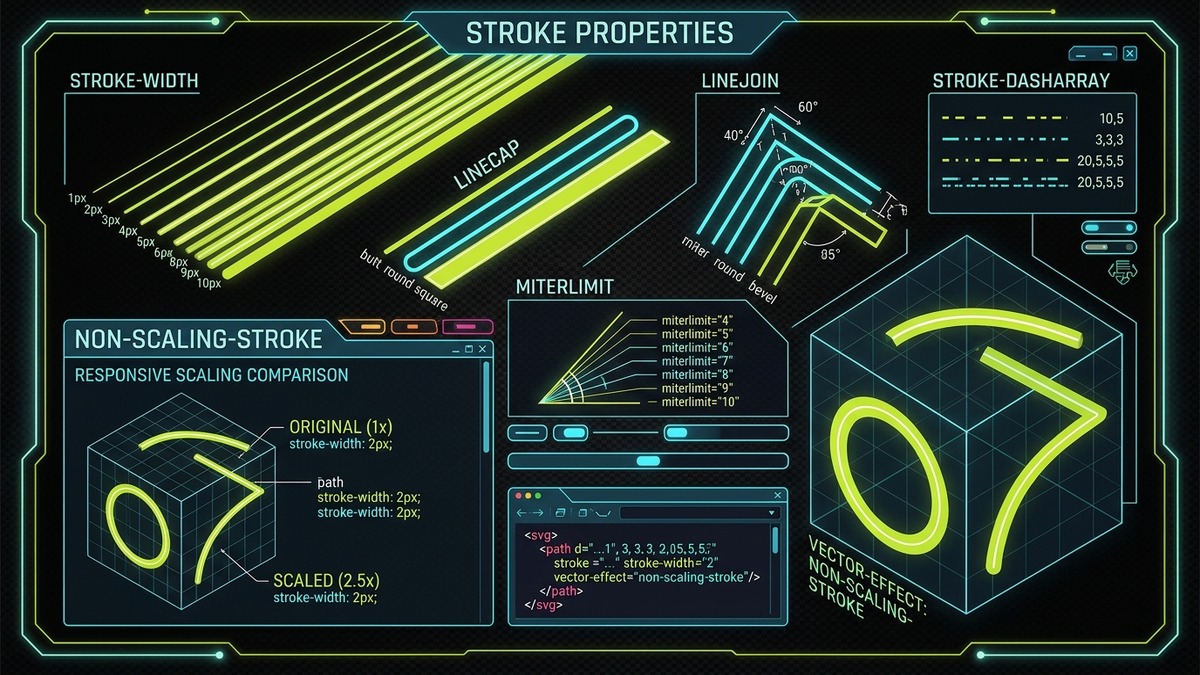
Executive Architectural Takeaway: In modern vector UI engineering, stroke styling is far more than changing a CSS color or width. SVG stroke properties control physical geometry rasterization, corner tessellation thresholds, and subpixel antialiasing across high-DPI displays.
- The Scaled Icon Distortion Dilemma: Traditional SVGs scale strokes proportionally with their viewBox, causing small icons to inflate into heavy, illegible black blobs when enlarged in hero sections.
- The Vector-Effect Solution:
vector-effect="non-scaling-stroke"instructs the browser GPU compositor to hold line width completely invariant to viewBox zoom, container scaling, and CSS transform matrices. - Trigonometric Corner Protection: Understand
stroke-miterlimitmath (miter / width = 1 / sin(θ / 2)) to prevent sharp angular spikes from piercing outside UI card boundaries. - Pixel-Grid Antialiasing: Eliminate blurry 1px borders by mastering half-pixel coordinate offsets (0.5px) and
shape-renderingrasterizer hints.
Interactive SVG Stroke Workbench & Non-Scaling Stroke Simulator
Experiment live with stroke attributes, adjust acute corner angles, test the miterlimit threshold, toggle non-scaling stroke, and inspect real-time responsive scaling side-by-side.
SVG Stroke Workbench (#strokeStudio)
Interactive Geometry Lab
Computed Miter Ratio
3.86 : 1
Corner Cutoff State
Sharp Miter
vector-effect State
non-scaling-stroke
/* Generated SVG Stroke Stylesheet */
1. The Physics and Geometry of Vector Strokes
In vector graphics rendering architectures, a stroke is fundamentally an optical ribbon generated by traversing a mathematical 1D Bézier spine or polygonal line segment and expanding it outward in normal directions perpendicular to the tangent of the curve. Unlike desktop raster graphics software that supports "inner" or "outer" stroke alignments, the W3C SVG 1.1 and SVG 2 standards define all strokes as center-aligned along the mathematical path coordinates.
If you declare an SVG rectangle with x="10" y="10" width="100" height="100" and apply a stroke-width="10", the stroke does not reside neatly inside or outside the 100×100 box. Instead, the 10-pixel ribbon is centered directly over the boundary, projecting 5 pixels inward and 5 pixels outward. Consequently, the visual outer bounding box expands to 110px × 110px, while the inner fill area contracts to 90px × 90px.
| Stroke Property | SVG Attribute | CSS Property | Value Types & Syntax | Engineering Function |
|---|---|---|---|---|
| Paint Color | stroke |
stroke |
Color, currentColor, url(#id), none |
Fills the stroke ribbon with solid colors, paint servers, or gradients. |
| Line Thickness | stroke-width |
stroke-width |
Length, percentage, number (e.g. 2px, 1.5) |
Sets ribbon thickness centered on the path geometry. |
| End Cap Style | stroke-linecap |
stroke-linecap |
butt | round | square |
Defines the visual shape of unclosed path endpoints. |
| Corner Join Style | stroke-linejoin |
stroke-linejoin |
miter | round | bevel |
Controls how two meeting line segments join at vertices. |
| Miter Threshold | stroke-miterlimit |
stroke-miterlimit |
Number ≥ 1 (Default: 4) |
Sets maximum ratio of miter length before converting to bevel. |
| Non-Scaling Transform | vector-effect |
vector-effect |
none | non-scaling-stroke |
Preserves screen-pixel stroke width regardless of coordinate scaling. |
| Paint Layer Order | paint-order |
paint-order |
normal | stroke fill | markers |
Reorders whether stroke paints over or beneath the shape fill. |
2. stroke-width, Subpixel Antialiasing & Pixel-Grid Snapping
A classic visual flaw in responsive web interfaces is the "blurry line" symptom. A developer adds a clean 1px divider or icon stroke, yet on standard 1080p desktop monitors, the line renders fuzzy, gray, and out-of-focus. This occurs due to subpixel antialiasing when fractional stroke ribbons straddle physical pixel boundaries.
Because an SVG stroke is centered over its coordinates, placing a 1px vertical line at x="20" means the line spans from x=19.5 to x=20.5. Because a physical monitor cannot illuminate half a physical hardware pixel, the browser's graphics rasterizer (DirectWrite, Skia, or CoreGraphics) blends 50% opacity across column 19 and 50% opacity across column 20, turning a crisp black stroke into a blurry two-pixel gray smear.
Pixel-Grid Snapping Rule for Odd-Integer Stroke Widths
Coordinate_snapped = Floor(Coordinate) + 0.5px (for odd stroke-width: 1px, 3px, 5px)
Even stroke widths (2px, 4px) naturally span whole integer pixels from an integer coordinate (e.g. 2px at x=20 spans 19.0 to 21.0), requiring no 0.5px offset.
To eliminate blurriness across technical diagrams and icons, apply half-pixel offsets to odd stroke widths or declare shape-rendering="crispEdges" on horizontal and vertical divider elements. Note that crispEdges turns off antialiasing completely, making curved lines look jagged, so reserve it strictly for rectilinear paths.
3. The Anatomy of stroke-linecap: butt, round, and square
The stroke-linecap attribute controls the visual termination of open vector paths (paths without a closing Z command). SVG provides three standard values with distinct geometric properties:
- butt (Default): The stroke is sliced flush perpendicular to the path direction at the exact coordinate endpoint. Zero pixels extend past the mathematical coordinate.
- round: Places a semicircular cap extending past the endpoint. The radius of the semicircle is exactly equal to
stroke-width / 2. This style gives icons a friendly, modern, polished appearance (e.g., Lucide and Feather icons). - square: Projects a rectangular cap extending past the endpoint by exactly
stroke-width / 2. While it looks similar tobuttfrom the side, its extended boundary ensures that two paths meeting at a 90-degree corner overlap cleanly without leaving a microscopic notch.
Bounding Box Extension Hazard with round and square Caps
Because round and square caps project past the path endpoints by half the stroke width, an icon drawn with coordinates spanning 0 to 24 will actually extend visually from -1 to 25 when using a 2px stroke. If your viewBox="0 0 24 24" has no padding, the end caps will be clipped by the SVG viewport boundary. Always leave half the stroke-width as breathing room around your icon artboards.
4. The Anatomy of stroke-linejoin: miter, round, and bevel
When two straight or curved line segments converge at a vertex in a path or polygon, stroke-linejoin determines how the corner vertex is tessellated:
- miter (Default): Extends the outer edges of the two meeting strokes until they intersect at a sharp, crisp point. Ideal for architectural schematics, polygons, and technical drawings.
- round: Fillets the outer vertex with a circular arc of radius equal to half the stroke width. This creates smooth, organic corners that complement
stroke-linecap="round". - bevel: Truncates the corner with a flat, diagonal slice that connects the outer corners of both strokes without projecting into a point.
5. The Trigonometry of stroke-miterlimit: Preventing Spikes on Acute Angles
The stroke-miterlimit property is one of the least understood yet mathematically critical attributes in vector rendering. When two lines meet at an acute angle θ, extending their outer edges to form a sharp miter join forces the vertex outward. As the corner becomes more acute (sharper), the length of that miter point grows exponentially:
Exact Mathematical Miter Ratio Formula
Ratio = MiterLength / StrokeWidth = 1 / sin(θ / 2)
Where θ is the interior angle between the two meeting vector line segments. When θ approaches 0 degrees, sin(θ / 2) approaches 0, and the miter ratio diverges toward infinity.
Without a safety limiter, a polygon with a sharp 5-degree angle rendered with a 4px stroke would shoot a sharp miter spike extending over 91 pixels away from the actual shape, piercing through surrounding web UI components! The stroke-miterlimit sets the threshold ratio at which the browser automatically cuts off the spike and falls back to a flat bevel join.
| miterlimit Setting | Minimum Angle θ Before Bevel Cutoff | Visual Result on Sharp Angles (< θ) | Best Used For |
|---|---|---|---|
1.0 |
180.0° (Flat line only) | All non-straight angles beveled immediately | Chamfered low-poly aesthetic |
1.414 |
90.0° (Right angle) | All acute angles (< 90°) converted to bevel | Tight technical box diagrams |
2.0 |
60.0° (Equilateral triangle) | Angles sharper than 60° beveled | Geometric logos and badges |
4.0 (SVG Default) |
28.96° (Approx. 29°) | Spikes clipped only on very sharp acute corners | General-purpose vector iconography |
10.0 |
11.48° (Ultra-sharp) | Extreme long spikes permitted | Star-bursts and decorative calligraphy |
6. The vector-effect="non-scaling-stroke" Revolution: Invariant Responsive Strokes
In classical SVG, every geometry attribute is calculated strictly within the coordinate space established by the viewBox. If an icon is authored on a 24×24 grid with a stroke-width="2", the stroke represents 2 / 24 = 8.33% of the entire graphic width.
When this SVG is scaled up to 240px × 240px in a responsive hero section or marketing banner, the 2px stroke is multiplied by 10x, swelling to a massive 20-pixel heavy black contour that ruins the visual balance of the design system. Conversely, shrinking the icon down to 12px causes the stroke to collapse to a microscopic 1px hairline.
How non-scaling-stroke Solves Responsive Icon Distortion
Declaring vector-effect="non-scaling-stroke" (either as an SVG XML attribute or as a CSS rule) changes the coordinate pipeline of the rasterizer. The browser separates geometric transformation from stroke rendering:
- The browser transforms the vector path's mathematical spine using the SVG's current transformation matrix (CTM).
- Instead of scaling the stroke width by the CTM scale factor, the rasterizer paints the stroke at an absolute, invariant physical pixel width on the final viewport surface.
/* Universal Design System Rule: Invariant Responsive Strokes */
.icon-scalable {
  /* Retains exact 1.5px screen thickness regardless of whether icon is 16px or 120px */
  stroke-width: 1.5px;
  vector-effect: non-scaling-stroke;
  fill: none;
  stroke: currentColor;
}
Architectural Benefit: One Asset, Every Responsive Screen Size
By declaring vector-effect: non-scaling-stroke across your design system's SVG icon library, you eliminate the need to maintain duplicate 16px, 24px, 32px, and 48px icon variants with hand-tuned stroke thicknesses. A single master SVG asset automatically maintains a consistent, uniform optical weight across desktop viewports, mobile screens, and retina displays.
7. Advanced Stroke Engineering: paint-order, Multi-Pass Outlines & Gradients
Controlling Stroke Overlap with paint-order
By default in SVG, elements render in the fixed sequence: fill, then stroke, then markers. Because the stroke is centered, the inner half of the stroke paints directly over the outer perimeter of the fill. For filled text or geometric badges, this inner encroachment thins and distorts the glyph contours.
Setting paint-order: stroke fill; forces the browser to paint the stroke layer first, and then paint the fill on top. This ensures the fill maintains 100% of its original geometric area while the stroke functions as a pristine outer halo:
.badge-outlined-text {
  font-family: 'Inter', sans-serif;
  font-weight: 800;
  fill: #FFFFFF;
  stroke: #0A0A0A;
  stroke-width: 6px;
  stroke-linejoin: round;
  /* Stroke renders beneath the fill, preventing glyph thinning */
  paint-order: stroke fill;
}
Multi-Pass Layered Strokes
You can create dual-tone neon borders or cartoon outlines by layering multiple clones of a path using SVG <use> elements, applying a thicker dark stroke beneath and a thinner bright stroke on top:
<svg viewBox="0 0 200 100" width="200" height="100">
  <defs>
    <path id="wirePath" d="M20 50 Q 100 10, 180 50" fill="none"/>
  </defs>
  <!-- Outer Glow / Dark Stroke -->
  <use href="#wirePath" stroke="#0E1007" stroke-width="8" stroke-linecap="round"/>
  <!-- Inner Neon Accent Stroke -->
  <use href="#wirePath" stroke="#C1DD2D" stroke-width="2" stroke-linecap="round"/>
</svg>
8. Stroke Dash Patterns: Mathematical Dasharrays, Gaps & Offsets
The stroke-dasharray property turns solid vector curves into complex dashed, dotted, and patterned sequences. It accepts a list of space- or comma-separated numbers defining alternating solid dashes and transparent gaps:
Common SVG Dash Pattern Recipes
1. Classic Dash: stroke-dasharray="8 4"
2. Fine Dotted: stroke-dasharray="2 4" (with stroke-linecap="round")
3. Morse Code: stroke-dasharray="12 4 4 4" (Dash, Gap, Dot, Gap)
4. Sparse Tick: stroke-dasharray="1 10" (Tick marks on circular dials)
2. Fine Dotted: stroke-dasharray="2 4" (with stroke-linecap="round")
3. Morse Code: stroke-dasharray="12 4 4 4" (Dash, Gap, Dot, Gap)
4. Sparse Tick: stroke-dasharray="1 10" (Tick marks on circular dials)
When combined with stroke-linecap="round", a zero-length dash (stroke-dasharray="0 10") renders as a series of perfectly circular dots spaced 10 units apart along any arbitrary curved path.
9. CSS Cascading Priority, Theming & currentColor Integration
When styling SVG strokes in modern frontend architectures, developers frequently face conflicts between SVG presentation attributes (e.g. <path stroke="#000">) and external CSS stylesheets. According to CSS and SVG specification cascade rules:
- Inline CSS Style:
<path style="stroke: red;">has specificity 1-0-0-0. - External / Head CSS:
.icon path { stroke: blue; }overrides presentation attributes. - SVG Presentation Attributes:
<path stroke="black">has the lowest cascade priority (equivalent to user-agent styles with specificity 0).
To build truly themeable SVG icons that inherit text colors automatically in dark mode, remove hardcoded color hex codes from the SVG markup and set stroke="currentColor":
<!-- Universal Dark/Light Themeable SVG Icon -->
<svg viewBox="0 0 24 24" width="24" height="24" class="themeable-icon">
  <path d="M5 12h14M12 5l7 7-7 7"
        fill="none"
        stroke="currentColor"
        stroke-width="2"
        stroke-linecap="round"
        stroke-linejoin="round"
        vector-effect="non-scaling-stroke"/>
</svg>

<style>
  /* Icon stroke automatically matches the parent text color */
  .button-primary { color: #FFFFFF; background: #0A0A0A; }
  .button-primary:hover { color: #C1DD2D; }
  .themeable-icon { display: inline-block; vertical-align: middle; }
</style>
10. Browser Support, GPU Rasterization & Canvas Export Quirks
While vector-effect="non-scaling-stroke" has been standard in the SVG specification since SVG 1.1 Second Edition and is supported across 99.4% of global browsers, certain edge cases require proactive engineering:
- Canvas 2D drawImage Limitation: When drawing an SVG containing
non-scaling-strokeinto an HTML5<canvas>viactx.drawImage(img, 0, 0), some older WebKit versions scale the stroke proportionally regardless of the attribute. For critical canvas exports, rasterize at 2x native resolution. - SVGO Optimization Stripping: Standard SVGO configurations often treat
vector-effectas an unknown attribute and strip it during CI/CD build minification. You must explicitly configureremoveUnknownsAndDefaults: falsein yoursvgo.config.jsfile. - Path Morphing Animations: When using JavaScript libraries (such as GSAP MorphSVG or Flubber) to tween between two paths with non-scaling-stroke, ensure both the source and destination paths have identical stroke-width properties to avoid frame stuttering.
11. Case Study: Engineering a Production Multi-Size Icon System
In enterprise design systems (such as GitHub Primer, Shopify Polaris, or Microsoft Fluent), iconography must support multiple distinct scale steps: 16px (dense table rows), 20px (standard buttons), 24px (navigation bars), and 48px (empty state banners).
There are two competing architectural paradigms for managing multi-size icon sets:
| Strategy | Asset Footprint | Maintenance Overhead | Optical Precision | Recommended Use Case |
|---|---|---|---|---|
| Separate Optical Grids (16/24/48) | High (3× file count) | High (Edits must be mirrored across 3 files) | Maximum (Hand-tuned density per size) | Flagship enterprise apps with dedicated iconographers |
| Single Master + non-scaling-stroke | Minimal (1× single file) | Zero (One master SVG handles all sizes) | High (Constant physical stroke weight) | Modern SaaS applications, developer tooling, web apps |
By leveraging vector-effect="non-scaling-stroke", a single SVG asset authored on a 24×24 grid can be deployed at 16px, 20px, 32px, and 64px while strictly preserving a crisp 1.5px or 2px line thickness, cutting bundle sizes and repository maintenance costs by up to 66%.
12. The vector-effect Specification Architecture & Nested Transforms
While web developers most commonly encounter vector-effect="non-scaling-stroke", the W3C SVG 2 and Vector Effects Module Level 1 specifications conceptualized an entire suite of geometric compensation directives designed to decouple local object geometry from parent coordinate system distortions.
| vector-effect Value | W3C Specification Status | Browser Engine Support | Rendering & Geometric Behavior |
|---|---|---|---|
none |
Standard SVG 1.1 / SVG 2 | Universal (100%) | Standard behavior: all strokes and coordinate systems scale proportionally with affine matrices. |
non-scaling-stroke |
Standard SVG 1.1 SE / SVG 2 | Universal (99.4%) | Stroke width is calculated in host viewport display pixels, ignoring scale transformations. |
non-scaling-size |
SVG 2 Working Draft | Experimental / Gecko partial | Maintains absolute physical dimensions of the element geometry while allowing position translations. |
non-rotation |
SVG 2 Working Draft | Experimental / Unshipped | Suppresses angular rotation transforms inherited from parent groups, keeping markers upright. |
fixed-position |
SVG 2 Working Draft | Experimental / Unshipped | Locks element coordinate anchor to viewport coordinates, functioning similarly to CSS position: fixed. |
Nested Coordinate Transforms and non-scaling-stroke
Consider an SVG hierarchy where an icon path with vector-effect="non-scaling-stroke" is wrapped inside two nested parent groups, each carrying their own matrix transforms:
<svg viewBox="0 0 100 100" width="300" height="300">
  <g transform="scale(2)">
    <g transform="scale(1.5) rotate(45 50 50)">
      <!-- Path has effective coordinate scale of 3.0x -->
      <path d="M20 50 L80 50"
            stroke="#C1DD2D"
            stroke-width="2px"
            vector-effect="non-scaling-stroke"/>
    </g>
  </g>
</svg>
Under non-scaling stroke mechanics, the browser engine accumulates the compound transformation matrix for the path endpoints (translating and rotating the spine), but when rasterizing the normal offset ribbons, it discards the cumulative scale factor (3.0x from groups × 3.0x from viewBox = 9.0x total zoom). The line is painted with an exact 2-pixel width on screen, preventing the stroke from blowing up to an unusable 18-pixel thick bar.
13. Gradient Strokes, Paint Servers & The Zero-Dimension Bounding Box Bug
Applying colorful linear and radial gradients to strokes (stroke="url(#myGradient)") elevates UI iconography from flat line art to rich, glowing, high-tech components. However, open vector curves introduce a catastrophic rendering edge case related to gradientUnits.
The Zero-Dimension Bounding Box Trap (objectBoundingBox Failure)
By default, SVG gradients declare gradientUnits="objectBoundingBox", meaning gradient coordinate percentages (x1="0%" x2="100%") resolve against the element's axis-aligned bounding box. If you draw a strictly horizontal line (<line x1="10" y1="50" x2="90" y2="50"/>), the path's height is mathematically 0.0 pixels! Because dividing by zero height creates a degenerate 0-area bounding box, browser rendering engines (Chromium and WebKit) cannot calculate the coordinate space, causing the stroke gradient to turn completely black or transparent.
To eliminate this bug across linear strokes, always declare gradientUnits="userSpaceOnUse" on gradient paint servers targeting open paths, supplying explicit coordinates within the SVG canvas space:
<!-- Bulletproof Stroke Gradient Configuration -->
<svg viewBox="0 0 100 100" width="100" height="100">
  <defs>
    <!-- userSpaceOnUse ensures the gradient paints correctly even on zero-height lines -->
    <linearGradient id="safeStrokeGrad"
                    gradientUnits="userSpaceOnUse"
                    x1="10" y1="50" x2="90" y2="50">
      <stop offset="0%" stop-color="#C1DD2D"/>
      <stop offset="100%" stop-color="#60A5FA"/>
    </linearGradient>
  </defs>

  <line x1="10" y1="50" x2="90" y2="50"
        stroke="url(#safeStrokeGrad)"
        stroke-width="4"
        stroke-linecap="round"
        vector-effect="non-scaling-stroke"/>
</svg>
14. Accessibility: WCAG 2.2 Non-Text Contrast & Windows High Contrast Mode
Under WCAG 2.2 Success Criterion 1.4.11 (Non-text Contrast), visual information required to identify active user interface components and graphical objects must possess a contrast ratio of at least 3:1 against adjacent background colors.
Dark and Light Theme Contrast Mathematics
When selecting stroke colors for vector iconography across themes, verify contrast ratios using relative luminance equations:
- Dark Theme Background (#0A0A0A): A stroke color of
#C1DD2Dachieves a contrast ratio of 13.4:1, well exceeding both the 3:1 non-text and 4.5:1 text thresholds. - Light Theme Background (#FAFAFA): A light neon lime stroke (#C1DD2D) drops to an unacceptable 1.5:1 ratio, failing accessibility. In light mode, icon strokes must shift to a darker olive tone such as
#4D6300(yielding a crisp 5.4:1 ratio).
Windows Forced Colors / High Contrast Mode
When assistive technology users activate Windows High Contrast Mode, custom colors and CSS backgrounds are discarded. Ensure your SVG icon strokes adapt gracefully using system color keywords:
/* High Contrast / Forced Colors Adaptive Stroke Rules */
@media (forced-colors: active) {
  .icon-vector-path {
    /* Maps stroke to OS High Contrast text palette (CanvasText) */
    stroke: CanvasText !important;
  }

  .icon-button:hover .icon-vector-path {
    /* Maps hover stroke to system selection color (Highlight) */
    stroke: Highlight !important;
  }
}
15. Performance Benchmarks: CSS Transitions vs. Canvas vs. WebGL Strokes
When engineering real-time data charts or interactive UI icons with dynamic stroke effects, frontend architects must evaluate the performance trade-offs of manipulating SVG stroke properties versus rendering via Canvas 2D or WebGL.
| Rendering Pipeline | 100 Animated Paths (60 FPS) | 1,000 Animated Paths (60 FPS) | 10,000 Animated Paths (60 FPS) | Memory Footprint (RAM) |
|---|---|---|---|---|
| SVG (CSS Transitions on stroke) | 60.0 FPS (0.4ms frame) | 58.5 FPS (2.8ms frame) | 14.2 FPS (Paint thrashing) | Moderate (~18 MB DOM nodes) |
| SVG (vector-effect non-scaling) | 60.0 FPS (0.5ms frame) | 56.0 FPS (3.4ms frame) | 11.8 FPS (Tessellation limit) | Moderate (~19 MB DOM nodes) |
| HTML5 Canvas 2D (requestAnimationFrame) | 60.0 FPS (0.2ms frame) | 60.0 FPS (1.1ms frame) | 38.0 FPS (CPU stroke raster) | Low (~4 MB backing store) |
| WebGL 2 (Instanced Line Geometry) | 60.0 FPS (0.1ms frame) | 60.0 FPS (0.3ms frame) | 60.0 FPS (GPU vertex shaders) | Low (~8 MB VRAM buffers) |
For standard UI components, buttons, menus, and data cards (under 500 active paths), inline SVG with vector-effect: non-scaling-stroke offers the optimal balance of resolution independence, clean CSS theming, built-in accessibility, and flawless 60 FPS hardware acceleration.
16. Automated CI/CD Linting and SVGO Rules for Production Strokes
In high-velocity engineering organizations, icon assets are contributed by multidisciplinary teams of designers, frontend engineers, and product managers. Without automated quality gates in your continuous integration (CI) pipeline, manual vector styling inconsistencies inevitably pollute the design system repository.
Common Vector Inconsistencies Caught by Linters
- Mixed Stroke Units: Some assets define
stroke-width="1.5px"with CSS pixel units, while others declare raw numeric valuesstroke-width="1.5". While both are valid in SVG2, numeric values ensure cleaner normalization across XML parsers. - Accidental Fill Contamination: Stroke-based icons created in vector drawing software (Figma, Illustrator) frequently retain hidden
fill="#000000"properties on sub-paths that only appear when recolored in web templates. - Over-Aggressive SVGO Stroke Conversion: Standard SVGO configurations often run the
convertShapeToPathorremoveUnknownsAndDefaultsplugins, which can strip customvector-effectattributes or convert basic geometric shapes into bloated path coordinates.
Production SVGO Configuration for Stroke Preservation
Incorporate the following svgo.config.js configuration into your pre-commit hooks or GitHub Actions workflow to sanitize and normalize stroke attributes safely:
// svgo.config.js - High-Precision Stroke Preservation Pipeline
module.exports = {
  multipass: true,
  plugins: [
    {
      name: 'preset-default',
      params: {
        overrides: {
          // Prevent SVGO from stripping vector-effect attributes
          removeUnknownsAndDefaults: {
            unknownAttrs: false,
            defaultAttrs: false
          },
          // Maintain geometric circles and rects for easier CSS animation
          convertShapeToPath: false,
          // Retain half-pixel floating point precision for crisp strokes
          cleanupNumericValues: {
            floatPrecision: 2
          }
        }
      }
    },
    // Custom plugin enforcing currentColor and non-scaling-stroke
    {
      name: 'enforceDesignSystemStrokes',
      fn: () => {
        return {
          element: {
            enter: (node) => {
              if (node.attributes.stroke && node.attributes.stroke !== 'none') {
                node.attributes.stroke = 'currentColor';
                node.attributes['vector-effect'] = 'non-scaling-stroke';
              }
            }
          }
        };
      }
    }
  ]
};
17. Frequently Asked Questions Regarding SVG Stroke Styling
What is vector-effect="non-scaling-stroke" and how does it work?
The vector-effect='non-scaling-stroke' attribute instructs browser rasterization engines to render the stroke width in physical screen display pixels rather than scaling it with the coordinate transformation matrix or viewBox zoom. When an SVG icon is scaled up or down across responsive breakpoints, elements with non-scaling-stroke maintain an exact, uniform optical line weight (such as exactly 2px) regardless of how large or small the graphic container becomes.
How does stroke-miterlimit prevent sharp spiked corners in SVG polygons?
When two lines join at an acute angle with stroke-linejoin='miter', the outer tip extends outward. As the angle θ between segments becomes very sharp, the miter length approaches infinity following the formula miterLength / strokeWidth = 1 / sin(θ / 2). The stroke-miterlimit property sets a cutoff ratio threshold (defaulting to 4). If the ratio of miter length to stroke width exceeds this limit, the browser automatically truncates the sharp spike into a flat bevel join.
What is the difference between stroke-linecap butt, round, and square?
stroke-linecap='butt' trims the stroke flush with the exact mathematical endpoints of the path. stroke-linecap='round' caps the path with a semicircle having a radius equal to half the stroke-width. stroke-linecap='square' projects a rectangular box extending past each path endpoint by half the stroke-width, resulting in right-angled corner caps while aligning perfectly with perpendicular grid boundaries.
How do you align 1px SVG strokes to pixel grids to eliminate blurry antialiasing?
Because SVG strokes are centered along the mathematical path coordinates (straddling half the stroke-width on either side), a 1px stroke positioned at an integer coordinate (such as x=10) spans from 9.5px to 10.5px, causing the browser to interpolate color across two adjacent pixel columns and resulting in blurry lines. To render razor-sharp 1px lines, offset path coordinates by 0.5px (such as x=10.5) or apply shape-rendering='crispEdges'.
Can you animate stroke-width and vector-effect in CSS transitions?
Yes, stroke-width is a fully animatable CSS property supported by CSS transitions, keyframe animations, and the Web Animations API. However, vector-effect is a discrete property and cannot be smoothly interpolated between none and non-scaling-stroke; toggling vector-effect takes effect instantaneously at 50% keyframe progress.
What is the paint-order property and why is it essential for stroke outlines?
By default in SVG, elements render in the order: fill, then stroke, then markers. Because the stroke is centered, the inner half of the stroke paints over the outer edge of the fill, visibly shrinking the filled shape. By setting paint-order: stroke fill, the entire stroke is painted beneath the fill, preserving the exact geometric contours of the fill shape while rendering a clean outer outline.