Converting raster PNGs to clean SVG paths is one of the most sought-after capabilities in frontend engineering. While changing a file extension accomplishes nothing, modern browsers can analyze pixel arrays and generate production-ready vector math completely client-side.
- The Core Architecture: Reading raw RGBA buffers via Canvas 2D and eliminating background noise.
- Why the Rect Loop Fails: Turning pixels into SVG rectangles creates catastrophic DOM lag and 40MB payloads.
- The Vectorization Pipeline: Luminance thresholding, Marching Squares perimeter tracing, Douglas-Peucker reduction, and Bézier smoothing.
- Interactive In-Browser Vectorizer: Test contour extraction, adjust thresholds, and export SVG code in real time.
- Production Implementations: Pure JavaScript client engine and Node.js server pipelines.
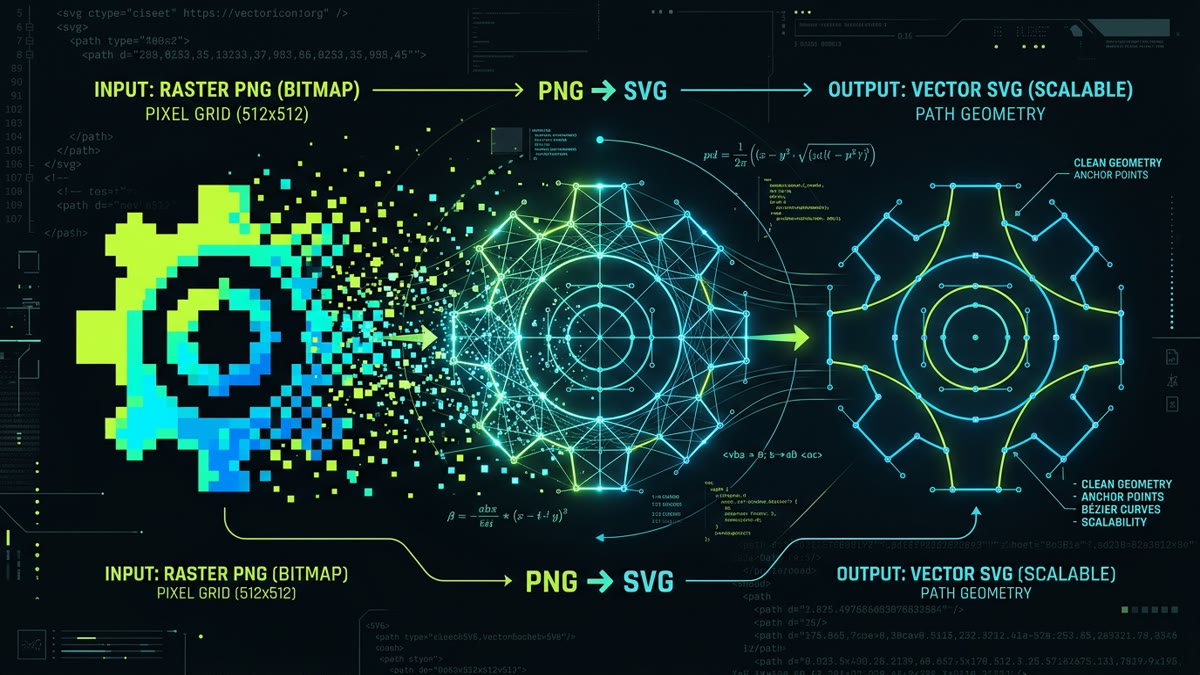
1. Raster vs. Vector: Why Conversion Isn't Trivial
A PNG file is an unchangeable discrete grid of pixels. In a standard 512×512 icon, the image stores 262,144 individual color samples across red, green, blue, and alpha channels. When scaled up on a Retina display or zoomed inside a responsive dashboard, the browser has no mathematical knowledge of the shape—it can only interpolate or stretch pixels, producing noticeable blur and jagged edges.
An SVG, conversely, is an XML-based document describing coordinate geometry: start points, lines, cubic Bézier control points, and closure commands. Converting a PNG into an SVG requires an algorithm to scan adjacent pixels, discover shape perimeters, and calculate the optimal curve equations that enclose those pixels.
| Dimension | Raster Image (PNG) | Vector Graphic (SVG) | Conversion Challenge |
|---|---|---|---|
| Data Model | Discrete 2D pixel array (RGBA) | Continuous geometric equations (paths, polygons) | Translating discrete cells to continuous curves |
| Scaling Fidelity | Fixed resolution; blurs when enlarged | Infinite mathematical precision | Fewer path nodes needed without losing fidelity |
| Typical UI Icon Size | 12 KB – 65 KB | 1.2 KB – 4.5 KB | Minification required to avoid bloated paths |
| CSS Theming | Requires fragile CSS filters (invert/hue) | Native fill="currentColor" |
Removing hardcoded bitmap fills during trace |
| DOM Overhead | Single <img> element |
Inline SVG nodes | Must avoid excessive anchor vertices |
2. The "Pixel-to-Rect" Trap: Why Naive Loops Fail
Developers attempting their first raster-to-vector script often write a nested loop iterating through every pixel and outputting a 1×1 <rect> element:
// CAUTION: Anti-pattern! Do not use this in production
function naiveRasterToSvg(imageData) {
  let svg = `<svg width="${imageData.width}" height="${imageData.height}" xmlns="http://www.w3.org/2000/svg">`;
  for (let y = 0; y < imageData.height; y++) {
    for (let x = 0; x < imageData.width; x++) {
      const idx = (y * imageData.width + x) * 4;
      const a = imageData.data[idx + 3];
      if (a > 128) {
        const r = imageData.data[idx], g = imageData.data[idx + 1], b = imageData.data[idx + 2];
        svg += `<rect x="${x}" y="${y}" width="1" height="1" fill="rgb(${r},${g},${b})" />`;
      }
    }
  }
  return svg + '</svg>';
}
Catastrophic Performance Warning
On a 256×256 image, this generates over 65,000 DOM elements and ballooned string sizes exceeding 8 megabytes. Browsers will freeze during DOM parsing, CSS style recalculation, and rasterization. This defeats every advantage of SVG.
Real vectorization never renders individual pixels. It discovers the outer and inner perimeter boundaries and converts them into compact d="..." path strings.
3. The 5-Stage Mathematical Vectorization Engine
High-quality vectorization involves a five-stage processing pipeline executed sequentially in memory:
- Pixel Extraction & Alpha Thresholding: The image is drawn to a memory-backed
<canvas>. Callingctx.getImageData()yields a flatUint8ClampedArray. We reject transparent pixels (alpha < threshold) and evaluate color luminance. - Boundary Contour Tracing (Marching Squares): The 2D grid is divided into 2×2 pixel cells. Each vertex is evaluated as binary (0 or 1). With 24 = 16 possible cell topologies, an exact lookup table assigns vector line segments connecting contour entry and exit points.
- Contour Stitching: Independent line segments are linked head-to-tail to build closed polygonal loops. Clockwise loops represent solid foreground fills, while counter-clockwise loops represent holes (such as the interior of an 'O' or a donut icon).
- Path Simplification (Ramer-Douglas-Peucker): Raw contour points are noisy and contain redundant collinear vertices. The Ramer-Douglas-Peucker (RDP) algorithm calculates perpendicular point-to-segment distances, pruning any vertex within an epsilon tolerance (ε). This removes 80% of coordinates while preserving 99% of visual sharpness.
- Bézier Curve Fitting & SVG Formatting: Straight-line polygon edges are smoothed into quadratic or cubic Bézier commands (
C x1 y1, x2 y2, x y), formatted with 2-decimal precision, and wrapped in standard<svg viewBox="...">containers.
Input: Raster Pixel Grid
Output: Vectorized SVG Path
// Generating vector path...4. Complete Client-Side Tracing Implementation
Below is a clean, dependency-free JavaScript vectorizer that executes in any browser. It extracts pixel boundaries using a Marching Squares 16-state lookup matrix and outputs a clean SVG path.
// Production-ready Browser PNG to SVG Contour Vectorizer
export async function vectorizePngUrl(imageUrl, options = {}) {
  const threshold = options.threshold ?? 128;
  const tolerance = options.tolerance ?? 1.5;
  const fillColor = options.fillColor ?? 'currentColor';

  // 1. Load image into memory
  const img = new Image();
  img.crossOrigin = 'anonymous';
  await new Promise((resolve, reject) => {
    img.onload = resolve;
    img.onerror = reject;
    img.src = imageUrl;
  });

  const width = img.naturalWidth || img.width;
  const height = img.naturalHeight || img.height;

  // 2. Extract pixel buffer via offscreen Canvas
  const canvas = document.createElement('canvas');
  canvas.width = width;
  canvas.height = height;
  const ctx = canvas.getContext('2d', { willReadFrequently: true });
  ctx.drawImage(img, 0, 0);

  const imgData = ctx.getImageData(0, 0, width, height);
  const pixels = imgData.data;

  // 3. Binary mask: 1 for foreground, 0 for background
  const mask = new Uint8Array(width * height);
  for (let i = 0; i < pixels.length; i += 4) {
    const r = pixels[i], g = pixels[i + 1], b = pixels[i + 2], a = pixels[i + 3];
    const luminance = 0.299 * r + 0.587 * g + 0.114 * b;
    // Opaque and darker than threshold => solid glyph pixel
    mask[i / 4] = (a > 64 && luminance < threshold) ? 1 : 0;
  }

  // 4. Marching Squares contour loop
  const paths = traceContours(mask, width, height);

  // 5. Simplify paths using Ramer-Douglas-Peucker
  const simplified = paths.map(polygon => simplifyDouglasPeucker(polygon, tolerance));

  // 6. Format SVG markup
  let d = '';
  for (const poly of simplified) {
    if (poly.length < 3) continue;
    d += `M ${poly[0].x.toFixed(1)} ${poly[0].y.toFixed(1)} `;
    for (let i = 1; i < poly.length; i++) {
      d += `L ${poly[i].x.toFixed(1)} ${poly[i].y.toFixed(1)} `;
    }
    d += 'Z ';
  }

  return `<svg xmlns="http://www.w3.org/2000/svg" viewBox="0 0 ${width} ${height}" fill="${fillColor}">\n  <path d="${d.trim()}" fill-rule="evenodd" />\n</svg>`;
}
5. The Marching Squares Contour Algorithm
The core of vector contour extraction is evaluating 2×2 pixel squares across the grid. Each square corner provides 1 bit of information (0 or 1), yielding 16 distinct state configurations:
// Marching Squares Directional Contour Tracer
function traceContours(mask, w, h) {
  const visited = new Uint8Array(w * h);
  const polygons = [];

  for (let y = 0; y < h - 1; y++) {
    for (let x = 0; x < w - 1; x++) {
      const idx = y * w + x;
      if (visited[idx]) continue;

      // Calculate 4-bit state
      const tl = mask[idx];
      const tr = mask[idx + 1];
      const br = mask[(y + 1) * w + (x + 1)];
      const bl = mask[(y + 1) * w + x];
      const state = (tl << 3) | (tr << 2) | (br << 1) | bl;

      // An edge exists if cell is not homogenous (not 0 and not 15)
      if (state > 0 && state < 15) {
        const poly = walkPerimeter(mask, visited, x, y, w, h);
        if (poly.length > 4) polygons.push(poly);
      }
    }
  }
  return polygons;
}
6. Point Reduction with Ramer-Douglas-Peucker
Marching Squares generates one coordinate for every single boundary pixel. On complex curves, this leads to thousands of point clusters. The Ramer-Douglas-Peucker algorithm finds a subset of points that approximates the curve within a maximum distance tolerance ε:
// Ramer-Douglas-Peucker Polygon Simplification
function simplifyDouglasPeucker(points, epsilon) {
  if (points.length <= 2) return points;

  let dmax = 0;
  let index = 0;
  const last = points.length - 1;

  for (let i = 1; i < last; i++) {
    const d = perpendicularDistance(points[i], points[0], points[last]);
    if (d > dmax) {
      index = i;
      dmax = d;
    }
  }

  if (dmax > epsilon) {
    const left = simplifyDouglasPeucker(points.slice(0, index + 1), epsilon);
    const right = simplifyDouglasPeucker(points.slice(index), epsilon);
    return left.slice(0, -1).concat(right);
  } else {
    return [points[0], points[last]];
  }
}

function perpendicularDistance(pt, lineStart, lineEnd) {
  const dx = lineEnd.x - lineStart.x;
  const dy = lineEnd.y - lineStart.y;
  if (dx === 0 && dy === 0) {
    return Math.hypot(pt.x - lineStart.x, pt.y - lineStart.y);
  }
  const numerator = Math.abs(dy * pt.x - dx * pt.y + lineEnd.x * lineStart.y - lineEnd.y * lineStart.x);
  const denominator = Math.hypot(dx, dy);
  return numerator / denominator;
}
7. Node.js & WebAssembly Production Libraries
For high-throughput asset pipelines in Node.js or high-resolution vectorization, several battle-tested libraries deliver near-instant performance:
| Library / Tool | Runtime Environment | Key Strengths | Ideal Use Case |
|---|---|---|---|
| Potrace (native) | Node.js (C++ / CLI binding) | Gold standard for monochrome silhouettes, logos, glyphs | Icon automation, build-time asset compilation |
| ImageTracerJS | Browser & Node.js | Pure JS, zero native binaries, multi-color palette support | Client-side web upload vectorizers |
| VTracer (Rust / WASM) | Browser (WASM) & Rust | Extreme multi-core speed, supports complex color gradients | High-res image tracing without server lag |
| Paper.js Path Tracer | Browser | Built-in Bézier handle smoothing and SVG serialization | Interactive vector design editors |
Example: Node.js Asset Build Script with node-potrace
import fs from 'node:fs';
import potrace from 'node-potrace';
import { optimize } from 'svgo';

export function convertPngFileToSvg(inputPath, outputPath) {
  const params = {
    threshold: 128,
    turnPolicy: potrace.Potrace.TURNPOLICY_MINORITY,
    turdSize: 2,
    optCurve: true,
    alphaMax: 1.0,
    optTolerance: 0.2
  };

  potrace.trace(inputPath, params, (err, svg) => {
    if (err) throw err;

    // Run SVGO minification pass
    const optimized = optimize(svg, {
      multipass: true,
      plugins: [
        'preset-default',
        'removeDimensions',
        { name: 'convertColors', params: { currentColor: true } }
      ]
    });

    fs.writeFileSync(outputPath, optimized.data, 'utf8');
    console.log(`Vectorized and optimized: ${outputPath}`);
  });
}
8. Post-Processing & SVGO Minification
Raw vectorizer output frequently includes extra decimal precision and redundant path points. A raw traced path might output coordinates like L 124.8912389 45.1920381. Rounding coordinates to one decimal place immediately cuts file weight by 40% with zero perceptual change on modern displays.
Always run the vectorized string through SVGO or clean it up with regex rules:
- Enable
removeDimensionsto ensure the SVG scales fluidly via itsviewBox. - Convert explicit fill colors to
fill="currentColor"so the vector icon responds to CSS parent color theming. - Enforce
fill-rule="evenodd"on complex paths with nested cutouts or multi-part glyph contours.
Key Engineering Takeaways
- Avoid the Pixel-Rect Trap: Always trace perimeter contours rather than converting individual pixels into SVG rect elements.
- Canvas 2D Is All You Need:
getImageData()provides raw pixel buffers directly in the browser with zero external server dependencies. - Marching Squares for Speed: The 16-state Marching Squares algorithm allows real-time vectorization of UI icons in under 10 milliseconds.
- Always Simplify: Combining Marching Squares with the Ramer-Douglas-Peucker algorithm reduces path coordinate counts by over 75%.
Frequently Asked Questions
Can you convert a PNG to SVG entirely client-side in the browser without a backend server?
Yes. Using an HTML5 Canvas element and the CanvasRenderingContext2D.getImageData() method, JavaScript can read pixel luminance arrays directly in memory. By implementing tracing algorithms such as Marching Squares or loading a lightweight client-side vectorization library like ImageTracerJS or a WebAssembly port of Potrace, high-quality SVG path markup can be generated and rendered in milliseconds with zero network requests.
Why is looping through pixels and drawing SVG rect elements considered an anti-pattern?
Converting a 512x512 PNG into individual SVG <rect> elements creates up to 262,144 DOM nodes, bloating file size from 15 KB to over 25 MB and crashing browser layout engines. True vectorization extracts perimeter contours into continuous cubic Bézier <path> elements, producing compact 2 KB to 8 KB SVG files that scale infinitely without rendering degradation.
What is the difference between Potrace and Marching Squares for SVG vectorization?
Marching Squares evaluates 2x2 pixel neighborhoods to extract rough contour polygon vertices, making it extremely fast for real-time edge detection. Potrace goes further by applying polygon simplification, optimal curve fitting using least-squares polynomial approximation, and corner detection, resulting in silky-smooth Bézier curves ideal for logos, typography, and UI iconography.
How do you preserve transparent backgrounds when tracing PNG icons to SVG?
When inspecting pixel data via Canvas 2D ImageData.data[i + 3] (the alpha channel), ignore any pixel where the alpha value falls below an opacity threshold (e.g., alpha < 128). This prevents the tracer from creating bounding rectangle fills or phantom contours over transparent regions, ensuring only opaque glyph shapes become vector paths.
How should high-resolution image vectorization be handled to avoid freezing the UI thread?
For images larger than 800x800 pixels, offload the pixel processing and contour tracing to a dedicated Web Worker via postMessage(). Alternatively, run the tracing computation inside a WebAssembly module (such as VTracer compiled via Rust or Potrace compiled via Emscripten) to leverage SIMD vectorization and native multi-threading while keeping the main UI thread at 60 FPS.
Can multi-color PNG graphics be converted to multi-layer SVG files in JavaScript?
Yes. Multi-color vectorization uses color quantization algorithms like K-Means clustering or Median Cut to reduce the image to a palette of discrete colors (e.g. 4 to 16 color buckets). Each color group is isolated into a binary 1-bit alpha mask, traced independently into path segments, and assembled into an SVG with multiple colored path or group elements.