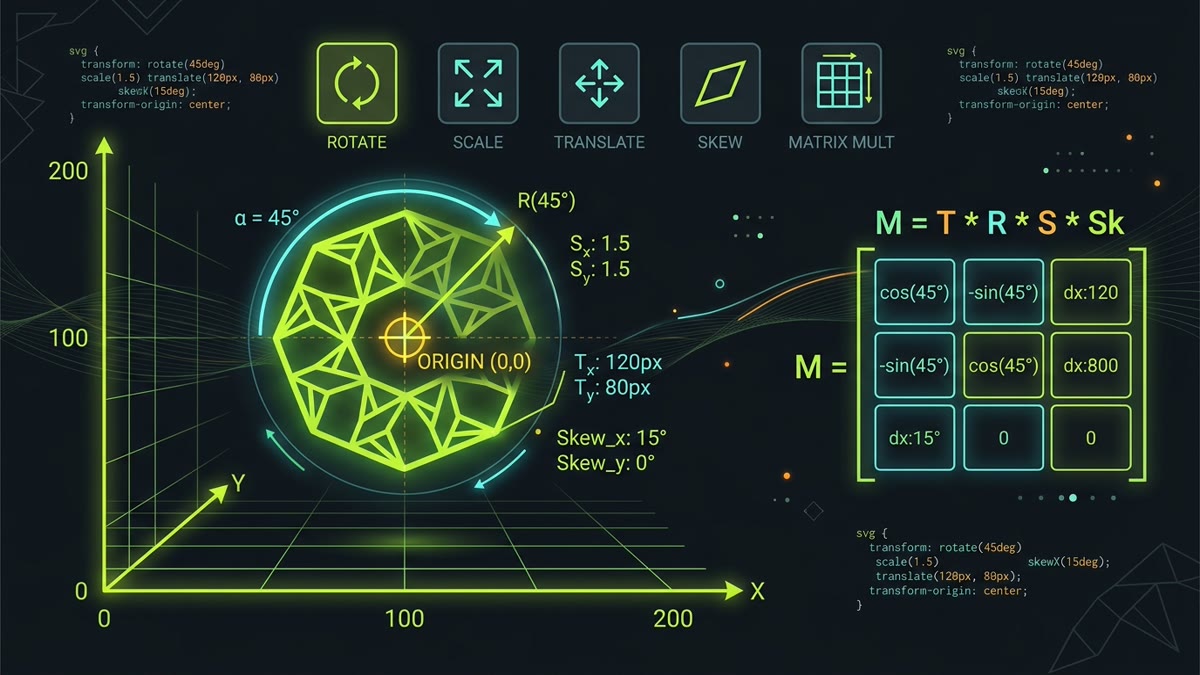
Rotating, scaling, and animating vector graphics often leads to unexpected bugs: elements spinning wildly off-screen, origins tethered to (0, 0), and mismatched coordinates. Mastering SVG transforms requires understanding how SVG coordinate systems interact with CSS standards.
- Attribute vs. CSS Property: Syntax nuances, coordinate systems, and precedence rules.
- The Origin Trap: Why
transform-origin: 50% 50%fails withouttransform-box: fill-box. - The Core Functions: Precise geometry behind
rotate,scale,translate,skew, andmatrix. - Interactive Transformation Studio: Experiment with real-time vector transformations, inspect the affine matrix, and toggle transform-box behaviors.
- Production UI Recipes: Centered rotating spinners, collapsible chevron toggles, and WebKit rendering fixes.
1. SVG Attribute vs. CSS Property: The Critical Differences
In modern web applications, you can transform SVG elements using two separate interfaces: the native XML transform="..." presentation attribute or the modern CSS transform: ... property. While they look superficially similar, they follow completely different coordinate models.
| Feature / Behavior | SVG transform Attribute | CSS transform Property | Best Practice Recommendation |
|---|---|---|---|
| Syntax Units | Unitless numbers: rotate(45), translate(20, 40) |
Strict CSS units: rotate(45deg), translate(20px, 40px) |
Use explicit CSS units for reactive state transitions |
| Center Point Override | Built-in coordinates: rotate(45, cx, cy) |
Requires separate transform-origin property |
CSS transform-origin with transform-box |
| CSS Cascade & Specificity | Lowest precedence (presentation attribute level) | Overrides SVG attribute completely in cascade | Avoid mixing both on the exact same DOM node |
| CSS Animations & Transitions | Requires SMIL <animateTransform> (legacy) |
Hardware-accelerated via CSS @keyframes |
Always use CSS transforms for interactive UI state |
| Origin Calculation Box | Current User Coordinate System (viewBox space) | Defaults to view-box; switchable to fill-box |
Explicitly declare transform-box: fill-box |
2. The Infamous transform-origin Bug (and the Fix)
Every developer who has tried rotating an SVG icon with CSS has faced this bug: you write transform: rotate(45deg); transform-origin: center; expecting the icon to spin smoothly in place. Instead, the icon launches across the screen in a massive orbit.
This occurs because standard HTML elements calculate percentage origins relative to their own border-box. SVG child elements (like <path>, <rect>, or <circle>) do not have a CSS box model. By default in CSS Transforms Module Level 2, their transform-box is set to view-box. This means 50% 50% refers to the center of the entire parent <svg viewBox="0 0 500 500">, rather than the small 24×24 icon sitting in the corner!
transform-box: fill-box;
transform-origin: center; /* or 50% 50% */
transform: rotate(45deg);
}
transform-box: fill-box instructs the browser's layout engine to compute percentages relative to the object bounding box (the tightest axis-aligned rectangle enclosing the vector path).Firefox & WebKit Property Order
Always declare transform-box: fill-box; before or alongside transform-origin. Some legacy WebKit builds fail to update the origin cache if transform-box is altered dynamically after initial layout.
// Computing transform code...3. The 6 Core Transformation Functions
Every 2D transformation in SVG resolves to one of six primitive operations. Understanding their geometric execution ensures you never guess when assembling animations.
1. Translate: translate(tx, [ty])
Moves the element by tx along the horizontal axis and ty along the vertical axis. If ty is omitted in the SVG presentation attribute, it defaults to 0. In CSS, translate: x y is now a standalone property in modern browsers.
/* SVG Presentation Attribute */
<path transform="translate(40, -15)" ... />

/* Modern CSS Property */
.icon-path {
  transform: translate(40px, -15px);
}
2. Rotate: rotate(angle, [cx, cy])
Rotates the element clockwise by angle. The SVG attribute version accepts an optional cx, cy parameter that defines the center of rotation directly in coordinate space. In CSS, rotation requires specifying transform-origin separately.
/* SVG Attribute: Rotate 90deg around coordinate (60, 60) */
<path transform="rotate(90, 60, 60)" ... />

/* CSS Equivalent */
.icon-path {
  transform-box: fill-box;
  transform-origin: 60px 60px;
  transform: rotate(90deg);
}
3. Scale: scale(sx, [sy])
Scales element dimensions by sx horizontally and sy vertically. If sy is omitted, it assumes sy = sx (uniform scaling). Negative values flip the graphic across its axis (e.g. scale(-1, 1) creates an instant horizontal mirror reflection).
4. Skew: skewX(angle) & skewY(angle)
Shears the coordinate system along the X or Y axis by the given angle. Skewing is particularly useful for creating isometric projections, speed streaks, and dynamic slanted badges.
5. The Affine Matrix: matrix(a, b, c, d, e, f)
Every sequence of translates, rotates, scales, and skews is multiplied together into a single 3×3 affine transformation matrix:
[ y' ] = [ b d f ] × [ y ]
[ 1 ] [ 0 0 1 ] [ 1 ]
New coordinates: y' = b × x + d × y + f
Parameters
a and d govern scaling, b and c govern shearing/rotation, and e and f govern pixel offsets.
4. Transform Stacking with <g> Groups
One of the most powerful patterns in SVG engineering is combining multiple transformations without computing complex matrix products. By nesting SVG <g> container tags, child elements inherit parent coordinate systems hierarchically.
Consider an icon where a radar dish rotates continuously while its entire chassis slides across a dashboard:
<svg viewBox="0 0 200 200" width="200" height="200">
  <!-- Parent Group handles linear motion -->
  <g class="vehicle-slide">
    <rect x="20" y="80" width="160" height="40" fill="#333" />

    <!-- Child Group handles local rotation around its own pivot -->
    <g class="radar-dish">
      <path d="M 90,60 L 110,60 L 100,30 Z" fill="#C1DD2D" />
    </g>
  </g>
</svg>

<style>
  .vehicle-slide {
    animation: slideAcross 4s ease-in-out infinite alternate;
  }
  .radar-dish {
    transform-box: fill-box;
    transform-origin: center;
    animation: spinAround 2s linear infinite;
  }

  @keyframes slideAcross {
    from { transform: translateX(0); }
    to { transform: translateX(30px); }
  }
  @keyframes spinAround {
    from { transform: rotate(0deg); }
    to { transform: rotate(360deg); }
  }
</style>
5. Production UI Animation Recipes
Recipe A: Smooth Circular Spinner (Loading State)
The standard UI spinner should rotate smoothly at 60 FPS without layout jitter. Always declare transform-box: fill-box and will-change: transform:
.ui-spinner {
  transform-box: fill-box;
  transform-origin: 50% 50%;
  animation: spinnerRotate 900ms cubic-bezier(0.4, 0, 0.2, 1) infinite;
  will-change: transform;
}

@keyframes spinnerRotate {
  0% { transform: rotate(0deg); }
  100% { transform: rotate(360deg); }
}
Recipe B: Accordion Chevron Flip (0° to 180°)
Rotating an accordion disclosure indicator without triggering layout recalculations:
.accordion-chevron {
  transform-box: fill-box;
  transform-origin: center;
  transition: transform 250ms cubic-bezier(0.16, 1, 0.3, 1);
}

.accordion-trigger[aria-expanded="true"] .accordion-chevron {
  transform: rotate(180deg);
}
Recipe C: Micro-Interaction Hover Bounce
Adding responsive micro-interactions to navigation icons without shifting neighboring text:
.nav-icon {
  transform-box: fill-box;
  transform-origin: bottom center;
  transition: transform 200ms ease;
}

.nav-link:hover .nav-icon {
  transform: scale(1.15) translateY(-2px);
}
6. Cross-Browser Quirks & Safari WebKit Solutions
WebKit historically implements SVG transformations using a separate rendering pipeline from CSS HTML elements. When animating transforms inside nested SVGs in Safari, developers often encounter unexpected clipping or stuttering.
Follow these four defensive rules to guarantee universal cross-browser reliability:
- Always Set
overflow: visible: Default browser stylesheets applyoverflow: hiddento root<svg>elements. If an internal node scales or translates past the boundary, it will be abruptly clipped unlessoverflow: visibleis declared. - Combine Transforms into Single Statements: Avoid separating
rotate,scale, andtranslateinto multiple CSS rules. Declare them in one compound string (e.g.transform: translate(10px, 10px) rotate(45deg) scale(1.2);) to ensure consistent matrix multiplication order across rendering engines. - Enforce Hardware Promotion: Adding
will-change: transform;hints to the browser compositor to promote the vector element to its own GPU rasterization layer, avoiding expensive CPU repaints on every animation frame. - Avoid Mixed Percentage & Pixel Units in Origins: WebKit versions prior to Safari 17 occasionally miscalculated hybrid declarations like
transform-origin: 50% 12px. Stick to either pure percentages (50% 50%) or pure coordinate lengths.
Key Engineering Takeaways
- Fix the Origin First: Always include
transform-box: fill-box;when setting percentage-basedtransform-originon SVG paths. - Order Dictates Geometry:
translate()followed byrotate()produces a different visual path thanrotate()followed bytranslate(). - Group for Hierarchy: Use
<g>tags to stack independent animation channels (e.g. parent translation + child rotation). - GPU Acceleration: Use
will-change: transform;and CSS keyframes rather than manual DOM JavaScript loops for 60 FPS performance.
Frequently Asked Questions
Why do SVG elements rotate around the top-left corner instead of their own center in CSS?
By default, SVG elements have transform-box: view-box. This causes transform-origin percentages (like 50% 50%) to be computed relative to the entire SVG canvas or viewBox origin (0, 0), rather than the individual shape's bounding box. Adding transform-box: fill-box fixes this instantly, anchoring rotation to the element's actual geometric center.
What is the difference between the SVG transform attribute and the CSS transform property?
The SVG transform attribute uses unitless values, accepts coordinate center arguments directly (e.g. rotate(45 50 50)), and operates in SVG coordinate space. The CSS transform property requires explicit angle and length units (deg, rad, px), relies on transform-origin and transform-box for anchor positioning, and overrides attribute transforms in the cascade.
How does the 2D affine matrix(a, b, c, d, e, f) function work in SVG?
The 2D matrix function combines translation, scaling, rotation, and skewing into six values: [a, c, e; b, d, f; 0, 0, 1]. Specifically, 'a' and 'd' control horizontal and vertical scaling, 'b' and 'c' control vertical and horizontal skew/rotation, and 'e' and 'f' define horizontal and vertical translation in pixels.
Why do nested SVG transforms behave differently depending on the order of functions?
Transformation functions are applied via non-commutative matrix multiplication from right to left (or in reverse declaration order). Translating then rotating (translate(50px) rotate(45deg)) moves the element first and spins it around the new coordinate, whereas rotating then translating (rotate(45deg) translate(50px)) shifts the element along the rotated coordinate axis.
How do you resolve Safari and WebKit rendering bugs with animated SVG transforms?
Safari historically suffers from repaint clipping and jitter when transforming SVG child nodes. Fix this by wrapping the transformed element in a group (<g>) tag, specifying will-change: transform on the targeted class, setting overflow: visible on the root <svg>, and declaring both transform-box: fill-box and transform-origin: center.
Can you animate individual paths inside an inline SVG with CSS keyframes?
Yes. When an SVG is inlined into the HTML DOM, each internal path, rect, or group can be targeted with CSS class names and animated with standard @keyframes rules. By pairing transform: rotate(...) with transform-box: fill-box and transform-origin: center, internal icon components like clock hands or gear teeth can rotate independently.