SVG Coordinate Systems, ViewBox & Units Glossary: 40+ Terms Explained
Executive Summary: The SVG coordinate space is the foundation of modern vector graphics. Mastering how an infinite 2D Cartesian user space maps into a browser layout viewport governs everything from pixel-perfect icon rendering and responsive scaling to GPU matrix transformations. This comprehensive reference defines 44 core SVG coordinate system, viewBox, viewport, and unit terms with live code examples and an interactive preserveAspectRatio simulator.
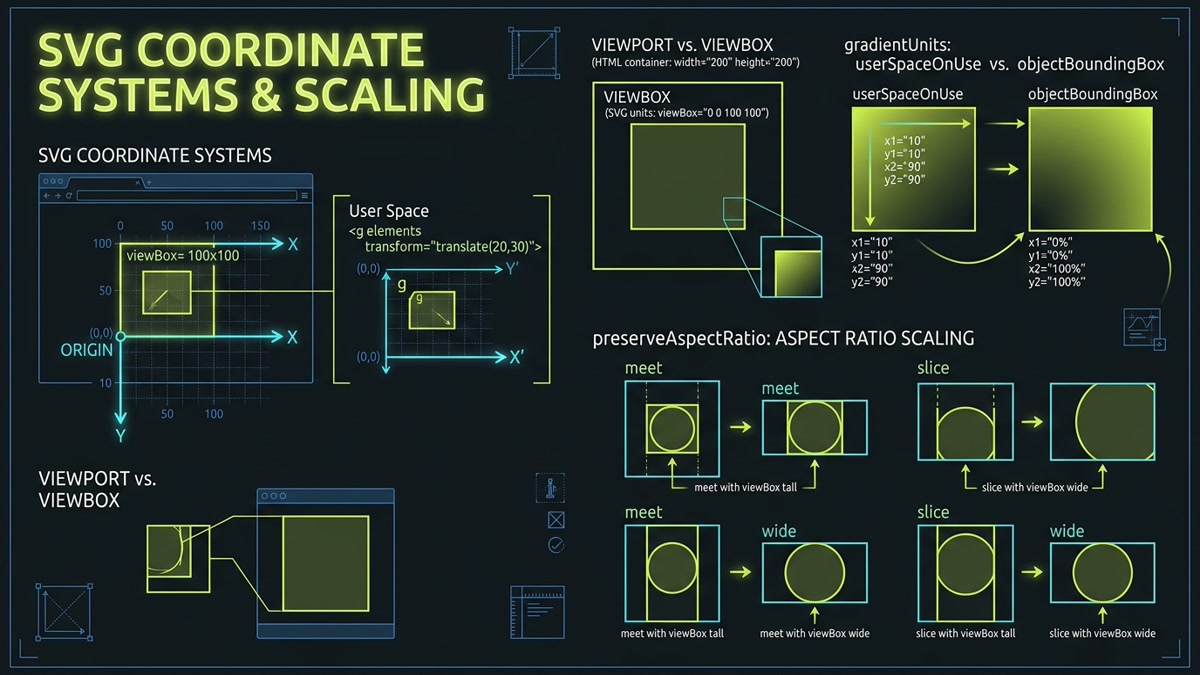
- Viewport vs. ViewBox: Clear mathematical distinctions between external HTML layout frames and internal vector canvases.
- UserSpaceOnUse vs. ObjectBoundingBox: Resolving absolute coordinate spaces versus relative bounding fractions in patterns, gradients, and masks.
- PreserveAspectRatio Matrix Modes: Uniform scaling mechanics (
meetvs.slice) and 9 directional alignment anchors. - Matrix Transformation APIs: Navigating CTM, Screen CTM, DOMPoint, and mouse coordinate projections.
Interactive ViewBox & PreserveAspectRatio Simulator
Test how different preserveAspectRatio directives map a fixed 100x100 viewBox onto a wide 260x120 viewport container. Switch modes to observe meet letterboxing, slice overflow clipping, and anchor alignments.
preserveAspectRatio="xMidYMid meet" scales the 100x100 user space uniformly to fit completely within the 280x130 viewport, leaving letterbox spacing on the left and right.
Coordinate Spaces & Unit Systems Matrix
Quick reference comparing how SVG establishes, calculates, and transforms coordinates across different rendering contexts:
| Space / Unit Mode | Origin Point (0,0) | Scale / Calculation Base | Primary Applications | DOM Transformation API |
|---|---|---|---|---|
userSpaceOnUse |
Top-left of local SVG user coordinate system | Absolute user units defined by viewBox or viewport | Patterns, gradients, masks matching shape geometry | element.getCTM() |
objectBoundingBox |
Top-left corner of the element's bounding box | Relative fractions from 0.0 to 1.0 (0% to 100%) | Stretching gradients & masks across dynamic shapes | element.getBBox() |
viewBox User Space |
Specified by min-x, min-y parameters |
Arbitrary resolution-independent unit grid (e.g. 24x24) | Icon definitions, responsive illustrations | svg.getScreenCTM().inverse() |
Viewport (CSS Pixels) |
Top-left of rendered SVG container element | Device pixel ratio scaled by browser layout zoom | Container layout, responsive sizing, touch targets | element.getBoundingClientRect() |
Screen / Client Space |
Top-left of browser window / viewport | Hardware pixels relative to device viewport window | Mouse event tracking, cursor drag-and-drop, tooltips | DOMPoint.matrixTransform() |
SVG Viewport ContainerThe finite rectangular layout window allocated to the SVG element on the web page. Established by CSS width/height or SVG presentation attributes. Serves as the clipping and projection frame for all vector content.
viewBox="min-x min-y width height"Defines the virtual camera aperture and internal user coordinate system. Specifies the rectangular bounds of vector space that the browser maps onto the external viewport.
preserveAspectRatio="[align] [meetOrSlice]"Controls how the browser projects the internal user coordinate system into an external viewport with a different aspect ratio. Dictates whether vectors scale uniformly or stretch non-uniformly.
Uniform Fit (Contain)Scales the viewBox uniformly until both dimensions fit completely inside the viewport. Equivalent to CSS object-fit: contain. Never clips graphic content, but may create pillarbox or letterbox margins.
Uniform Cover (Clip)Scales the viewBox uniformly until it completely covers the viewport container. Equivalent to CSS object-fit: cover. Fills the entire viewport with zero dead margin, but slices off vector parts extending past edges.
Non-Uniform Stretch (Fill)Disables uniform aspect ratio preservation completely. Distorts vector geometry non-uniformly so the viewBox coordinates stretch to match the exact width and height of the host viewport.
Top-Left AnchorAligns the minimum X coordinate of the viewBox with the left viewport edge, and the minimum Y with the top edge. Anchors content to top-left during aspect ratio scaling.
Top-Center AnchorHorizontally centers the viewBox along the X-axis while anchoring its minimum Y edge flush with the top of the viewport.
Top-Right AnchorAligns the maximum X boundary with the right edge of the viewport, anchored to the top.
Middle-Left AnchorAligns the left edge flush with the left viewport boundary while vertically centering the viewBox along the Y-axis.
Center-Center Anchor (Default)The W3C default alignment parameter. Centers the viewBox both horizontally and vertically inside the viewport space.
Middle-Right AnchorAligns the right boundary flush with the right viewport edge while vertically centering the viewBox along the Y-axis.
Bottom-Left AnchorAnchors the viewBox flush against the bottom-left corner of the viewport frame.
Bottom-Center AnchorHorizontally centers the viewBox along the X-axis while anchoring its bottom edge to the bottom of the viewport.
Bottom-Right AnchorAnchors the viewBox flush against the bottom-right corner of the viewport frame.
Virtual Canvas SpaceThe infinite 2D Cartesian coordinate space in which path coordinates and shapes are defined. Positioned relative to an origin (0,0) with positive X extending right and positive Y extending downward.
Layout Frame CoordinatesThe physical pixel coordinate space established by the viewport on the rendered webpage. Its origin (0,0) sits at the top-left corner of the SVG container element.
Unscaled Default SpaceThe user coordinate system when no viewBox or transforms are active, where one user unit equals one CSS pixel on the host display.
Browser Window PixelsThe pixel coordinate system returned by mouse and pointer events (e.clientX, e.clientY). Mapped into SVG user space via getScreenCTM().inverse().
Active Transformed FrameThe active local coordinate system resulting from cumulative affine transformations applied by parent <g>, <svg>, or <use> elements.
Rotated/Scaled SpaceA localized user space whose axes have been rotated, translated, or sheared. Child elements position themselves relative to the newly modified axes rather than the root origin.
Absolute User CoordinatesSpecifies that coordinates and dimensions within paint servers, masks, or clip paths reference the current user coordinate system in absolute units (pixels), maintaining consistent scale regardless of target element dimensions.
Relative Fraction (0.0 – 1.0)The default mode where coordinates are fractions of the bounding box of the element being painted. x1="0" x2="1" spans 100% of the element width.
Pattern Tile vs Inner GraphicspatternUnits governs whether the repeating tile box scales with the element or in user pixels. patternContentUnits governs whether shapes inside the tile calculate in user pixels or fractions.
Mask Bounds vs Inner ShapesmaskUnits defines the coordinate system for the clipping bounds of the <mask> element. maskContentUnits dictates whether the inner luminance shapes calculate relative to the masked element.
Clipping Boundary UnitsSpecifies whether vector paths inside a <clipPath> evaluate in userSpaceOnUse (fixed pixels) or objectBoundingBox (0-to-1 normalized fractions).
Gradient Vector ResolutionControls whether linear/radial gradient vectors (x1, y1, x2, y2) are resolved in userSpaceOnUse or objectBoundingBox space.
Standard Coordinate UnitNumbers declared without units in SVG attributes (e.g. width="24", r="5"). Exactly equals 1 user space coordinate, mapping to 1 CSS pixel before viewBox transformations.
96 DPI Reference PixelThe standard CSS pixel unit defined as 1/96th of an inch. In SVG, appending px behaves identically to unitless user units in the absence of CSS font scaling.
Physical UnitsPhysical measurement units converted to user units via standard CSS ratios: 1in = 96px, 1pt = 1.333px, 1pc = 16px, 1cm = 37.795px, 1mm = 3.7795px.
Typographic UnitsDynamic units computed from the computed font metrics of the SVG element. Allows vector icons to scale fluidly with neighboring typography when width="1em" height="1em" is set.
Viewport-Relative PercentagesLengths resolved as percentages against the width (for X coordinates), height (for Y coordinates), or normalized diagonal length of the nearest ancestor SVG viewport.
Constant Display StrokeA vector styling property that instructs the browser GPU to calculate stroke thickness after all viewBox and CSS transforms, keeping line caliper locked to display pixels regardless of zoom.
Local to Viewport MatrixThe active 3x3 affine matrix transforming 2D coordinates from current user space into the nearest SVG viewport coordinate system.
User Space to Screen PixelsThe DOM method returning the transformation matrix that maps coordinates from local user space directly to the client screen display pixel grid.
Affine Matrix InterfaceThe standard JavaScript API representing affine geometric transformation matrices. Provides multiplication, inversion, translation, and rotation methods for vector projection.
Affine Matrix FunctionCompact matrix notation representing [scaleX, skewY, skewX, scaleY, translateX, translateY]. Transforms any vector coordinate (x, y) via x' = ax + cy + e, y' = bx + dy + f.
Transformation Anchor PointIn native SVG specification space, transform-origin defaults to (0,0) (top-left of the canvas), unlike HTML elements which default to (50%, 50%) (center of bounding box). Modern CSS allows transform-box: fill-box; transform-origin: center; to center rotations.
Interactive Pan & ZoomDOM properties on the root SVGSVGElement representing the user-agent panning translation point and magnification scale factor applied to the entire graphic.
Sub-ViewportsAn <svg> element nested inside another <svg> establishes its own local viewport, with an independent coordinate origin, width, height, and viewBox projection.
<symbol> with viewBoxWhen a <symbol> with its own viewBox is referenced via <use width="X" height="Y">, the browser creates a synthetic nested viewport, mapping the symbol's viewBox onto the use dimensions.
Viewport Clipping BoundaryControls whether graphics rendered outside the rectangular viewport limits are clipped (default hidden) or allowed to spill into neighboring document layout (overflow: visible).
Legacy Viewport ClippingA deprecated CSS clipping property formerly used by browser engines to restrict SVG viewport visibility bounds, now superseded by modern clip-path.
zoomAndPan="magnify | disable"An SVG document-level presentation attribute specifying whether the browser should permit user-initiated interactive panning and zooming controls.
Key Coordinate Systems Takeaways
Mastering SVG coordinate architecture means recognizing the two distinct worlds inside every vector graphic: the host webpage viewport, governed by CSS box model pixels, and the infinite internal user space, governed by mathematical viewBox coordinates. With uniform preserveAspectRatio alignment, precise userSpaceOnUse vs objectBoundingBox decisions, and getScreenCTM() matrix transformations, developers build razor-sharp, distortion-free vector interfaces across all devices.
Frequently Asked Questions
What is the difference between an SVG viewport and viewBox?
The viewport is the physical or CSS layout rectangle allocated to the SVG on the webpage (defined by width and height in HTML/CSS). The viewBox is the internal camera or canvas coordinate system (min-x, min-y, width, height) in which vector paths are drawn. The browser maps the internal viewBox onto the external viewport using preserveAspectRatio rules.
How does userSpaceOnUse differ from objectBoundingBox?
userSpaceOnUse resolves coordinates in the current user coordinate space using absolute units (pixels), keeping gradients, patterns, and masks consistent across different elements. objectBoundingBox treats coordinates as relative fractions (0.0 to 1.0) of the bounding box of the target element, causing visual effects to stretch proportionally if the element changes shape.
How do preserveAspectRatio="meet" and "slice" behave when scaling?
Both preserve uniform aspect ratios without distorting geometry. "meet" scales the viewBox until the entire viewBox fits inside the viewport, potentially creating empty letterbox bars on the sides. "slice" scales the viewBox until it completely covers the viewport, slicing off whatever vector content extends outside the viewport bounds.
How do you translate browser screen coordinates (clientX, clientY) into SVG user coordinates?
Create a DOMPoint representing the mouse coordinates, obtain the element's inverse Screen Current Transformation Matrix via svg.getScreenCTM().inverse(), and apply point.matrixTransform(inverseMatrix). This calculates the exact user space coordinate regardless of viewport scaling, CSS translations, or zoom levels.
Why do unitless numbers in SVG default to CSS pixels?
Under the W3C SVG 2 and CSS specifications, one user coordinate unit equals one reference CSS pixel (1/96 of an inch). Omitting units (e.g. width="24") allows mathematical operations, coordinate transforms, and viewBox mappings to function without unit conversion overhead.
What causes SVG icons to scale disproportionately or warp?
SVG warping occurs when an explicit width and height with different aspect ratios are applied to an SVG that either lacks a viewBox attribute or has preserveAspectRatio="none". Adding a square viewBox (e.g. 0 0 24 24) and omitting preserveAspectRatio="none" prevents non-uniform distortion.