SVG Typography & Font Glyphs Glossary
The definitive developer reference for vector text rendering, baseline alignment tables, textPath geometry, glyph metrics, and OpenType-SVG architecture.
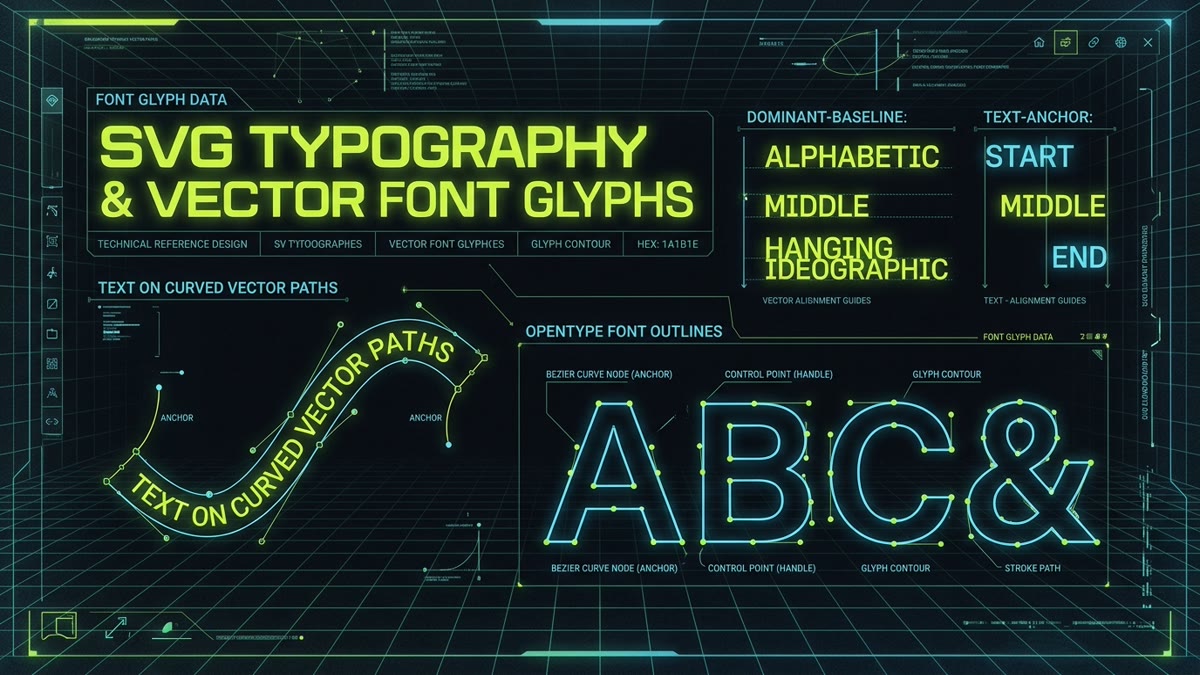
<text>The primary container element in SVG for rendering accessible, selectable text within a vector coordinate system. Unlike HTML paragraphs, it requires explicit (x, y) coordinate positioning.
<tspan>A sub-element child of <text> used to apply inline styling variations, positional coordinate offsets (dx, dy), or distinct font weights to specific spans of text without breaking the containing line context.
<textPath>An element that aligns text along the contour of an arbitrary vector <path>. Enables curved labels, circular badges, and flowing wave text animations in vector illustrations.
startOffsetAn attribute on <textPath> specifying the distance from the start of the reference path at which the first text glyph is rendered. Can be defined as a fixed pixel length or percentage.
method / spacingAttributes controlling how glyphs conform to a curved path. method="align" renders glyphs perpendicularly without deformation; method="stretch" warps glyph shapes. spacing="exact" preserves glyph widths; spacing="auto" dynamically adjusts kerning.
text-anchorDefines horizontal text alignment relative to the specified coordinate origin (x, y). Values: start (text begins at origin), middle (origin is horizontal center), and end (text ends at origin).
dominant-baselineDetermines which baseline of the font glyph is aligned to the y coordinate coordinate. Critical values for icon centering include middle, central, alphabetic, and hanging.
alignment-baselineSpecifies how an inline <tspan> element aligns vertically relative to its parent text's baseline table. Useful for superscripts, subscripts, and mathematical notation.
baseline-shiftShifts the baseline vertically for superscript or subscript positioning. Accepts super, sub, percentages, or absolute length units.
alphabeticThe standard typographic baseline upon which Western Latin, Greek, and Cyrillic glyphs sit. Glyphs with descenders (such as 'p', 'q', 'y') extend below this line.
hangingA baseline table commonly used in Indic scripts (like Devanagari) where glyphs visually hang down from a top horizontal line. Also used in Latin typography for alignment with caps.
ideographicThe bottom alignment baseline used for CJK (Chinese, Japanese, Korean) ideographic character grids, sitting below the alphabetic baseline.
writing-modeDefines whether text lines layout horizontally or vertically, and the direction blocks progress. Supports horizontal-tb (standard), vertical-rl (East Asian vertical), and vertical-lr.
glyph-orientation-verticalControls the rotational orientation of glyphs when rendered in a vertical writing-mode. Values: 0deg (upright stack) or 90deg (rotated sideways).
textLengthSpecifies the total target horizontal width (or vertical height in vertical modes) that the text string must span, forcing the renderer to compress or expand glyph spacing.
lengthAdjustDetermines how textLength constraints are satisfied: spacing (adjusts letter and word spacing only) or spacingAndGlyphs (scales glyph contours horizontally).
letter-spacing / word-spacingCSS typographic properties supported natively in SVG 2.0 to expand or tighten tracking between individual characters and spaces.
unicode-bidi / directionProperties managing bidirectional text rendering (LTR vs RTL) for Arabic, Hebrew, and Persian script integration within vector graphics.
dx / dyAttributes that supply a list of relative coordinate shifts for each subsequent character in a text string. Allows wavy, scattered, or kerning-adjusted typographic layouts.
rotateAn attribute on <text> or <tspan> containing space-separated angle values in degrees to rotate each individual character about its coordinate anchor.
paint-orderControls the layering order of fill, stroke, and markers. In text rendering, setting paint-order: stroke fill ensures thick outlines appear behind the letterforms rather than eating into the glyph interiors.
font-feature-settingsEnables OpenType typographic features inside SVG text, including discretionary ligatures ("dlig"), tabular figures ("tnum"), and stylistic sets ("ss01").
OpenType-SVGAn open specification embedding true SVG vector tables inside OpenType fonts. Powers multi-color icon glyphs, gradients, and transparency in a single font file.
<font> / <glyph>Deprecated W3C SVG 1.1 font elements (replaced in SVG 2 by WOFF2 and OpenType). Modern browsers no longer parse pure SVG font files directly due to web standards modernization.
WOFF2 SubsettingThe practice of stripping unused characters from a web font file using tools like glyphhanger or fonttools, reducing icon font payloads from 150KB to under 4KB.
Units Per EmThe coordinate grid upon which font glyph outlines are drawn, typically 1000×1000 (PostScript) or 2048×2048 (TrueType) units, defining relative scaling ratios.
font-variation-settingsAdjusting continuous design axes—such as weight (wght), optical size (opsz), and slant (slnt)—dynamically within SVG text elements via CSS custom properties.
Path OutliningExporting text as static Bézier curves (<path d="...">) in tools like Figma or Illustrator. Guarantees 100% visual consistency on all systems, eliminating missing-font bugs at the cost of screen-reader searchability.
getSubStringLength()A native SVG DOM JavaScript method that calculates the rendered pixel advance width of a substring within a <text> element, factoring in kerning and ligatures.
getStartPositionOfChar()Returns a DOMPoint indicating the exact coordinates where the glyph for the specified character index begins, enabling precision tooltips and cursor highlights.
getBBox()Returns the tightest axis-aligned rectangle enclosing the rendered glyph contours in local coordinate space (x, y, width, height).
Accessible TextScreen readers extract readable text from <text> elements by default. If the text is purely decorative or duplicated by an icon, suppress it using aria-hidden="true".
<style> @font-faceEmbedding Base64-encoded WOFF2 font data directly into an SVG's <defs><style> block so that external web font files do not fail CORS checks when loaded via <img> tags.
Frequently Asked Questions
What is the difference between text-anchor and CSS text-align in SVG?
In HTML, text-align aligns text relative to the containing block width (left, center, right). In SVG, text-anchor determines how text aligns relative to its specific (x, y) coordinate origin. Values are start (origin is left of text in LTR), middle (origin is the exact horizontal center of the text string), and end (origin is the right edge of text).
How does dominant-baseline differ from alignment-baseline?
dominant-baseline defines the default baseline table for an entire text element or coordinate system (e.g. central, middle, hanging, or alphabetic). alignment-baseline is used on child elements (like <tspan>) to align that specific child relative to the parent text element's dominant baseline.
Why does SVG text look different across different operating systems?
When SVG text uses system fonts without embedded vector outlines or base64 @font-face rules, the client browser relies on local OS font rendering engines (DirectWrite on Windows, CoreText on macOS, FreeType on Linux). Different font metrics, kerning tables, and hinting cause subtle variations in text width and line wrapping.
What is OpenType-SVG and how is it used in icon design?
OpenType-SVG is an extension to the OpenType font specification that embeds complete SVG vector graphics within font glyph tables. This allows glyphs to display multi-color gradients, complex vector shapes, and transparency within standard font files, commonly used for color emojis and multi-tone icon fonts.
Should I convert text to paths or keep live text in SVG icons?
For small UI icons and logos where exact visual reproduction is critical across all devices without font file dependencies, converting text to vector paths (<path>) guarantees 100% fidelity. For data visualizations, charts, and accessible graphics where text must be searchable, copyable, and readable by screen readers, keep live <text> elements.
How do I make text follow a curved path in SVG?
Wrap your text within a <textPath> element inside a <text> tag, and link it to an existing vector <path> via the href attribute (e.g. <textPath href="#curvePath">Curved Text</textPath>). Use startOffset to adjust where along the path the text starts.