How to Convert SVG to PNG in JavaScript (Client-Side & Node.js): The Complete 2026 Guide
Vector-to-Raster Conversion Architecture: Converting vector SVG graphics into raster PNG images is a foundational requirement for design tools, chart exports, social preview cards, and avatar creators. Yet most client-side tutorials fail on Retina screens, drop external CSS typography, or trigger canvas CORS security exceptions. This definitive engineering blueprint delivers:
- The Complete Canvas Pipeline: Step-by-step code turning XML SVG strings into downloadable PNG Blobs with zero memory leaks.
- Retina & 4K Scaling Math: Eliminating blurry rasterization by multiplying pixel buffers by
window.devicePixelRatio. - CSS & Web Font Inlining: Overcoming browser security boundaries to guarantee custom Google Fonts and dark mode colors render into the PNG.
- CORS & Tainted Canvas Protections: How to prevent
SecurityError: The operation is insecurewhen handling external assets. - OffscreenCanvas & Web Workers: Offloading heavy rasterization work from the main thread for butter-smooth 60fps UI performance.
- Server-Side Node.js / Bun Pipeline: High-throughput rasterization using
sharpand Rust-powered@resvg/resvg-js. - Client vs Server Matrix: Technical trade-offs comparing CPU, memory, font handling, and throughput.
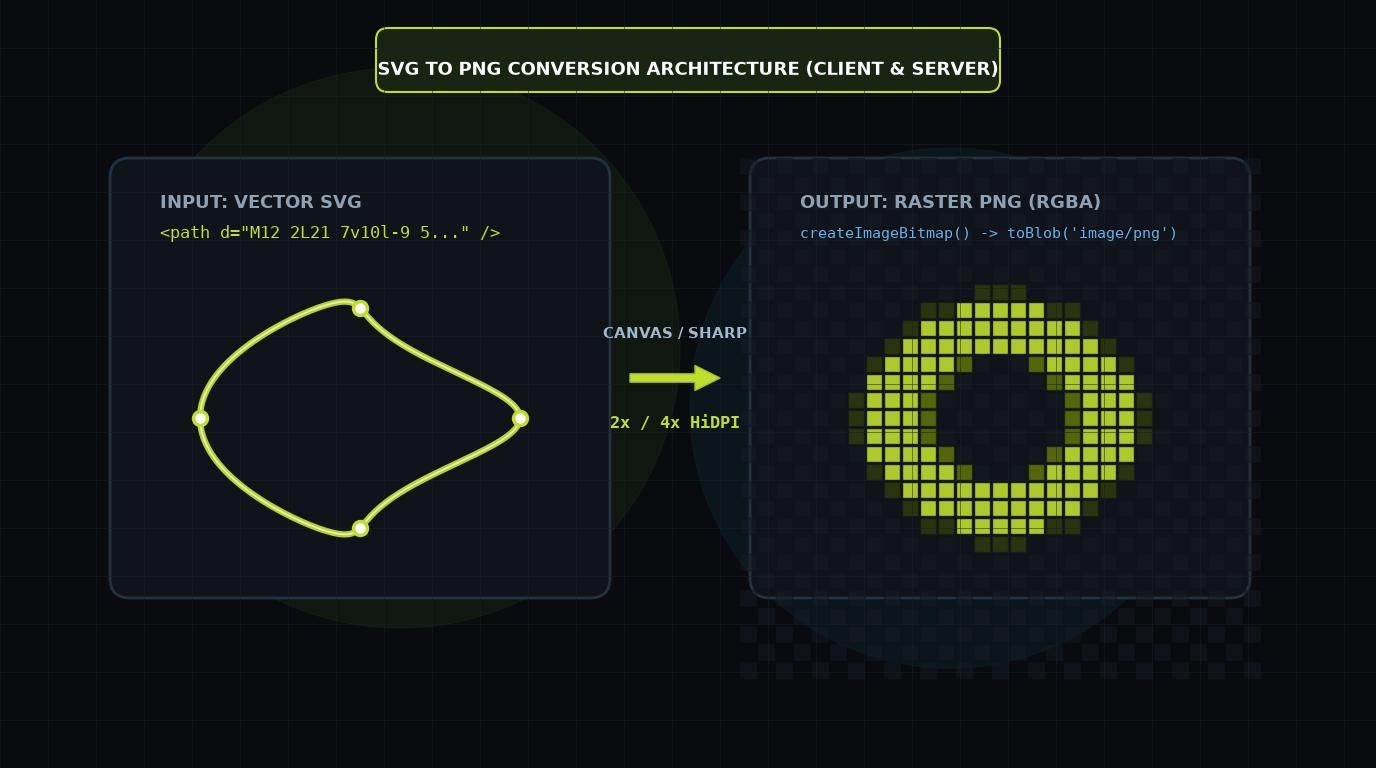
1. The Mechanics of SVG-to-Raster Conversion
Unlike JPEG or PNG images (which store a discrete 2D grid of RGBA color values), an SVG file is an XML document defining mathematical geometry: Bezier curves, arc commands, matrix transforms, and paint servers. To generate a PNG from an SVG, a rendering engine must:
- Parse XML: Construct the SVG DOM tree and compute the element bounding boxes.
- Calculate Coordinates: Resolve relative units (percentages,
em,currentColor) against the specifiedviewBoxand canvas dimensions. - Discretize Paths: Sample vectors across target pixel coordinates using anti-aliasing algorithms.
- Encode Bitmap: Compress the raw RGBA buffer into a standard PNG binary chunk (IHDR, IDAT, IEND).
For an in-depth review of the underlying path geometry math, explore our guide on SVG Path Arc Commands & Math.
2. The Bulletproof Client-Side Canvas Pipeline
Below is the complete, modern production implementation for converting an SVG element or SVG string to a PNG Blob entirely in the user's browser, with proper memory cleanup and error handling:
/**
 * Converts an SVG string or SVG element into a high-resolution PNG Blob.
 *
 * @param svgInput - SVG string or live SVGElement
 * @param options - Target dimensions and scale multiplier
 * @returns Promise resolving to the PNG Blob
 */
export async function convertSvgToPng(
  svgInput: string | SVGElement,
  options: {
    width?: number;
    height?: number;
    scale?: number;
    backgroundColor?: string;
  } = {}
): Promise<Blob> {
  // 1. Normalize input to SVG XML string
  let svgString = typeof svgInput === 'string'
    ? svgInput
    : new XMLSerializer().serializeToString(svgInput);

  // 2. Parse SVG to extract dimensions if not provided
  const parser = new DOMParser();
  const doc = parser.parseFromString(svgString, 'image/svg+xml');
  const svgEl = doc.documentElement;

  const naturalWidth = parseFloat(svgEl.getAttribute('width') || '0') ||
                       svgEl.viewBox.baseVal.width || 300;
  const naturalHeight = parseFloat(svgEl.getAttribute('height') || '0') ||
                        svgEl.viewBox.baseVal.height || 150;

  const targetWidth = options.width || naturalWidth;
  const targetHeight = options.height || naturalHeight;
  const scale = options.scale || window.devicePixelRatio || 1;

  // 3. Ensure SVG has explicit dimensions and viewBox
  svgEl.setAttribute('width', String(targetWidth));
  svgEl.setAttribute('height', String(targetHeight));
  if (!svgEl.getAttribute('viewBox')) {
    svgEl.setAttribute('viewBox', `0 0 ${naturalWidth} ${naturalHeight}`);
  }
  svgString = new XMLSerializer().serializeToString(svgEl);

  // 4. Create Blob and Object URL
  const svgBlob = new Blob([svgString], { type: 'image/svg+xml;charset=utf-8' });
  const blobUrl = URL.createObjectURL(svgBlob);

  try {
    // 5. Load SVG into an HTMLImageElement
    const img = new Image();
    await new Promise<void>((resolve, reject) => {
      img.onload = () => resolve();
      img.onerror = () => reject(new Error('Failed to load SVG into HTMLImageElement'));
      img.src = blobUrl;
    });

    // 6. Setup Canvas with HiDPI dimensions
    const canvas = document.createElement('canvas');
    canvas.width = Math.round(targetWidth * scale);
    canvas.height = Math.round(targetHeight * scale);

    const ctx = canvas.getContext('2d');
    if (!ctx) throw new Error('Could not acquire 2D canvas rendering context');

    // Optional background fill (defaults to transparent)
    if (options.backgroundColor) {
      ctx.fillStyle = options.backgroundColor;
      ctx.fillRect(0, 0, canvas.width, canvas.height);
    }

    // Scale canvas to match target high-res multiplier
    ctx.scale(scale, scale);
    ctx.drawImage(img, 0, 0, targetWidth, targetHeight);

    // 7. Extract PNG Blob
    return await new Promise<Blob>((resolve, reject) => {
      canvas.toBlob(blob => {
        if (blob) resolve(blob);
        else reject(new Error('Canvas toBlob conversion returned null'));
      }, 'image/png');
    });
  } finally {
    // 8. Always revoke object URL to prevent memory leaks
    URL.revokeObjectURL(blobUrl);
  }
}
3. Fixing the #1 Bug: Blurry Retina and 4K Exports
The most common defect in browser-based SVG exporters is image blurriness on Retina laptops and modern smartphones. When an author writes:
// WRONG: Produces fuzzy pixelated PNGs on Retina screens
canvas.width = 500;
canvas.height = 500;
ctx.drawImage(img, 0, 0, 500, 500);
The browser allocates an internal pixel grid of only 500x500 pixels. On a device with a window.devicePixelRatio of 2.0 (standard MacBook or iPhone), displaying or printing that 500px image requires doubling each pixel, creating a muddy, soft result.
Always scale the canvas coordinate buffer by your desired export factor (e.g., scale = 2 or window.devicePixelRatio), then tell the 2D context to scale its coordinate operations with ctx.scale(scale, scale). The resulting PNG contains double the pixels for razor-sharp vector crispness.
4. Inlining CSS Classes & Custom Web Fonts
When an SVG is converted to an image via new Image().src = blobUrl, the browser isolates the SVG in a strict security sandbox. It will NOT inherit styles from external stylesheets (like Tailwind or Bootstrap CSS), and it cannot load Google Fonts via <link> tags.
How to Embed Styles Before Conversion
To preserve custom CSS styling, you must inject the computed styles directly into the SVG prior to serialization:
export function inlineSvgStyles(svgElement: SVGElement): void {
  const elements = svgElement.querySelectorAll('*');
  elements.forEach(el => {
    const computed = window.getComputedStyle(el);
    const fill = computed.getPropertyValue('fill');
    const stroke = computed.getPropertyValue('stroke');
    const strokeWidth = computed.getPropertyValue('stroke-width');
    const color = computed.getPropertyValue('color');

    // Replace currentColor with resolved RGB value
    if (fill === 'currentColor') el.setAttribute('fill', color);
    if (stroke === 'currentColor') el.setAttribute('stroke', color);
    if (strokeWidth) el.setAttribute('stroke-width', strokeWidth);
  });
}
For custom typography, fetch your WOFF2 font file, convert it to a base64 Data URI, and embed it into a <style> block inside the SVG's <defs> container.
5. Non-Blocking Exports: OffscreenCanvas & Web Workers
Converting large SVGs (such as complex data visualizations, architectural blueprints, or 100+ icons in a batch zip export) on the main UI thread causes noticeable frame drops and freezes user clicks. Modern browsers support OffscreenCanvas inside dedicated Web Workers:
// worker.js (Dedicated Web Worker)
self.onmessage = async function(e) {
  const { svgString, width, height, scale } = e.data;

  // Render SVG to ImageBitmap in worker thread
  const blob = new Blob([svgString], { type: 'image/svg+xml' });
  const imgBitmap = await createImageBitmap(blob);

  // Initialize OffscreenCanvas
  const canvas = new OffscreenCanvas(width * scale, height * scale);
  const ctx = canvas.getContext('2d');
  ctx.scale(scale, scale);
  ctx.drawImage(imgBitmap, 0, 0, width, height);

  // Convert to Blob without touching the DOM
  const pngBlob = await canvas.convertToBlob({ type: 'image/png' });
  self.postMessage({ pngBlob });
};
6. Server-Side Node.js / Bun Pipeline with Sharp
For backend social preview generation (Open Graph images) or automated icon build steps, server-side rasterization avoids all browser DOM limitations.
Using Sharp (High-Throughput libvips)
import sharp from 'sharp';
import fs from 'node:fs/promises';

export async function convertSvgFileToPng(svgPath, pngPath, size = 1024) {
  const svgBuffer = await fs.readFile(svgPath);

  await sharp(svgBuffer, { density: 300 }) // Higher density ensures sharp vector scaling
    .resize(size, size, { fit: 'contain', background: { r: 0, g: 0, b: 0, alpha: 0 } })
    .png({ compressionLevel: 9 })
    .toFile(pngPath);
}
Using @resvg/resvg-js (100% SVG Spec Compliance)
While sharp is fast, it relies on librsvg, which has known limitations with complex SVG gradients, SVG filters, and advanced text layout. For pixel-perfect compliance with the SVG 1.1 / 2.0 specifications, @resvg/resvg-js is the gold standard:
import { Resvg } from '@resvg/resvg-js';

const resvg = new Resvg(svgString, {
  fitTo: { mode: 'width', value: 1200 },
  font: { loadSystemFonts: true }
});

const pngData = resvg.render();
const pngBuffer = pngData.asPng();
7. Client-Side vs. Server-Side Architecture Matrix
| Architecture | Pros | Cons | Best Fit |
|---|---|---|---|
| Client HTML5 Canvas | Zero server CPU cost, instantaneous user feedback, no API costs. | Retina scaling bugs, sandbox font restrictions, potential CORS canvas taint. | User download buttons, avatar generators, interactive UI exports. |
| Client OffscreenCanvas Worker | Non-blocking 60fps UI, supports batch exports. | Requires Web Worker setup and transferrable object messaging. | Bulk icon zip downloads, complex multi-page dashboard exports. |
| Node.js Sharp | Blazing fast (C++ libvips), handles gigabytes of throughput. | Limited support for advanced SVG filters and CSS variables. | Automated CI/CD icon pipelines, high-volume image CDNs. |
| Node.js / Bun Resvg | Flawless SVG spec compliance, perfect text layout and filters. | Slightly higher CPU utilization than raw libvips. | Dynamic Open Graph banners, print-ready rasterization. |
8. How IconStash Powers High-Res PNG Exports
On IconStash, every single icon across all 28 indexed libraries supports instant, client-side PNG export without waiting for server roundtrips. When you click Export PNG on any icon (like our Lucide, Heroicons, or Tabler pages), IconStash's canvas rasterizer dynamically computes vector bounds, applies anti-aliasing scaling factors, and outputs a crystal-clear PNG directly to your downloads folder.
Frequently Asked Questions
Why do converted PNG images look blurry on Retina and 4K displays?
By default, HTML5 canvas allocates pixel buffer memory based on CSS logical pixels (96 DPI). On Retina screens (devicePixelRatio 2 or 3), drawing without multiplying canvas.width and canvas.height by window.devicePixelRatio forces the browser to upscale the bitmap, causing blur. Always set canvas buffer dimensions to (width * dpr) and scale the 2D context using ctx.scale(dpr, dpr).
Why do external CSS classes and web fonts disappear when converting SVG via canvas?
When an SVG is loaded into an HTMLImageElement via an object URL or data URI, browser security sandboxing treats the SVG as an isolated document with no access to external parent stylesheets or web font declarations. You must serialize computed CSS styles directly into inline SVG style attributes or embed base64 @font-face rules inside the SVG defs before drawing.
How can I export a 24x24 SVG icon at 1024x1024 without raster quality loss?
Because SVG is vector-based, you simply set the canvas width and height to 1024x1024 and pass (0, 0, 1024, 1024) to ctx.drawImage(img, 0, 0, 1024, 1024). Provided the root SVG has a valid viewBox attribute (e.g. viewBox='0 0 24 24') and width/height set to 100%, the browser vector rasterizer renders the path geometry at full 1024px fidelity.
What causes the 'Tainted canvases may not be exported' SecurityError?
This error occurs if the SVG references cross-origin images or external paint servers without proper CORS headers (crossOrigin='anonymous'), or if the SVG contains foreignObject tags in certain browsers. When tainted, the canvas API disables toDataURL() and toBlob() to prevent cross-origin pixel data extraction.
How do I convert SVG to PNG on the backend in Node.js or Bun?
Use the high-performance 'sharp' library (sharp(Buffer.from(svgString)).png().toBuffer()) or '@resvg/resvg-js' (a Rust-based library offering 100% SVG spec compliance and perfect text layout rendering).