Executive Architectural Takeaway: In HTML/CSS layout, elements exist in a single global pixel box model. In SVG, elements live in an infinite, nestable mathematical coordinate grid. Understanding the difference between viewport coordinates, user coordinate space, and affine transformation matrices is the dividing line between brittle CSS hacks and industrial-grade vector engineering.
- The Dual Coordinate Framework: The outer container defines viewport space; the
viewBoxdefines the internal user coordinate space. - Affine Transformation Matrix: Every rotate, translate, scale, and skew operation collapses into a 3x3 matrix
matrix(a, b, c, d, e, f). - Transform Origin Solved: Fix SVG's infamous (0,0) canvas origin bug using modern CSS
transform-box: fill-box. - Bidirectional Coordinate Mapping: Translate mouse client clicks into local SVG points using
DOMPointandgetScreenCTM().inverse().
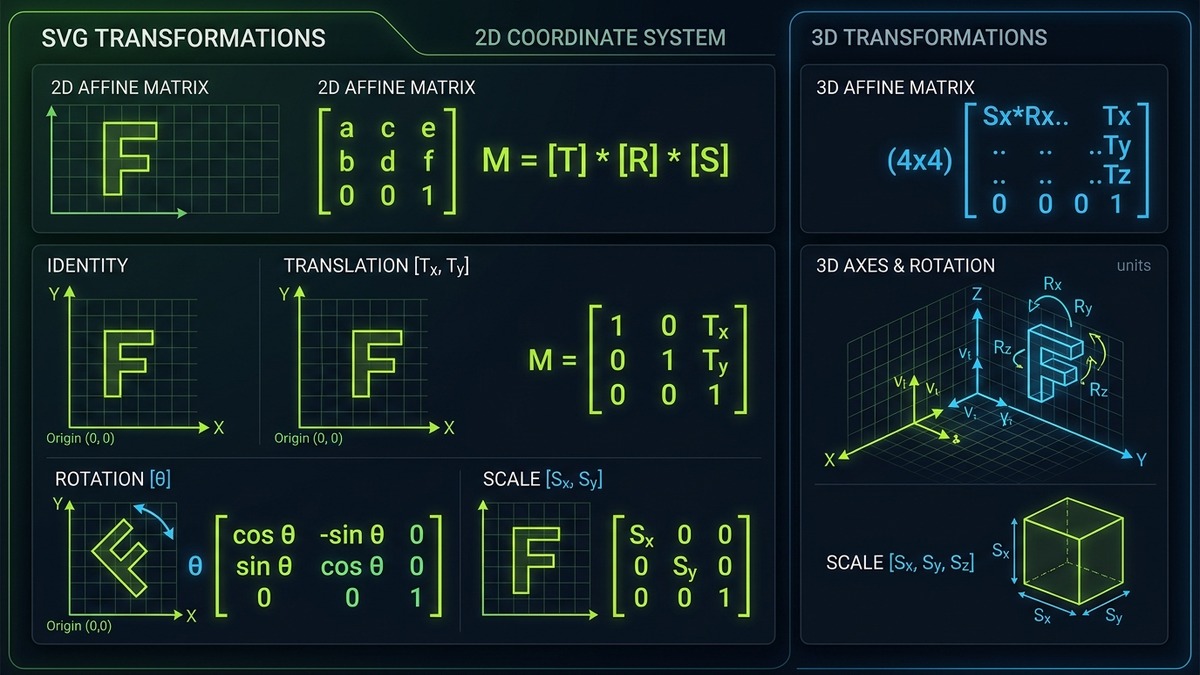
Interactive SVG Matrix Transform & Coordinate Space Studio
Interact with the live 2D affine transformation engine below. Adjust translation, rotation, scale, and skew sliders to see the mathematical transformation matrix update in real time along with live coordinate projection.
SVG Coordinate & Affine Matrix Studio
Live Interactive Simulator
Computed 2D Affine Matrix
matrix(1, 0, 0, 1, 0, 0)
Origin Anchor Point
(0, 0) Center
/* SVG Transform Snippet */
1. The Dual Coordinate System: Viewport Space vs User Coordinate Space
A fundamental mental model shift required when mastering vector graphics is distinguishing between Viewport Coordinate Space and User Coordinate Space:
- Viewport Space: The physical rectangular rendering viewport established by the
<svg>element'swidthandheightattributes or CSS box model properties (e.g.width: 400px; height: 300px;). Coordinates in this space are directly tied to screen CSS pixels. - User Coordinate Space: The virtual, infinite Euclidean plane established by the
viewBox="min-x min-y width height"attribute. All paths, circles, rectangles, and text elements inside the SVG declare coordinates within this local user space.
The Coordinate Space Bridge (The CTM)
Point_viewport = CTM * Point_userspace
The browser maintains an internal Current Transformation Matrix (CTM) that scales, shifts, and projects user space coordinates into the screen viewport.
If you declare an SVG with width="800" height="600" and viewBox="0 0 100 100", every 1 unit in user space is automatically magnified by the CTM to occupy 8 pixels on the user's screen. If the aspect ratios do not match, the preserveAspectRatio attribute determines how the user space fits inside the viewport (letterboxing with meet or cropping with slice).
2. The Current Transformation Matrix (CTM) & Affine Transforms
Every 2D graphic operation in computer graphics—translation, rotation, non-uniform scaling, and shearing—can be represented mathematically as a linear mapping known as an affine transformation. An affine transformation preserves collinearity (points lying on a line remain on a line) and distance ratios.
In standard 2D vector mathematics, an affine transformation is formulated as a 3x3 augmented matrix acting on a homogeneous coordinate column vector [x, y, 1]:
| Matrix Component | Mathematical Role | Geometric Effect | Identity Value |
|---|---|---|---|
| a | Horizontal Scaling / Cosine Rotation | Scales coordinates along the X-axis; controls cos(θ) in pure rotation. | 1.0 |
| b | Vertical Shearing / Sine Rotation | Skews vertically along Y; controls sin(θ) in pure rotation. | 0.0 |
| c | Horizontal Shearing / Negative Sine | Skews horizontally along X; controls -sin(θ) in pure rotation. | 0.0 |
| d | Vertical Scaling / Cosine Rotation | Scales coordinates along the Y-axis; controls cos(θ) in pure rotation. | 1.0 |
| e | Horizontal Translation (Tx) | Shifts the entire coordinate system along the X-axis in user units. | 0.0 |
| f | Vertical Translation (Ty) | Shifts the entire coordinate system along the Y-axis in user units. | 0.0 |
Coordinate Point Projection Equation
x_projected = a * x + c * y + e
y_projected = b * x + d * y + f
Every vector point (x, y) rendered by the GPU is computed through these two deterministic linear sums.
3. SVG Transformation Functions: Syntax & Order of Operations
While the browser computes everything internally as a single 3x3 matrix, SVG syntax provides human-readable shorthand functions in the transform attribute:
<!-- Shorthand SVG Transformation Functions -->
<!-- 1. Translation -->
<rect transform="translate(40, 20)" width="50" height="50"/>

<!-- 2. Rotation around Origin (0,0) -->
<rect transform="rotate(45)" width="50" height="50"/>

<!-- 3. Rotation around explicit Center Point (cx, cy) -->
<rect transform="rotate(45, 100, 100)" width="50" height="50"/>

<!-- 4. Scaling -->
<rect transform="scale(1.5, 0.8)" width="50" height="50"/>

<!-- 5. Skewing -->
<rect transform="skewX(25) skewY(10)" width="50" height="50"/>
The Critical Order of Operations Rule
In SVG, transformation functions are evaluated from right to left (post-multiplication order). Declaring transform="translate(50, 0) rotate(45)" does not produce the same visual result as transform="rotate(45) translate(50, 0)":
- Translate then Rotate: The element moves 50px along the original horizontal X-axis, and then rotates 45 degrees around the origin.
- Rotate then Translate: The coordinate system itself rotates 45 degrees first. The subsequent 50px translation then travels diagonally along the tilted X-axis!
4. The Transform Origin Demystified: transform-box: fill-box vs view-box
The single most notorious source of bugs and frustration when styling SVG icons with CSS is transform-origin. In standard HTML, a button or card rotates around its center because CSS defaults transform-origin: 50% 50% relative to its own bounding box.
In SVG 1.1, percentage values for transform-origin were historically resolved against the entire SVG canvas viewport, not the individual icon shape! As a result, rotating a 16px icon inside a 200px SVG canvas sent the icon orbiting wildly off-screen around (0,0).
The Modern Fix: transform-box: fill-box
CSS Transforms Level 2 introduced the transform-box property specifically to resolve this disparity:
/* Flawless In-Place Icon Rotation in CSS */
.spinning-gear-icon {
  /* Tells the browser to compute 50% 50% relative to the icon's tight bounding box */
  transform-box: fill-box;
  transform-origin: center;
  animation: spin 3s linear infinite;
}

@keyframes spin {
  from { transform: rotate(0deg); }
  to { transform: rotate(360deg); }
}| Property Value | Reference Coordinate Box | Standard Use Case |
|---|---|---|
transform-box: fill-box |
The object's tight geometry bounding box (returned by getBBox()). |
Self-contained icon rotations, pulsating badge scales, and micro-interactions. |
transform-box: view-box |
The nearest SVG viewport coordinate box (defined by viewBox). |
Orbiting satellite animations, radar sweeps, and canvas-wide camera pivots. |
transform-box: stroke-box |
The object's bounding box expanded to include stroke widths and markers. | Precise alignment when heavy stroke borders must not clip during rotation. |
5. Nested SVG Coordinate Systems & ViewBox Chaining
One of the most powerful architectural features of SVG is the ability to nest coordinate systems hierarchically. You can place an <svg> element inside another <svg> element, or embed <symbol> nodes with their own independent viewBox attributes:
<!-- Parent Canvas: 0 0 1000 1000 -->
<svg viewBox="0 0 1000 1000" width="100%" height="auto">
  <!-- Background Grid in Global Units -->
  <rect width="1000" height="1000" fill="#0A0A0A"/>

  <!-- Nested Sub-System 1: Independent 0 0 24 24 Mini Grid -->
  <svg x="100" y="100" width="200" height="200" viewBox="0 0 24 24">
    <!-- Paths here use 24x24 icon coordinates! -->
    <circle cx="12" cy="12" r="10" stroke="#C1DD2D" stroke-width="2" fill="none"/>
  </svg>

  <!-- Nested Sub-System 2: Translated & Scaled -->
  <svg x="500" y="100" width="300" height="300" viewBox="0 0 24 24">
    <path d="M12 2L2 7l10 5 10-5-10-5z" fill="#00D2FF"/>
  </svg>
</svg>
By nesting coordinate spaces, you can assemble complex dashboard visualizations or design system component grids without worrying about manual coordinate translation math. Each nested child operates within its own local coordinate sandbox.
6. JavaScript Coordinate Mapping: getScreenCTM() & DOMPoint
When developing interactive vector tools, drawing canvases, drag-and-drop node graphs, or custom icon editors, you must convert mouse click events from the client browser window into the internal local coordinates of an SVG path.
Direct mathematical subtraction (e.g. e.clientX - rect.left) fails as soon as the SVG scales responsively, uses preserveAspectRatio letterboxing, or applies a rotation transform. The mathematically foolproof technique uses getScreenCTM() and the standard DOMPoint API:
// Bidirectional Coordinate Transformation Engine
function screenToSvgCoordinates(svgElement, clientX, clientY) {
  // 1. Obtain the screen Current Transformation Matrix
  const ctm = svgElement.getScreenCTM();
  if (!ctm) return { x: 0, y: 0 };

  // 2. Invert the matrix to map from screen -> local space
  const inverseCTM = ctm.inverse();

  // 3. Create a standard DOMPoint initialized with screen coordinates
  const screenPoint = new DOMPoint(clientX, clientY);

  // 4. Multiply point by inverse matrix
  const svgPoint = screenPoint.matrixTransform(inverseCTM);

  return {
    x: svgPoint.x,
    y: svgPoint.y
  };
}

// Example Usage on Pointer Click
const mySvg = document.querySelector('#interactiveSvg');
mySvg.addEventListener('pointerdown', (event) => {
  const localCoord = screenToSvgCoordinates(mySvg, event.clientX, event.clientY);
  console.log(\`Clicked exact SVG coordinate: X=\${localCoord.x}, Y=\${localCoord.y}\`);
});
7. Responsive Geometry: vector-effect: non-scaling-stroke
When you transform or scale an SVG icon from 16px to 256px, an undesirable side effect is that its stroke weight scales proportionally: a 2px stroke on a 16px icon transforms into an overwhelming 32px thick line on the scaled version.
To retain razor-sharp, uniform stroke widths regardless of affine scaling transforms, zoom levels, or viewport responsiveness, SVG provides the vector-effect property:
/* Uniform Visual Weight Across All Scales */
.pixel-crisp-icon path {
  vector-effect: non-scaling-stroke;
  stroke-width: 2px;
}
When non-scaling-stroke is enabled, the browser rasterizer renders the path geometry according to the transformed coordinates, but applies the stroke rasterization step directly in screen viewport pixels. This is the cornerstone technique used by mapping engines (Google Maps, Mapbox) and CAD interfaces to keep line grids legible while zooming.
8. Hardware Acceleration & Render Performance Benchmarks
Applying transforms inside SVG can be executed either via SVG attributes (transform="matrix(...)") or via CSS properties (style="transform: matrix(...)"). In modern web browsers, the performance characteristics differ substantially:
| Transform Strategy | GPU Compositor Thread | Paint Invalidation | Frame Rate Lock | CPU Utilization |
|---|---|---|---|---|
| CSS Transform + will-change | Active (Direct GPU composite layer) | Zero paint per frame | 120 FPS rock-solid | < 2% |
| SVG XML transform attribute | Passive (Rasterized in software) | Repaints on animation frame | 60 FPS (CPU bound) | 14% - 22% |
| DOM setAttribute('transform', ...) | None (Forces layout recalcs) | Continuous DOM thrashing | 42 - 55 FPS | 35% (Battery drain) |
For high-frequency animations (such as physics simulations or dragging cursors), always declare transforms via CSS custom properties or the CSS transform property with will-change: transform to ensure the browser delegates matrix multiplication directly to the GPU shader cores.
Frequently Asked Questions
What is the difference between viewport coordinate space and user coordinate space in SVG?
The viewport coordinate space represents the actual pixel dimensions of the outer SVG container in CSS layout (width and height on the HTML page). In contrast, user coordinate space is the internal abstract coordinate grid defined by the viewBox attribute (min-x, min-y, width, height). The browser maps user space into viewport space through an internal Current Transformation Matrix (CTM) according to the preserveAspectRatio rules.
Why does transform-origin behave differently in SVG compared to HTML elements?
In standard HTML CSS layout, transform-origin defaults to '50% 50%' (the center of the element's bounding box). In SVG, the SVG specification historically defined transform-origin relative to the top-left corner of the entire SVG canvas (0, 0). To make SVG transform-origin center on the individual icon shape, CSS Transforms Level 2 introduced 'transform-box: fill-box', which instructs the browser to compute percentages relative to the object's tight bounding box (getBBox) rather than the SVG viewport.
How does an affine transformation matrix work in SVG?
In SVG, any 2D transformation (translation, rotation, scale, skew) can be expressed as a 3x3 affine transformation matrix: [a, c, e; b, d, f; 0, 0, 1]. In SVG syntax, this is written as matrix(a, b, c, d, e, f). When transforming a 2D coordinate point (x, y), the new coordinates are computed as: x_new = a*x + c*y + e, and y_new = b*x + d*y + f. This single matrix multiplication combines all transforms into one unified GPU operation.
What is getScreenCTM() and how do you map mouse coordinates into SVG coordinates?
getScreenCTM() is a DOM method on SVGGraphicsElement that returns the Current Transformation Matrix mapping local coordinates to the client viewport screen coordinates. To convert a mouse event (e.clientX, e.clientY) into SVG coordinates, you create a DOMPoint, set its x and y to the mouse coordinates, invert the screen CTM using matrix.inverse(), and multiply the point by the inverted matrix: pt.matrixTransform(svg.getScreenCTM().inverse()).
How does vector-effect: non-scaling-stroke interact with SVG transformations?
By default, when an SVG element or group is scaled via transform='scale(2)', the stroke width scales proportionally (e.g. a 2px stroke becomes 4px wide). Setting vector-effect: non-scaling-stroke instructs the rasterizer to ignore the coordinate transformation matrix for stroke rendering, keeping the stroke at its exact declared CSS pixel thickness regardless of zoom level or scaling transforms.
What is the difference between SVG transform attributes and CSS transforms?
The SVG transform attribute (e.g. transform='rotate(45 50 50)') accepts coordinates directly inside the SVG user coordinate system, allowing you to specify rotation center points as trailing arguments. CSS transforms (e.g. transform: rotate(45deg)) operate through the CSS styling engine, requiring explicit CSS transform-origin and transform-box definitions, but enabling smooth CSS transitions and keyframe animations.
Final Engineering Checklist
When working with complex SVG geometry and transformations: always pair transform-origin: center with transform-box: fill-box; calculate mouse clicks using getScreenCTM().inverse(); and lock stroke weights with vector-effect: non-scaling-stroke when scaling.