Best Font Awesome Alternatives: 10 Open-Source SVG Replacements (2026)
By Jouni Flemming••16 min read•Ranked by Coverage, MIT Licensing & Web Performance
Font Awesome defined an era of web design, but in 2026, modern frontend engineering has moved past icon fonts, paid Pro paywalls, and bloated CSS bundles. Below are the top 10 open-source, permissive SVG alternatives that eliminate render-blocking assets and deliver pixel-perfect clarity.
Why Developers Are Switching: Paywalled glyphs, kit scripts, layout shift (CLS), and multi-megabyte bundle payloads.
The 10 Ranked Alternatives: Comprehensive breakdown of Lucide, Tabler, Phosphor, Heroicons, Bootstrap, Material Symbols, and more.
Interactive Migration & Bundle Savings Calculator: Convert legacy Font Awesome classes into modern tree-shakeable components and see your bundle savings.
Architectural Comparison: Icon count, stroke vs fill variants, npm packages, and license freedom.
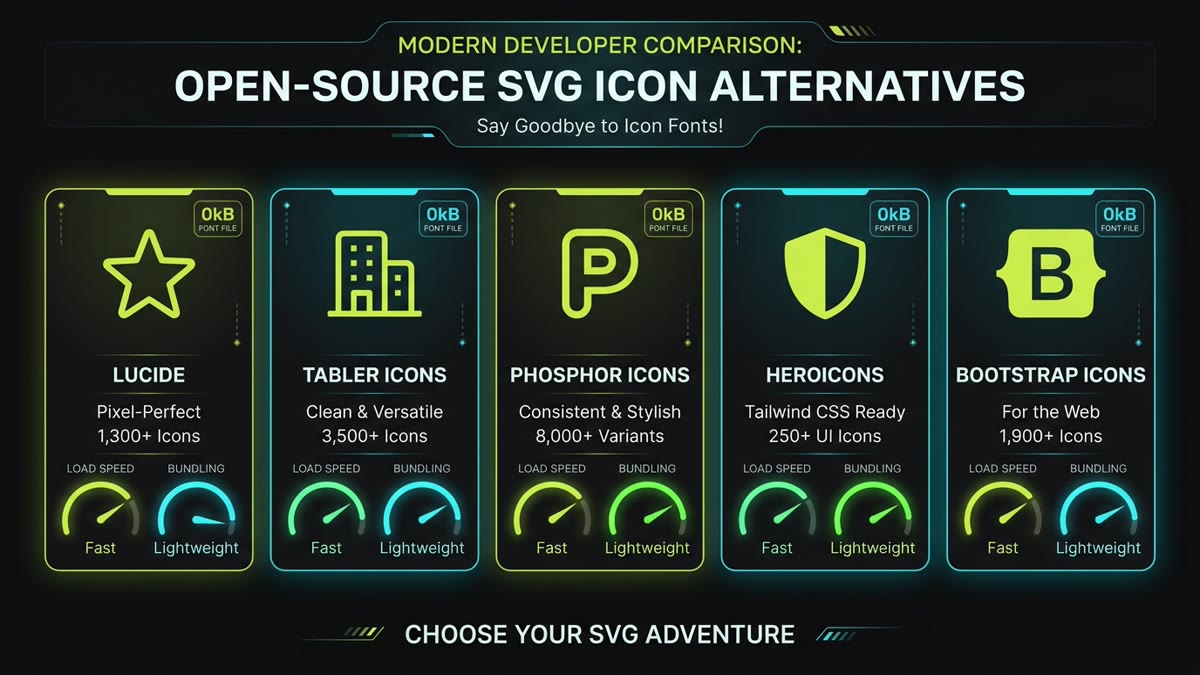
Figure 1: High-performance open-source alternatives to Font Awesome: zero font files, zero paywalls, 100% tree-shakeable SVGs.
1. Why Developers Are Replacing Font Awesome in 2026
For over a decade, Font Awesome was the default choice for web icons. You included a single CDN stylesheet and pasted <i class="fa fa-home"></i> into your markup. However, modern frontend architectures (React 19, Next.js 15, Vite, Vue 3, SvelteKit, and Tailwind CSS) have exposed deep technical bottlenecks with the icon font model:
Kit Paywalls & Licensing Lock-in: Essential modern icons (duotone styles, thin strokes, brand variants) are locked behind commercial Font Awesome Pro subscriptions. If a free user needs a single missing glyph, they are forced into expensive yearly licenses.
Network Bloat & Performance Penalties: A full Font Awesome kit loads multi-megabyte CSS and .woff2 files over the wire, even if your web page only displays 8 icons. This triggers render-blocking network delays and hurts Google Core Web Vitals (Largest Contentful Paint).
Flash of Unstyled Text (FOUT) & CLS: When an icon font loads asynchronously, browsers frequently render empty boxes (tofu) or fallback text before the glyph font file compiles, causing Cumulative Layout Shifts (CLS) that hurt SEO rankings.
No Native Tree-Shaking: Modern build tools cannot prune unused glyphs from a compiled binary font file. In contrast, inline SVG component libraries (such as Lucide or Tabler) only bundle the exact SVG nodes imported in your JavaScript files.
2. Font Awesome Alternatives at a Glance
All ten alternatives below are 100% open-source, indexed on IconStash, and completely free for commercial use under MIT, ISC, or Apache 2.0 licenses.
Comprehensive Open-Source Font Awesome Alternatives Matrix
The community fork of Feather that has become the standard for modern SaaS dashboards, developer tools, and Next.js applications. Features 1,979+ icons drawn on a uniform 24px grid with consistent 2px stroke geometry and zero visual clutter.
With over 6,300 icons, Tabler is the closest direct match to Font Awesome's vast breadth of concepts. If your application requires niche business, hardware, medical, or developer symbols, Tabler has them all completely open source.
The ultimate replacement for Font Awesome Pro's weight tiers. Every single Phosphor icon comes in six distinct weights: Thin, Light, Regular, Bold, Fill, and Duotone—allowing seamless typographic hierarchy at zero cost.
Designed by the Tailwind CSS team, Heroicons offers pixel-perfect 24px outline, 24px solid, 20px mini, and 16px micro variations crafted specifically to pair with standard utility classes.
While designed for Bootstrap, these 2,000+ icons work in any framework. Includes both outline and filled versions for virtually every icon, plus an optional CSS font file if you still need legacy class support.
Google's next-generation variable icon system. Features four variable design axes: weight (100 to 700), fill (0 or 1), grade (-25 to 200), and optical size (20px to 48px) for unmatched dynamic responsive control.
A beautifully consistent library of over 2,800 icons where every single concept is provided in both a crisp outline and solid fill version, making it ideal for interactive active/inactive UI states.
A massive open-source library containing over 2,000 icons with no dependencies. Features native packages for React, Vue, Svelte, React Native, and Flutter with clean 24px viewBox definitions.
Font Awesome Brands has lagged behind the modern tech landscape. Simple Icons indexes over 3,100 brand logos—from major cloud providers to obscure dev tools—under public domain CC0 licensing with exact official hex brand colors.
The original inspiration for modern stroke-based UI icons. While no longer actively expanding at 286 icons, Feather remains the gold standard for landing pages and minimal web applications that only need fundamental navigation controls.
4. Step-by-Step Migration Playbook: Removing Font Awesome
Migrating a production application from Font Awesome to modern SVGs can be done in four predictable steps:
Step 1: Audit Icon Usage
Run a project-wide search for fa-, fas fa-, and far fa- to inventory the exact icons your application renders. In 95% of web apps, teams discover they use fewer than 35 distinct icons across their entire codebase.
Step 2: Choose Your Primary and Brand Sets
Pair a comprehensive UI set (such as Lucide or Phosphor) with Simple Icons for brand and social logos. This covers 100% of standard application needs with zero paywall barriers.
Step 3: Replace Font Links with Tree-Shaken Imports
Remove the render-blocking <link rel="stylesheet" href="...font-awesome.min.css"> tag from your HTML document head. In your JavaScript components, replace class strings with direct component imports:
After deploying, inspect Google Lighthouse or Chrome User Experience Report (CrUX) metrics. By removing the font files, you will observe immediate improvements in Largest Contentful Paint (LCP) and total elimination of layout shifts caused by font glyph loading.
Key Engineering Takeaways
Say Goodbye to Paywalls: Permissive licenses (MIT, ISC, Apache 2.0) give your organization legal freedom with zero recurring subscriptions.
Slash 95%+ Asset Weight: Tree-shakeable SVG components import only what you use, shrinking bundle footprints from 400 KB down to under 3 KB.
Zero Layout Shifts: Inline SVGs render synchronously with HTML, permanently eliminating FOUT and font loading delays.
Phosphor for Weights, Tabler for Depth: Use Phosphor if you need multiple weights, Tabler if you need massive coverage, and Lucide for modern clean SaaS UI.
Frequently Asked Questions
Why are web developers migrating away from Font Awesome?
The primary drivers are kit paywalls, bundle size bloat, and modern frontend architecture. Font Awesome locks popular styles and icons behind commercial Pro tiers and requires account kits. Furthermore, loading font files (.woff2) incurs render-blocking network requests and Cumulative Layout Shifts (CLS), whereas modern open-source alternatives like Lucide, Tabler, and Phosphor offer MIT licenses and 100% tree-shakeable inline SVG components.
Which icon library is the best direct drop-in replacement for Font Awesome?
For sheer coverage and similar naming, Tabler Icons (6,300+ icons) and Phosphor Icons (9,000+ variants across 6 weights) are the closest drop-in replacements. For Tailwind CSS and modern React/Next.js SaaS applications, Lucide and Heroicons are the developer favorites due to their consistent 24px grid alignment and featherweight tree-shaken components.
Are these Font Awesome alternatives 100% free for commercial use without attribution?
Yes. Every alternative featured in this guide—including Lucide, Tabler, Phosphor, Heroicons, Bootstrap Icons, Remix Icon, Iconoir, and Feather—is licensed under permissive open-source licenses (MIT, ISC, or Apache 2.0). You can use them in client websites, commercial SaaS dashboards, mobile apps, and enterprise products with zero attribution or licensing fees.
How much JavaScript and font bundle weight do you save by switching to inline SVGs?
A typical Font Awesome font and CSS bundle weighs between 180 KB and 850 KB over the wire, even if your app only displays 12 icons. Migrating to tree-shakeable SVG icon components imports only the exact icons your pages render, dropping your bundle payload to approximately 1.5 KB to 3 KB—yielding a 98% reduction in icon asset weight and faster Core Web Vitals LCP scores.
What should I use to replace Font Awesome's brand and social media icons?
Simple Icons is the authoritative open-source library for brand logos and social media icons. It indexes over 3,000 brand vectors (GitHub, Google, Stripe, Discord, X, LinkedIn, etc.) with exact brand guidelines, hex color codes, and permissive CC0 1.0 Universal licensing, making it far superior to Font Awesome Brands.
Can I replace Font Awesome class tags like <i class='fa fa-user'></i> automatically?
Yes. You can use regex codemods, build-time Babel/Vite transform plugins, or IconStash's interactive converter below to map legacy <i> tags into modern SVG React/Vue components or clean inline <svg> elements. For legacy multi-page apps, libraries like Tabler and Bootstrap Icons also offer drop-in CSS class stylesheets.